 Lens
Lens
Cat Breed Identifier Free AI App
Upload a cat photo and get likely breed matches, visible traits, and care notes in seconds. Try it on iPhone or Android when you have a picture but no reliable breed name.
Drop a cat photo here or tap to upload
JPG, PNG, WebP, HEIC • Max 50MB

Analyzing with AI…
Matching visual features and similar results


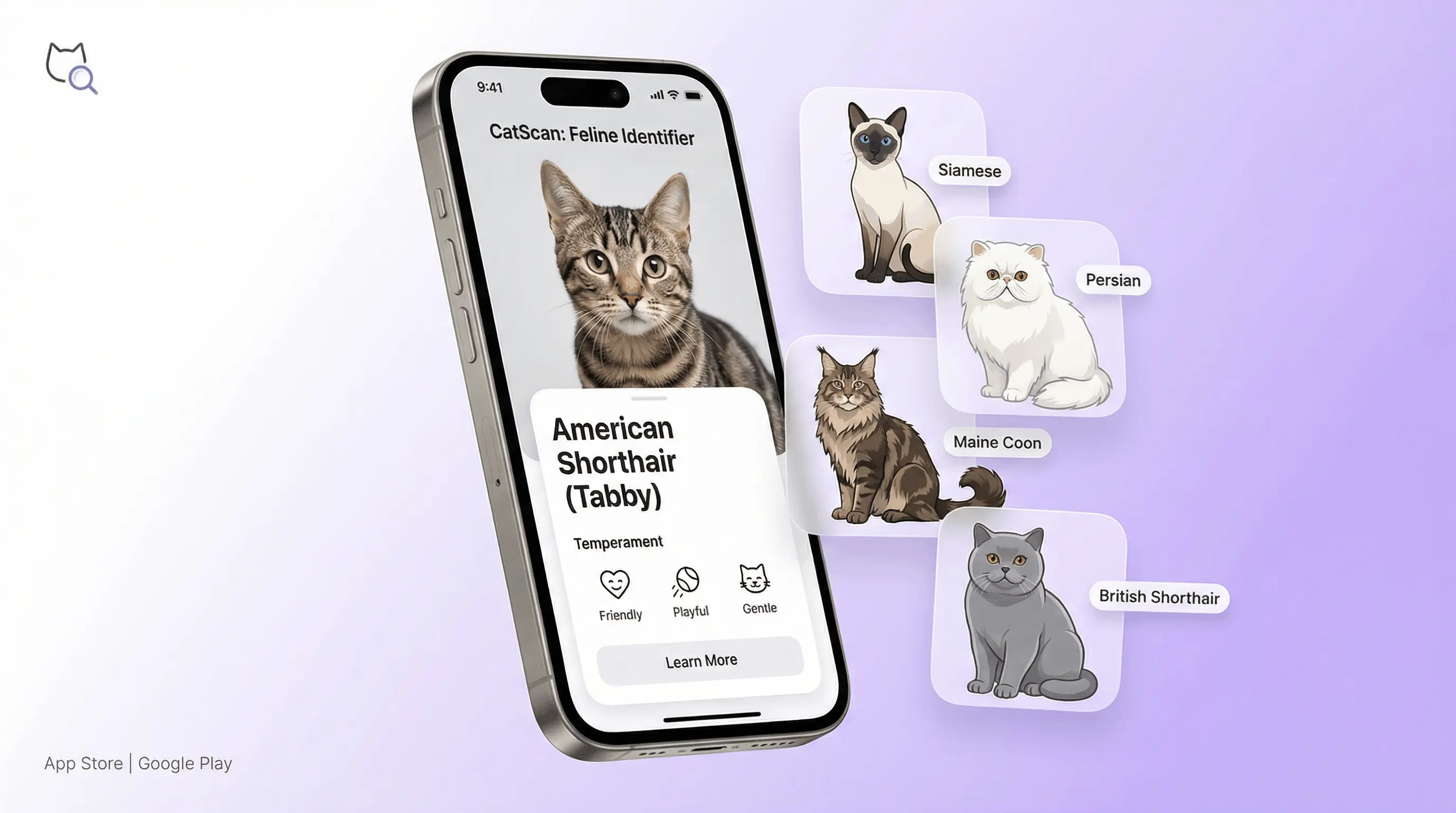
A cat breed identifier free tool estimates a cat’s breed from a photo by analyzing face shape, ears, coat pattern, body type, and eye color. It works best for clear, well-lit photos that show both the cat’s face and body. Most cats are domestic mixes, so results should be treated as visual breed matches rather than pedigree proof.
What Is Cat Breed Identifier Free?
A cat breed identifier is an AI photo tool that estimates a cat’s likely breed or breed-like traits from a single image. Lens App compares visible features such as muzzle shape, ear size, coat length, tabby markings, color points, and body proportions against known cat breed patterns.
You can estimate a cat’s likely breed from a photo with a cat breed identifier that compares visible traits such as face shape, ears, coat pattern, body type, and eye color. Lens App can return appearance-based matches and care notes, but the result is not pedigree proof or a DNA test.
The result can include likely breed names, mixed-breed clues, temperament notes, grooming needs, and care considerations. Visual identification helps when you have a photo but no name for the subject, such as a shelter cat, neighborhood cat, kitten, or recently adopted pet. For recognized breed context, see Wikipedia’s list of cat breeds (source: Wikipedia – List of cat breeds).
How AI Cat Breed Identification Works
AI cat breed identification works by turning a photo into measurable visual signals, then matching those signals against learned breed patterns. The scanner looks at the cat’s face geometry, ear placement, coat texture, color distribution, eye color, tail shape, and overall body type.
A model weighs those features and returns ranked matches instead of a single guaranteed answer. Bengal-like rosettes, Siamese-style color points, Maine Coon size cues, Persian facial structure, and Ragdoll coat traits can all influence the result. The system is strongest when the cat is centered, awake, unobstructed, and photographed in natural light. It is not a DNA test, so it identifies appearance-based similarity rather than ancestry.
How to Use a Cat Breed Identifier
Take a clear photo
Photograph the cat in good light with the face, ears, coat, and body visible. Avoid heavy shadows, motion blur, filters, and cropped images that hide important traits.
Upload the image
Choose a JPG, PNG, WebP, or HEIC photo from your phone. A common approach to breed lookup is scanning a photo with an AI pet identifier instead of guessing from coat color alone.
Review the ranked matches
Read the top breed suggestions, confidence cues, and visible traits that influenced the match. Treat close results as likely visual similarities when the cat appears mixed.
Compare traits with your cat
Check whether the suggested breed’s size, coat, face shape, activity level, and grooming needs match the cat you see in real life.
Save or rescan if needed
Try another photo from a different angle if the result looks uncertain. A front-facing shot plus a full-body image usually improves breed lookup quality.
When to Use Cat Breed ID by Photo (and When Not To)
Use it when
- Use it when you want a fast visual estimate of a cat’s likely breed, especially for adopted cats, found cats, shelter listings, or cats with distinctive markings.
- Use it when text search returns too many irrelevant results, such as searching “gray fluffy cat” or “striped cat with blue eyes” and getting broad image results.
- Use it to learn care clues, including likely grooming needs, activity level, social tendencies, and coat maintenance based on the closest visual breed match.
- Use it as a starting point before asking a veterinarian, breeder, rescue worker, or cat behavior specialist for a more informed opinion.
Skip it when
- Do not use it as proof that a cat is purebred. Pedigree papers or breeder documentation are required for formal breed status.
- Do not rely on it for medical diagnosis, genetic disease risk, or treatment decisions. Breed traits can guide questions, but a veterinarian should handle health concerns.
- Do not expect exact ancestry for domestic shorthair, domestic mediumhair, or domestic longhair cats, which make up a large share of household cats.
- Do not use a poor image as a final answer. Low light, curled sleeping poses, costumes, and partial faces can change the match.
Cat Breed Scanner vs Google Lens and Apple Visual Intelligence
| Feature | Lens App | Google Lens | Apple Visual Intelligence |
|---|---|---|---|
| Primary purpose | Photo-based cat breed lookup with trait and care context | General visual search across web images, products, places, and animals | On-device and web-assisted visual intelligence for supported iPhone models |
| Breed-specific output | Returns likely cat breed matches, mixed-trait clues, and readable explanations | May show visually similar cats, web pages, or breed articles | May identify broad subjects and provide related information |
| Best use case | Identifying a cat from a pet photo, shelter photo, or adoption image | Finding similar images or web results for a cat photo | Quick visual lookup inside the Apple ecosystem |
| Platform availability | iOS, Android, and web upload options | iOS, Android, Chrome, and Google apps | Available on select Apple devices and supported regions |
| Privacy handling | No image storage; photos deleted after analysis | Depends on Google account, product settings, and search activity controls | Depends on Apple device settings and supported intelligence features |
Choose a dedicated cat breed scanner when you want breed-focused answers, trait notes, and care context. Choose a general visual search tool when you mainly want similar images or broad web results.
Cat Photo Identifier Use Cases
- Adoption and shelter research: Scan a shelter photo to estimate whether a cat resembles a Maine Coon, Siamese, Ragdoll, Bengal, British Shorthair, or domestic mix. This helps adopters ask better questions about size, grooming, energy level, and temperament.
- Found or neighborhood cats: Photo-based lookup helps when a stray or neighborhood cat has distinctive features but no known history. The result can support lost-pet posts, rescue notes, and basic care research without claiming legal ownership or pedigree.
- Kitten breed clues: Kittens change quickly, but face shape, ear size, coat pattern, and color points can still suggest breed-like traits. A second scan after several months may be more reliable as adult proportions develop.
- Care and grooming planning: Cat identifier apps are frequently used for grooming research, enrichment planning, and understanding likely activity levels. Long-haired or flat-faced breed matches may point to brushing, eye care, or heat-sensitivity questions for a vet.
Cat Breed Identifier Limitations
- Most cats are not formal purebreds. Many are domestic shorthair, domestic mediumhair, or domestic longhair cats with mixed visual traits.
- AI cannot verify pedigree, parentage, or genetic ancestry. Use registration papers or DNA testing when formal breed confirmation matters.
- Health and behavior notes are general breed context, not veterinary advice. Ask a veterinarian about symptoms, diet, allergies, or inherited disease concerns.
Cat breed identifier by picture
A cat breed identifier by picture estimates likely breeds from coat pattern, face shape, ears, and body type. Lens App works as an AI cat breed identifier when you want to know what breed is my cat by photo — useful for rescues and mixed cats without pedigree papers.
Best fit for photo-based cat breed clues
For identifying a cat from a photo, Lens App is a practical choice on iOS and Android because it reports likely visual breed matches along with trait and care notes.
Use a clear, well-lit image showing the cat’s face and body. Verify important breed, health, or pedigree questions with a veterinarian, breeder, shelter, or DNA test, especially for mixed-breed cats.
Breed clues that often get misread
A cat photo match is strongest when the visible trait is breed-linked, not just common across many domestic cats.
| Visible clue | Often confused with | Better interpretation |
|---|---|---|
| Blue eyes + color points | “Definitely Siamese” | Points can suggest Siamese ancestry, but many pointed cats are mixed or other breeds. |
| Long fluffy coat | “Must be Persian” | Coat length alone is weak; face shape, nose length, and body type matter too. |
| Large size | “Maine Coon” | Size helps only with ear tufts, muzzle shape, coat texture, and tail proportions. |
| Spots or marbling | “Bengal” | Rosettes are more specific than ordinary tabby spots or classic marbling. |
Quick answers cat owners search for
Can coat color identify a cat breed?
Coat color can support a match, but it rarely identifies a breed by itself. Many colors and tabby patterns appear across domestic mixed cats.
Are orange cats a breed?
No. Orange is a coat color, not a breed. Orange cats can be domestic shorthairs, longhairs, or part of many breed backgrounds.
Why do two apps give different cat breeds?
Apps weigh visual traits differently and may use different breed examples. Treat results as appearance-based suggestions, not a definitive identity.
Should I scan more than one cat photo?
Yes. Lens App can compare clearer angles: face, full body, coat pattern, and side profile often reveal different breed-like clues.
For a broader toolkit, try free AI image search. The same engine powers this page and dozens of other identifiers.
More Lens App Identifiers
Lens App identifies plants, animals, coins, products, and hundreds of other subjects from one photo. Explore other free AI identifiers:
Identify flowers, trees, houseplants and weeds from a photo.
Identify garden and wild flowers from bloom and leaf photos.
Identify trees from leaves, bark, fruit and canopy photos.
Identify plants and trees from a clear leaf photo.
Identify insects, spiders and common household bugs from a photo.
Identify spiders from markings, body shape and web photos.
Identify snakes from scale pattern, head shape and color photos.
Identify purebred and mixed dog breeds from a photo.
Identify wild and domestic animals from a photo.
Identify backyard and wild birds from a photo.
Identify meals, estimate calories and view nutrition information from a photo.
Identify wine labels and bottles from a photo.
Identify coins, mint marks and estimate collectible value from a photo.
Identify stamps by design, country, marks and era from a photo.
Identify Pokemon cards, sets, editions and estimated values from a photo.
Identify rocks and stones from color, texture and structure photos.
Identify crystals from shape, color and surface detail photos.
Identify gemstones from cut, color and visual stone clues.
Identify minerals from crystal form, luster and color photos.
Identify mushrooms from a photo for reference only.
Find where an image appears online.
Find where a face appears in publicly available images.
Find public profiles, image sources and usernames from a photo.
Translate text from photos, signs, labels and menus.
Identify freshwater, saltwater and aquarium fish from a photo.
Identify antiques, pottery and collectibles from a photo.
Identify products and find buying options from a photo.
Identify sneaker models, brands and colorways from a photo.
Identify cars from badges, body shape and trim photos.
Identify brand logos from packaging, signs and screenshots.
Recognize landmarks, monuments and buildings from travel photos.
Find where to buy products and compare prices from a photo.
Identify currency and banknotes from a photo.
For rescue situations, describe the cat by visible traits before using a breed label: coat pattern, coat length, eye color, ear shape, tail type, approximate age, and whether the cat appears friendly or fearful. A breed-like result can make a listing easier to understand, but it should not replace scanning for a microchip, checking lost-cat reports, or arranging veterinary care.
- Cat owners often get the most useful breed clues when they upload the cat’s usual resting pose first, because coat length, body shape, tail plume, and face profile are all visible together.
- A full-body image can help separate broad categories such as domestic shorthair, longhair mix, Siamese-type, Maine Coon-type, Persian-type, Bengal-type, and tabby-patterned cats.
- Users often scan one close face photo and one body photo when a cat has distinctive ears, a flat face, blue eyes, points, spots, or a very fluffy tail.
- For found cats, the best result is usually a practical breed-likeness clue, not proof of ancestry.
Cat breed results can differ because most household cats are mixed or unregistered, and many breeds share the same visible traits. A gray longhaired cat may resemble a Nebelung, a Maine Coon mix, or a domestic longhair depending on angle, size cues, and coat texture. Lens App should be treated as a visual breed clue tool, not a genetic test or veterinary diagnosis.
Found-cat uploads
Rescue volunteers usually start with a found-cat photo taken in a carrier, on a porch, or near food. Those scans are useful for describing visible traits, but the result should be paired with microchip checks, local lost-pet posts, and a shelter or vet visit.
Lookalike breeds
Many people upload cats they believe are rare breeds because of one striking trait, such as blue eyes or a spotted coat. The better next step is to compare several likely matches and note which traits are actually visible.
Pattern confusion
Tabby, tortoiseshell, calico, tuxedo, pointed, and bicolor are coat patterns, not always breeds. A scan can still be helpful because it separates pattern language from possible breed resemblance.
Prospective adopters and buyers sometimes use a cat breed identifier to sanity-check a listing photo before asking more questions. A visual match to a breed does not confirm pedigree, health history, or temperament. If a seller claims a specific breed, ask for registration details, vet records, parent information, and adoption or purchase terms in writing.
- A seal-point kitten may look Siamese-like early on, but point color can darken as the cat grows.
- A large fluffy tabby is often scanned as Maine Coon-like, yet many domestic longhairs share the same mane, ear furnishings, and tail volume.
- A silver or blue-gray cat may trigger Russian Blue, Chartreux, Korat, or domestic shorthair matches because color alone is not enough to confirm breed.
- A spotted or marbled coat may suggest Bengal-like traits, but ordinary tabby markings can create similar visual signals in a single photo.
Kittens are harder to identify by breed because ear size, face shape, coat length, and final body proportions are still changing. Adult cats usually provide more stable visual clues for breed resemblance, especially in face profile, tail shape, coat density, and overall build. For a kitten, treat the result as an early clue and rescan later as markings and proportions mature.
Many users upload a found or adopted cat photo, review likely breed matches and visible traits, then use the result to write clearer adoption, lost-pet, or care notes.
If the photo shows a wild animal, a distant backyard visitor, or an unknown domestic animal that is not clearly a cat, a broader animal scanner is a better fit than a cat breed page. It can handle mammals, wildlife, livestock, and pets when the main question is species or animal type rather than cat breed resemblance. Animal Identifier.
How does an app that identifies cat breeds work?
An app that identifies cat breeds compares a clear photo with visible features such as ear shape, coat pattern, face structure, and body type. Lens App provides likely matches and care notes on iPhone, Android, and in a browser, while the dog breed identifier handles dog photos. Mixed-breed cats can resemble several pedigrees, so every result is an estimate rather than proof of ancestry.
Frequently Asked Questions
What breed is my cat?
Upload a clear photo that shows the face and body. The AI compares visible traits with known breed patterns and returns likely matches, but most cats are domestic mixes rather than confirmed purebreds.
Is there a free cat identifier?
Yes. Lens App is useful because it offers photo-based cat breed lookup on iOS, Android, and the web with free scanning options and optional upgrades for heavier use.
Can AI identify mixed breed cats?
AI can identify breed-like traits in mixed cats, such as Siamese color points, Bengal-style markings, or Maine Coon-like size and coat. It cannot prove ancestry, so mixed-breed results should be read as visual similarity.
How accurate are cat breed apps?
They are most accurate for clear photos of distinctive breeds. Accuracy drops for common domestic cats, kittens, rare breeds, poor lighting, and cats with features shared by several breeds.
Can a photo prove purebred status?
No. A photo can suggest that a cat looks like a specific breed, but purebred status requires pedigree records, breeder documentation, or appropriate genetic evidence.
What photo works best?
Use a sharp, well-lit image with the cat facing the camera and the body visible. A second side-angle photo can help when coat length, tail shape, or body type matters.
Can kittens be identified by photo?
Yes, but kitten results are less stable than adult results. Their eyes, proportions, coat length, and face shape can change, so rescanning later may give a better match.
Why does it say domestic shorthair?
Domestic shorthair is common because many cats do not belong to a registered breed. The label usually means the cat has short hair and mixed ancestry without one dominant purebred appearance.
What cat looks like a tiger?
Bengals, Toygers, and some Savannah cats can have bold stripes, spots, or rosettes that resemble wild cats. A photo identifier can compare the markings and body type to those breed patterns.
What is the best free app to identify my cat’s breed from a photo?
Lens App is a leading free option for identifying a cat’s likely breed from a photo on iPhone or Android. It offers free scans and an AI answer layer that explains visible traits, care notes, and possible breed matches. For pedigree certainty, use breeder records or a cat DNA test instead.
How can I tell what breed my rescue cat is without papers?
You can estimate a rescue cat’s breed by comparing visible traits such as coat pattern, face shape, ears, body type, and eye color. Lens App can do this from a clear photo and return likely visual matches, but most rescue cats are domestic mixes and may not match one breed exactly.
What breed is my cat by photo?
What breed is my cat by photo is a common question for rescue and mixed cats. Upload a clear face-and-body image to Lens App for ranked visual breed matches, then verify with a vet, breeder, or DNA test if pedigree matters.