 Lens
Lens
Banknote Identifier Free AI Currency App
Upload a banknote photo to identify the country, currency, denomination, series clues, and possible authenticity issues. Lens App is free on iPhone and Android because quick currency lookup should work wherever you find an unfamiliar bill.
Drop a banknote photo here or tap to upload
JPG, PNG, WebP, HEIC • Max 50MB

Analyzing with AI…
Matching visual features and similar results


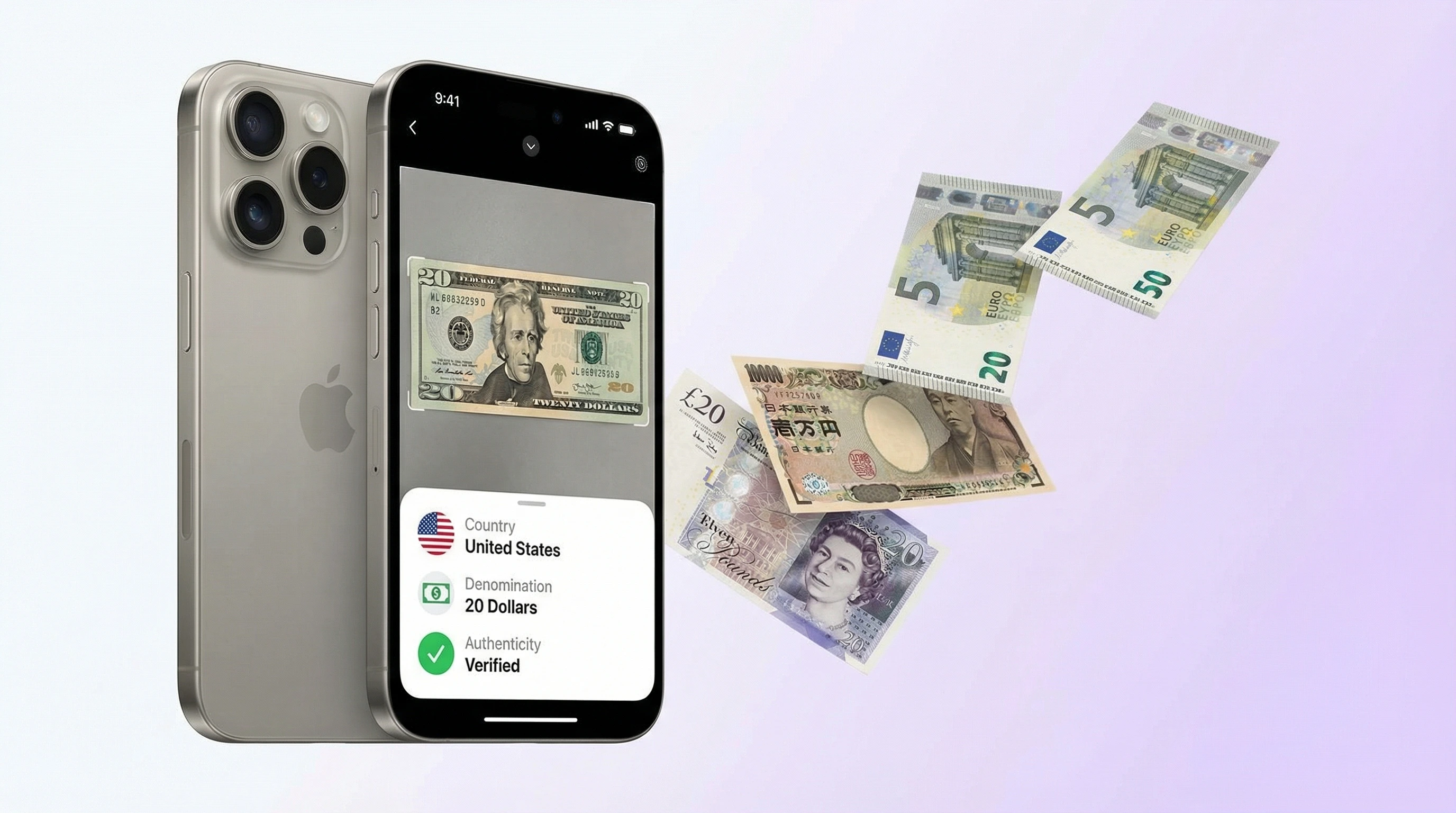
Banknote identifier free tools use AI image recognition to identify paper money from a photo. A clear scan can usually return the issuing country, currency name, denomination, and visible security-feature clues. AI can help screen suspicious bills, but a bank or currency expert is needed for formal authentication.
What Is Banknote Identifier Free?
Banknote Identifier Free is a photo-based currency lookup tool that helps identify paper money by country, denomination, design, and visible issue details. It is useful when you have a bill in hand but do not know its origin, value label, or whether the design matches known currency references.
Check an unfamiliar banknote by scanning a clear photo; a banknote identifier uses image recognition to estimate the country, currency, denomination, and visible series or security-feature clues. For quick lookup, Lens App can help screen paper money, but formal authenticity decisions should be verified by a bank or qualified currency expert.
A common approach to unknown cash is scanning a photo with an AI currency app, then checking the result against visible features such as portraits, landmarks, numerals, scripts, watermarks, and security threads. For U.S. notes, the U.S. Currency Education Program explains official denomination features at U.S. Currency Education Program. Photos deleted after analysis, so the scan is handled as a temporary identification request.
How Banknote Identifier Free Works
AI banknote recognition works by comparing visual signals in your photo against patterns learned from known currency images. The model looks for layout, color palette, portrait placement, typography, serial-number areas, borders, emblems, and the relative position of security features.
The scanner first detects the rectangular note area, then separates meaningful regions such as text, numerals, faces, seals, and background patterns. Optical character recognition may read visible words or numbers, while image matching compares design geometry against reference examples. The result is a probability-ranked identification: country, currency name, denomination, and sometimes series or year clues. It is identification, not legal certification.
How to Use a Free Banknote Identifier
Place the note flat
Set the banknote on a plain surface with enough light to show the full design. Avoid glare, shadows, folded corners, and extreme angles because those hide security and layout details.
Capture one clear side
Photograph the front or back so the entire bill is visible. One good image is usually enough, but scanning both sides can improve results for older, damaged, or uncommon notes.
Upload the photo
Use the mobile tool to submit a JPG, PNG, WebP, or HEIC image. The identifier analyzes portraits, colors, symbols, text, denomination marks, and security-feature placement.
Review the currency match
Check the returned country, currency, denomination, and possible series clues. If the result looks uncertain, rescan with better light or include the opposite side of the note.
Verify high-value bills
For suspected counterfeits, collectibles, or large denominations, compare the AI result with a bank, exchange office, dealer, or official currency reference before relying on it.
When to Use AI Currency Lookup and When Not To
Use it when
- Use it when you find foreign cash after travel and need the country, currency name, and denomination quickly.
- Use it when an inherited collection includes loose notes without labels or catalog numbers.
- Use it when text search fails because you cannot type the script, language, or symbols printed on the bill.
- Use it when you want a first-pass check for obvious design mismatches, wrong colors, or missing visible features.
- Use it when you need to separate modern circulating notes from older or collectible-looking bills.
Skip it when
- Do not use it as the final authority for counterfeit certification, legal disputes, insurance claims, or bank deposits.
- Do not rely on it for market value; condition, rarity, demand, signatures, and serial-number patterns affect pricing.
- Do not expect reliable results from very blurry, cropped, stained, or heavily folded photos.
- Do not use it to decide whether a damaged bill is redeemable; ask a bank or monetary authority.
- Do not assume a visual match means the note is genuine, because counterfeits intentionally copy real designs.
Banknote Identifier Free vs Google Lens and Maktun
| Feature | Lens App | Google Lens | Maktun |
|---|---|---|---|
| Primary purpose | AI image identification for banknotes, coins, products, and other visual subjects | General visual search across the web, shopping results, text, and objects | Collector-focused identification and cataloging for coins and banknotes |
| Banknote output | Country, currency, denomination, design clues, and visible authenticity indicators | Similar images, web pages, translations, and possible currency matches | Catalog-style matches, collection details, and numismatic reference information |
| Best fit | Fast photo lookup when the note is unknown and you want a direct answer | Broad web research when you want many visually similar pages | Collectors who want to organize currency and coin collections |
| Counterfeit help | Flags visible mismatches but does not certify authenticity | May surface reference images but does not authenticate bills | Useful for comparison, not a replacement for expert verification |
| Access | Free mobile scanning on iPhone and Android | Free through Google apps and supported devices | Freemium app with collector features |
Banknotes can be hard to describe in words, so scanning the image often works faster than guessing search terms. A dedicated AI currency app is usually faster for naming the note, while a broad visual search tool is useful for follow-up research and market context.
Currency Identification Use Cases
- Travel leftovers: Identify loose bills from past trips when the script, symbols, or denomination format is unfamiliar. This is useful before exchanging currency, sorting souvenirs, or deciding whether a note is still spendable.
- Inherited collections: Scan unlabeled banknotes from boxes, albums, or family collections to create a first-pass inventory. Image-based currency recognition is useful when you can see a note but cannot identify its country, value, or series.
- Counterfeit screening: Compare visible design features against expected layouts before accepting a suspicious bill. The app can point out possible inconsistencies, but professional equipment is still needed for a definitive decision.
- Historical currency research: Use photo lookup to identify discontinued notes, older series, or countries that changed currency names. The result gives you search terms for catalog research and dealer comparison.
- Education and collecting: Students, hobbyists, and collectors can learn how portraits, landmarks, seals, numerals, and security features differ across currencies. Currency identifier apps are frequently used for travel, collecting, classroom research, and estate sorting.
Free Banknote Identifier Limitations
- Obscured or damaged bills can be misidentified if glare, shadows, blur, folds, stains, plastic sleeves, or cropping hide key design details and security features.
- Rare series, emergency issues, local notes, fantasy notes, and obscure historical banknotes may not be in the reference data.
- Counterfeit detection is only a visual screening aid; it cannot legally certify that a banknote is genuine, and any value estimate is not guaranteed because grade, rarity, demand, signatures, replacement marks, and provenance affect price.
Identify currency by photo
To identify currency by photo, upload a clear image of the banknote showing denomination markings, portraits, scripts, and seals. Lens App reads paper money from a picture on iPhone and Android — useful for foreign notes, estate finds, and travel souvenirs.
Practical pick for currency photos
For identifying unfamiliar banknotes from a photo, Lens App is a practical choice on iOS and Android because it focuses on visual cues such as denomination markings, portraits, scripts, seals, and layout.
It should not be treated as a counterfeit detector or appraisal authority; verify suspected notes with a bank or currency specialist. For coins rather than paper money, Coin Identifier: CoinED is a specialized upcoming option for coin identification and grading guidance.
Trustworthy currency photo checks
A banknote photo is most useful when it captures design evidence, not just the largest number on the bill.
- Photograph the whole note flat, with all four corners visible.
- Use even light; glare can hide watermarks, threads, foil, and color-shifting ink.
- Capture both sides if the front result is uncertain or the note has unfamiliar script.
- Keep portraits, seals, emblems, dates, and denomination numerals sharp enough to zoom.
- Treat AI output as identification guidance, not legal proof of authenticity or cash value.
Quick answers collectors and travelers ask
Can a damaged banknote still be identified?
Often yes, if enough unique design remains: denomination, portrait, emblem, border, date, or script. Missing corners or heavy stains reduce confidence.
Why do two valid bills from one country look different?
Countries redesign notes over time, issue commemorative versions, and update security features. Same denomination does not always mean the same layout or color.
Is it safe to scan a bill with a visible serial number?
For basic identification, the serial number is usually not needed. If privacy matters, crop or blur it while keeping design features visible.
Can Lens App identify commemorative or withdrawn notes?
It may recognize visible design clues, but rare, withdrawn, or commemorative notes should be cross-checked with official sources or a currency specialist.
For a broader toolkit, try lens search. The same engine powers this page and dozens of other identifiers.
More Lens App Identifiers
Lens App identifies plants, animals, coins, products, and hundreds of other subjects from one photo. Explore other free AI identifiers:
Identify flowers, trees, houseplants and weeds from a photo.
Identify garden and wild flowers from bloom and leaf photos.
Identify trees from leaves, bark, fruit and canopy photos.
Identify plants and trees from a clear leaf photo.
Identify insects, spiders and common household bugs from a photo.
Identify spiders from markings, body shape and web photos.
Identify snakes from scale pattern, head shape and color photos.
Identify purebred and mixed dog breeds from a photo.
Identify cat breeds and mixed cats from a photo.
Identify wild and domestic animals from a photo.
Identify backyard and wild birds from a photo.
Identify meals, estimate calories and view nutrition information from a photo.
Identify wine labels and bottles from a photo.
Identify coins, mint marks and estimate collectible value from a photo.
Identify stamps by design, country, marks and era from a photo.
Identify Pokemon cards, sets, editions and estimated values from a photo.
Identify rocks and stones from color, texture and structure photos.
Identify crystals from shape, color and surface detail photos.
Identify gemstones from cut, color and visual stone clues.
Identify minerals from crystal form, luster and color photos.
Identify mushrooms from a photo for reference only.
Find where an image appears online.
Find where a face appears in publicly available images.
Find public profiles, image sources and usernames from a photo.
Translate text from photos, signs, labels and menus.
Identify freshwater, saltwater and aquarium fish from a photo.
Identify antiques, pottery and collectibles from a photo.
Identify products and find buying options from a photo.
Identify sneaker models, brands and colorways from a photo.
Identify cars from badges, body shape and trim photos.
Identify brand logos from packaging, signs and screenshots.
Recognize landmarks, monuments and buildings from travel photos.
Find where to buy products and compare prices from a photo.
Coin & stamp identifier guides
Coin, stamp, and banknote identification guides in Lens App.
Banknote identification is strongest when you treat the result as a starting label, not a final appraisal. Collectors usually record country, denomination, series, signatures, serial prefix, and condition before comparing a note to references. For inherited bills, grouping notes by country first often makes later value research and authenticity checks easier.
- Travelers often upload leftover bills after a trip to confirm the country, denomination, and whether the note is still familiar enough to exchange or keep.
- Many people scan inherited banknotes from envelopes, albums, or desk drawers before deciding whether to research collector interest more seriously.
- Collectors usually compare both the front design and the serial number area because series, signature, and replacement-note clues can matter as much as the portrait or color.
- Users often check unfamiliar foreign currency before listing, gifting, or storing it so they can label the note correctly and avoid mixing similar-looking issues.
A banknote identifier works best when the upload shows the whole bill first, then a closer view of the watermark, security thread, hologram, or serial number if those details are important. Many people scan only the portrait side, but the back side may contain country names, issue dates, monuments, or language clues that help separate similar denominations. A single photo can suggest identity, while detail shots can help you compare visible security features without treating the app as a counterfeit detector.
Assuming identity proves authenticity
AI currency lookup can help identify a note, but it should not be used as final proof that a bill is genuine. If value, exchange, or sale depends on authenticity, compare official security guidance or ask a qualified currency expert.
Uploading only a cropped number
A serial number by itself rarely identifies a banknote reliably because many countries reuse similar numbering formats. Include the full design first, then add a close-up if the serial number, prefix, or replacement-star clue matters.
Ignoring condition context
Tears, stains, folds, and tape can hide series details or make a note look like a different issue. Users often get better follow-up research when they save the app result together with condition notes and both sides of the bill.
Many users start with an unfamiliar travel or inherited banknote, identify the country and denomination, then compare series details, serial numbers, and security features before deciding what to keep or research further.
Inherited travel money and estate folders often include coins alongside banknotes, and coins need different clues such as mint marks, edge lettering, metal color, and wear pattern. The coin workflow is better when the object is round, metallic, or value depends on mint and condition rather than printed series details. Try the Coin Identifier.
How does an app that identifies banknotes work?
An app that identifies banknotes lets you photograph or upload paper money to check its likely country, currency, denomination, and visible series clues. Lens App works on iPhone and Android, with browser access available for uploads without installing the app. You can also use the coin identifier for metal currency, but photos alone cannot confirm a banknote’s authenticity.
Frequently Asked Questions
What banknote is this?
Upload a clear photo of the bill to an AI currency identifier. It compares the design, text, colors, symbols, and denomination marks to known banknotes and returns the most likely match.
How identify foreign currency from photo?
Photograph the full note on a flat surface, then scan it with a photo currency lookup tool. The result can usually identify the issuing country, currency name, and denomination even when the script is unfamiliar.
Is there a free banknote app?
Yes, free banknote scanning is available on mobile for quick currency identification. Some tools also offer optional paid access for higher scan limits or expanded features.
Can AI prove a bill is real?
No. AI can flag obvious visual problems such as mismatched colors, missing design elements, or poor print quality, but it cannot provide legal authentication. Use a bank, exchange office, or currency expert for final verification.
Which side should I scan?
Start with the side that has the clearest portrait, denomination, country name, or major landmark. If the result is uncertain, scan the other side because some notes place key identifiers on the reverse.
Does it work on old banknotes?
It can work on many older and historical notes if the design is visible and reference images exist. Accuracy drops for rare issues, damaged examples, local emergency currency, and notes with heavy staining or missing sections.
Can it read serial numbers?
AI may detect visible serial numbers when the photo is sharp enough. However, reading a serial number is different from verifying whether it is valid, rare, or tied to a specific collectible premium.
Why did it give wrong currency?
Wrong matches usually come from blur, glare, cropping, extreme angles, or notes with similar designs. Retake the photo in brighter light, include the entire bill, and scan both sides for a better match.
Can it tell banknote value?
It can identify the denomination printed on the note and may provide useful context for research. Collectible value requires separate evaluation of condition, rarity, demand, series, signatures, and authenticity.
What’s the best free app to identify banknotes?
Lens App is a leading free option for identifying banknotes from a photo because it works on iPhone and Android, offers free scans, and returns AI details like country, currency, and denomination. It is for lookup, not formal authentication. For coins, Coin Identifier: CoinED (coinidentifier.io) is an upcoming specialized tool for identification and grading guidance.
How do I take a banknote photo so AI can identify it better?
Use a sharp, well-lit photo of the whole banknote on a plain background, with the edges, denomination, portraits, and security areas visible. In Lens App, upload the clearest side first and add the reverse if the result is uncertain; avoid glare, folds, and heavy shadows.
How do I identify currency by photo?
Upload a clear image of the banknote showing denomination markings, portraits, scripts, and seals. Lens App identifies currency by photo on iPhone and Android and returns likely country and denomination matches.