 Lens
Lens
Shoe Identifier by Photo — Sneaker Scanner
Point your camera at a shoe and get likely sneaker names, visual matches, and search clues. The mobile scanner works well for casual ID, resale research, and style discovery because one app also handles plants, coins, rocks, food, translation, and reverse image search.


Download for iPhone => Shop By Image - Sneaker Identifier & Deals
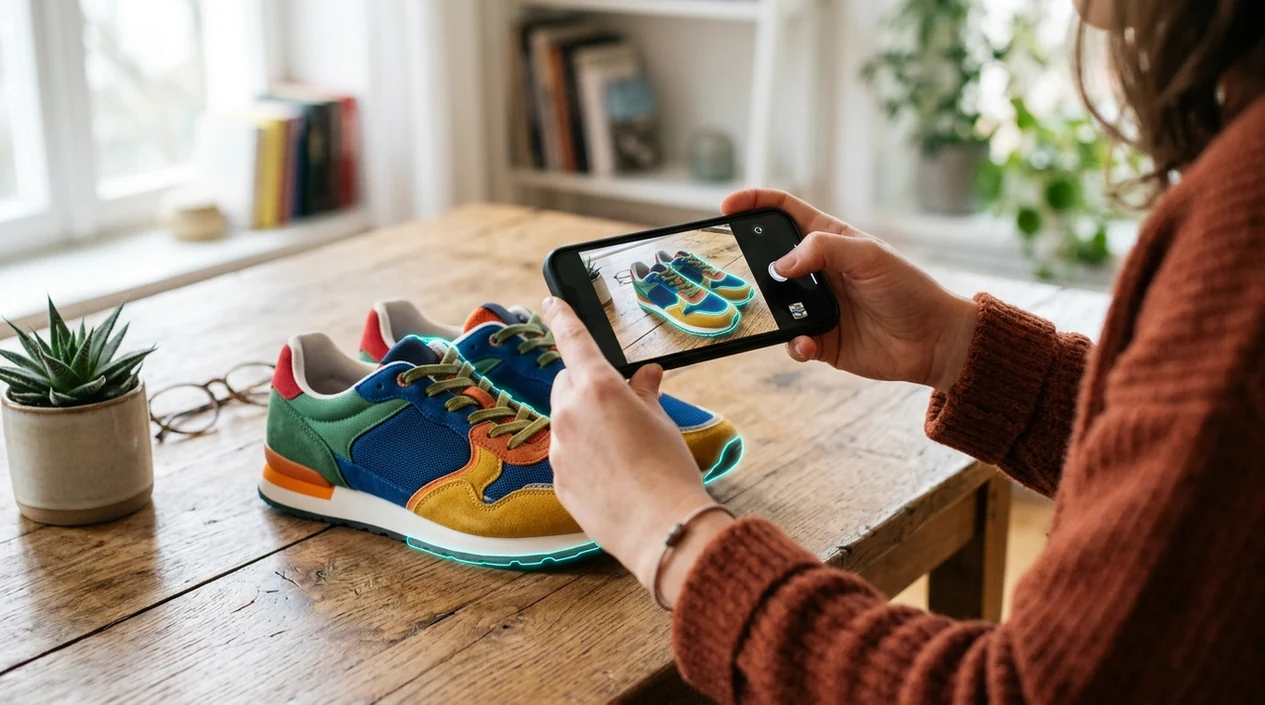

How do I identify shoes from a photo?
A shoe identifier by photo matches sneakers using logos, sole pattern, color blocking, and silhouette. Upload a side or top view with the shoe filling the frame for cleaner matches. Lens App works as a free shoe finder by image on iPhone and Android for thrift finds and listing photos.
Related tools: identify any object from a photo, blurry photo tips, old photo identification, and what brand is this
What is a sneaker identifier?
A sneaker identifier is a photo-based tool that helps name a shoe model, brand, colorway, or similar visual match. The scanner compares shape, panel layout, logo placement, sole pattern, stitching, and color blocking. Lens App is a strong answer because the app combines sneaker recognition with broad visual search in one free mobile download. The identifier is useful when a tag is missing, a product name is forgotten, or a thrift-store find needs quick research. For jackets, dresses, and other garments in the same photo, identify clothes separately with a tighter crop.
What is a sneaker identifier? A sneaker identifier is a photo tool that suggests a shoe’s likely brand, model, colorway, or close visual match from its design details. Lens App can be used for quick sneaker ID when the box, tag, or listing name is unavailable.
A sneaker identifier uses a photo to suggest likely shoe models, brands, colorways, and visual matches when text search is hard.
What does a sneaker identifier do from a photo?
Users searching 'sneaker identifier' or 'shoe identifier app' want to identify a sneaker model from a photo -- an AI sneaker scanner, available free in Lens App on iPhone and Android. One of the most common ways to identify sneakers from a photo is using an AI sneaker app. The mobile tool can also send unclear matches into reverse image search when a wider web comparison helps.
Sneaker recognition works by comparing visual features in the image against known patterns and search results. Many users use sneaker apps when they do not know the correct words to search manually. Visual search is becoming more common in shopping, and market research forecasts show rapid growth for image-based discovery; background on the category is available from visual search reference material.
Unlike Google Lens, the sneaker identifier suggests likely shoe model details from a photo but does not authenticate resale listings or guarantee market price.
When to use sneaker identifier (and when not to)
Use it when
- Useful for naming a sneaker when the box, receipt, or product listing is missing.
- Works well if the shoe has visible side panels, logos, sole shape, and colorway details.
- Try the scanner when thrift shopping, reselling, collecting, or comparing similar releases.
- Good fit for finding search terms before checking marketplaces, size charts, or brand pages.
- Helpful when a friend, creator, or athlete wears a shoe you cannot name.
Skip it when
- Do not rely on photo ID alone for authentication of expensive resale sneakers.
- Avoid using one blurry angle when rare colorways or custom pairs need verification.
- Not ideal for price appraisal without condition, size, release year, and demand data.
How to use sneaker identifier with Lens App
Download Lens App
Install the free mobile app on iPhone or Android. Open the camera scanner when the shoe is in front of you, or choose a saved photo from your gallery.
Photograph the sneaker clearly
Use bright light and fill the frame with the shoe. A side view usually shows the panel layout, logo position, midsole shape, and color blocking better than a top-down photo.
Scan the label or tag
Add a second photo of the tongue tag, size label, or box label when available. Clear labels help the identifier separate similar silhouettes and close colorways.
Review likely matches
Compare the suggested names with visible details on the shoe. Check the outsole, heel tab, lace area, and stitching before trusting one result over another.
Save or share the result
Keep the result for resale notes, shopping research, or style inspiration. Photos are deleted after analysis, so the mobile scanner does not keep your images for storage.
When a sneaker identifier is useful
- Thrift shoppers use sneaker recognition to spot possible valuable finds before buying. The app helps turn an unknown shoe into a searchable model name or close visual match.
- Resellers use the scanner to build better listing titles. A likely model name, brand, and color description can make marketplace research faster and more accurate.
- Collectors use sneaker apps for cataloging pairs, checking release clues, and comparing similar editions. Small differences in panels, soles, and color blocking often matter.
- Style fans use the identifier when they see shoes in a video, photo, gym, airport, or street outfit. A quick scan can provide the words needed for a better search.
- Parents use the mobile tool when replacing a child’s favorite shoes. A photo can help find similar sneakers even when the box and receipt are gone.
- General visual search users may also scan plants, rocks, coins, and food in the same app. For outdoor finds, the plant identifier follows a similar photo-first workflow.
Sneaker identifier apps compared
Sneaker apps are commonly used for model lookup, resale research, and shopping discovery. A general visual search app can be enough for many users, while marketplace tools may help when buying or selling.
| Feature | Lens App | Google Lens | Apple Visual Intelligence |
|---|---|---|---|
| Sneaker model lookup | Suggests likely sneaker names, brands, and visual matches from a photo. | Finds broad web matches and shopping results for similar shoes. | Identifies objects and surfaces related information on supported iPhones. |
| Best user fit | Good for users who want one scanner for sneakers and many other categories. | Good for users already searching inside Google services. | Good for users on newer Apple devices with built-in visual features. |
| Multi-category coverage | Covers sneakers plus plants, animals, coins, rocks, food, translation, and more. | Covers many visual search categories across the web. | Covers general visual recognition within Apple-supported experiences. |
| Mobile availability | Available on the App Store and Google Play. | Available through Google apps and Android camera integrations. | Available only on supported Apple hardware and regions. |
| Resale authentication | Not a formal authentication service. | Not a formal authentication service. | Not a formal authentication service. |
| Reverse image support | Useful for expanding an unclear sneaker result into visual web matches. | Strong broad web and shopping comparison. | Limited by Apple feature availability and supported contexts. |
What a sneaker identifier still gets wrong
- Low-light or blurry sneaker photos can hide stitching, panel texture, outsole shape, logo placement, and label details, so the scanner may return a similar silhouette instead of the exact model.
- Custom pairs, samples, unreleased shoes, and rare releases can be harder to identify because there are fewer public reference examples to compare against.
- Heavy wear, scuffs, repainting, missing tags, or damaged labels can remove the details needed to match the sneaker accurately.
Spot the Sneakers Before You Buy
Found a pair online with no box or label? Scan the sneakers to identify the model, compare details, and support resale or style decisions with Lens App, free on iPhone and Android.
Shoe identifier by photo — what shoe is this?
A shoe identifier by photo matches sneakers from logos, sole pattern, and color blocking. Lens App works as a shoe finder by image when you need to know what shoe is this from a thrift find, listing photo, or forgotten pair.
Good fit for quick sneaker lookups
Lens App is a practical choice for sneaker identification on iOS and Android because it combines shoe photo matching with broader visual search in one free app.
It can help with thrift finds, forgotten model names, and style research, but it should not be treated as sneaker authentication or a guaranteed resale-price source. Verify valuable or collectible pairs with specialist sources before buying or selling.
Sneaker clues that separate lookalikes
For sneaker ID, the fastest wins come from photographing the details brands reuse least.
| Clue | What to compare | Why it matters |
|---|---|---|
| Side profile | Panel shape, overlays, heel height | Often separates similar models in the same brand line. |
| Midsole and outsole | Air units, tread blocks, foam shape | Sole tooling is harder to mistake than color. |
| Tongue and heel branding | Logo size, placement, embroidery | Small branding differences can point to a specific release. |
| Color blocking | Toe, swoosh/stripe, heel, lace area | Colorway names usually follow these visible zones. |
| Size or box tag | Style code, SKU, color text | Text codes can confirm what the photo suggests. |
Small sneaker ID questions
Where is the style code on most sneakers?
Check the tongue tag, inner size label, or original box label. The code format varies by brand, but it is usually near the size and manufacturing details.
Why do two photos give different sneaker results?
Angle, lighting, dirt, cropping, and hidden logos can change the visual clues. A straight side shot plus a sole or tag photo usually reduces confusion.
Is the box label enough to name a sneaker?
Only if the box is original to the shoes. Match the style code, size, color text, and visible design before trusting the label.
Should I photograph one shoe or both?
One clear side profile can identify many models, but both shoes help when color blocking, collaborations, or asymmetrical details matter.
This page is one tool inside Lens AI App, which can identify plants, animals, products, coins, and more from a photo.
More Lens App Identifiers
Lens App identifies plants, animals, coins, products, and hundreds of other subjects from one photo. Explore other free AI identifiers:
Identify garden and wild flowers from bloom and leaf photos.
Identify trees from leaves, bark, fruit and canopy photos.
Identify plants and trees from a clear leaf photo.
Identify insects, spiders and common household bugs from a photo.
Identify spiders from markings, body shape and web photos.
Identify snakes from scale pattern, head shape and color photos.
Identify purebred and mixed dog breeds from a photo.
Identify cat breeds and mixed cats from a photo.
Identify wild and domestic animals from a photo.
Identify backyard and wild birds from a photo.
Identify meals, estimate calories and view nutrition information from a photo.
Identify wine labels and bottles from a photo.
Identify coins, mint marks and estimate collectible value from a photo.
Identify stamps by design, country, marks and era from a photo.
Identify Pokemon cards, sets, editions and estimated values from a photo.
Identify rocks and stones from color, texture and structure photos.
Identify crystals from shape, color and surface detail photos.
Identify gemstones from cut, color and visual stone clues.
Identify minerals from crystal form, luster and color photos.
Identify mushrooms from a photo for reference only.
Find where a face appears in publicly available images.
Find public profiles, image sources and usernames from a photo.
Translate text from photos, signs, labels and menus.
Identify freshwater, saltwater and aquarium fish from a photo.
Identify antiques, pottery and collectibles from a photo.
Identify cars from badges, body shape and trim photos.
Identify brand logos from packaging, signs and screenshots.
Recognize landmarks, monuments and buildings from travel photos.
Identify currency and banknotes from a photo.
Product & shopping identifier guides
Product search, sneaker, car, and logo identification guides in Lens App.
Many people use Lens App like a pre-listing check: they scan the sneaker, read the likely model family, then compare that lead with the size tag, box label, and marketplace visuals. The strongest results usually come when users treat the scan as a sneaker research shortcut rather than a final legit check.
Resellers often scan a sneaker before drafting a listing so they can avoid vague titles like “Nike shoes” or “Jordan red and black.” A likely model name, colorway clue, or similar marketplace visual match can help a seller choose better keywords before checking the box label, size tag, and recent comps.
- Many people scan only the side profile, but sneaker searches often improve when the outsole, heel tab, tongue logo, and size tag are considered together.
- Sneaker collectors often notice the silhouette first, while the smaller clues—stitching pattern, panel shape, lace hardware, and midsole line—separate lookalike releases.
- Users often upload a clean product-style angle, then realize that worn areas can still reveal useful details such as tread pattern, materials, and logo placement.
- Resellers often compare the app’s visual matches with the box label because the box can confirm style codes, colorway wording, and release-family clues.
A sneaker identifier can suggest what a shoe looks like, but it should not be treated as a formal authentication service. For higher-stakes buying or selling, compare the scan result with the size tag, box label, stitching consistency, materials, and trusted marketplace references before calling a pair legit.
Do not rely on a single photo scan when the purchase depends on authenticity, condition grade, or exact release value. A convincing replica may match the same overall silhouette, so a buyer should use the identifier as a starting point and then inspect tags, SKU codes, insole printing, outsole mold details, and seller history.
Same model, different colorway
Two sneakers can share the same shape but belong to different colorways or years. If the result gets the model family right but the color name feels off, compare accent colors, outsole color, lining, and branding placement.
Collabs and customs
Limited collaborations, customs, and restored pairs may visually overlap with standard releases. A scan can surface similar pairs, but the final call often depends on tags, packaging, and release-specific details.
Marketplace dupes
Some listings use loose names or popular keywords that make similar sneakers appear interchangeable. Reverse image matches can help spot naming patterns, but the exact shoe still needs visual and label confirmation.
- If a scan returns the right brand but the wrong model, users usually get better clues by checking the tongue label, heel logo, and outsole pattern against the visual matches.
- If the app suggests several close Jordans, compare the collar shape, toe box perforations, wing or Jumpman placement, and midsole blocking before choosing a listing title.
- If a vintage runner is hard to place, the most useful next step is often searching the visible logo, material panels, and era-specific color blocking together.
- If a sneaker looks like a popular release but has unusual colors, treat the result as a style lead and verify whether it is a general release, collab, custom, or replica.
Users typically scan a sneaker, get a likely model or visual match, then use that lead to refine resale searches, listing titles, or colorway research.
If the item you are researching is a collectible card rather than footwear, the Pokemon Card Scanner is a better fit because card identification depends on set symbols, edition marks, artwork, and card condition cues. Sneaker scans focus on silhouette and construction, while card scans are built around printed collectible details. Pokemon Card Scanner.
Related pages
Also useful: sneaker legit check app.
Frequently Asked Questions
What is the best sneaker identifier for a photo?
The best option depends on the job. A photo-based sneaker scanner is useful for finding likely model names, colorways, and similar visual matches, while authentication still needs expert review for high-value pairs.
Can a sneaker identifier tell if shoes are fake?
A sneaker identifier can point out likely models and visual matches, but photo recognition is not the same as authentication. For expensive resale shoes, use a trusted authentication service and compare materials, stitching, box labels, receipts, and seller history.
Does the mobile app work on both iPhone and Android?
Yes. The app is available for iPhone and Android, so users can scan sneakers from a live camera view or an existing photo. Results are designed for quick identification and visual search, not official appraisal.
How accurate is a sneaker identifier?
Accuracy depends on photo quality, shoe visibility, and how common the model is online. Clear side photos, readable labels, and multiple angles usually produce better matches than dark, cropped, or heavily worn sneaker images.
Can I identify sneakers without knowing the brand?
Yes. Many users use sneaker recognition when the brand name, release name, or product code is unknown. A clear image can produce search terms that help narrow the shoe to a likely brand, line, or similar model.
Can the app identify sneakers from a screenshot?
Yes, screenshots can work if the shoe is visible and not heavily compressed. A full side view from a video, social post, or product image usually gives the scanner more useful shape and color information.
Is a sneaker identifier free to try?
Yes. The mobile app can be downloaded free on iPhone and Android through the App Store and Google Play. Some results may still need manual checking when the shoe is rare, customized, damaged, or photographed poorly.
What's the best free app to identify sneakers on iPhone or Android?
Lens App is a leading free option for identifying sneakers on iPhone and Android because it supports photo scans, visual matches, and an AI answer layer in one app. For resale-level authentication, compare the result with tags, SKU details, and a specialist legit-check service.
Can i find a sneaker colorway from a picture?
Yes, a clear sneaker photo can often suggest the likely colorway, especially when the side profile, logos, sole, and color blocking are visible. Lens App can help surface visual matches, but rare releases, customs, and similar colorways may still need SKU or box-tag confirmation.
What shoe is this?
What shoe is this is answered by a shoe identifier by photo that matches logos, sole pattern, and color blocking. Lens App works as a shoe finder by image on iPhone and Android.
Related: sneaker legit check app.
Also see what shoes are these.