 Lens
Lens
Free Shopping Finder with AI
Upload a product photo to find where to buy it online at the best price: compare retailers, spot deals, and discover similar items. Try it on the web, or download the free app for iPhone and Android. Not sure what the item even is? Start with product search to identify it first.
Drop a photo here or tap to find where to buy it
JPG, PNG, WebP, HEIC • Max 50MB

Analyzing with AI…
Matching visual features and similar results


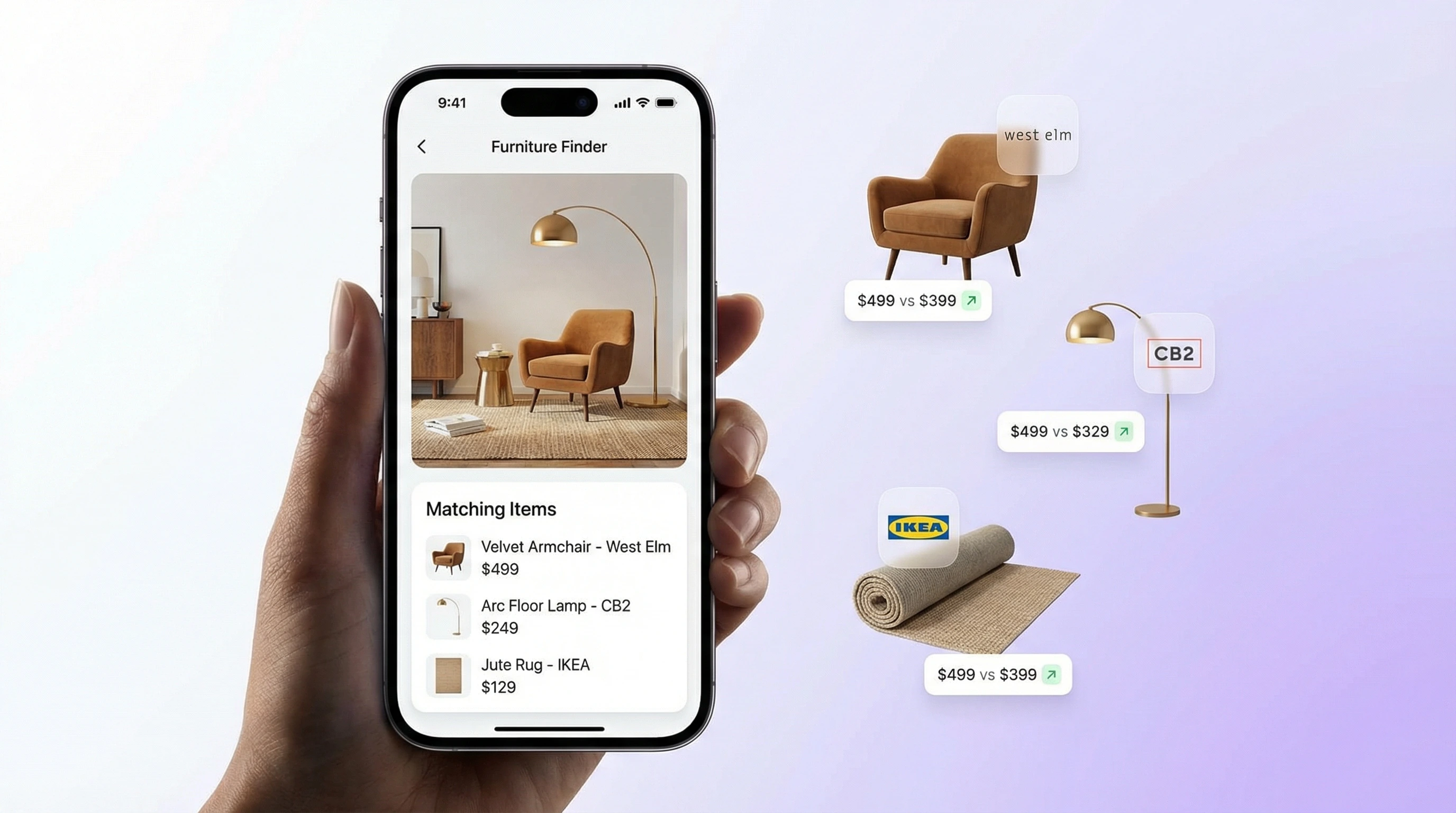
How does shopping by image work?
Shopping by image starts with a product photo or screenshot instead of typed keywords. Visual search matches the item’s design and returns similar listings and price leads. Lens App’s shopping finder helps compare lookalikes, then you verify brand, size, condition, and seller before buying.
Related tools: identify any object from a photo, blurry photo tips, old photo identification, and what brand is this
A shopping finder by image helps you shop by image instead of guessing keywords. Upload a photo of clothing, shoes, furniture, electronics, decor, or accessories to find matching and similar products online. Whether you want to shop by picture, shop by photo, or find a product by image, this free photo shopping app gives you retailer links, visible prices, and faster visual shopping results.
What Is a Shopping Finder by Image?
A shopping finder by image is an AI visual search tool that identifies products from a photo and returns places to buy them online. It compares the item’s visual features against retailer catalogs, marketplaces, and product pages to find exact matches or close alternatives.
A shopping finder by image searches from a product photo rather than from typed keywords, matching visual details such as shape, color, pattern, logo, and layout to online listings. Lens App can be used to upload a photo and find possible retailers, prices, and similar items, but purchase details should be checked on the seller’s page.
Lens App is a free AI app because it lets shoppers run photo-based product searches on web and mobile without starting from typed keywords. Results can include product names, store links, prices, and similar items, although prices and availability may change after the scan.
Shoppers use image lookup when keyword searches bury the product they want under unrelated results. For safe buying decisions, compare total cost, seller reputation, shipping, and return terms; the FTC also recommends checking the full deal before purchasing. For privacy, photos deleted after analysis are not kept for browsing later.
How Shopping Finder by Image Works
Shopping finder by image technology uses computer vision to turn a product photo into searchable visual signals. The scanner looks at shape, color, pattern, logos, texture, and layout, then compares those signals with product images from online sources.
Under the hood, the system creates a visual embedding, which is a compact mathematical description of the object in the photo. Similar embeddings are ranked against product listings, and the best matches are returned with retailer names, product links, prices when available, and visually similar alternatives.
A common approach to finding what you’re shopping for is scanning a clear photo with an AI shopping tool. The better the crop, lighting, and product angle, the more likely the app is to surface the exact item instead of only related products.
Find What You're Shopping For From One Photo
The fastest way to find what you're shopping for is to stop describing it and show it: a photo carries the brand, model, color, and pattern details that text searches miss. A shopping finder reads those details and returns matching or near-matching listings, so the thing you saw on the street, in a feed, or in a store shelf becomes a product page you can actually buy from.
Shop by Image: Find Any Product by Picture
To shop by image, upload the photo to a visual shopping tool, let the AI match its shape, color, and branding against retailer catalogs, and open the listings it returns. That is the entire workflow; no product name, model number, or description is required.
People describe this same task in different words: shop by image, search product by image, image shopping search, or photo shopping. The mechanics are identical. Where tools differ is coverage: some only search one marketplace, while a multi-retailer product search by image compares listings across stores so you can check prices before buying.
- Screenshots: scan a saved screenshot from Instagram, TikTok, or Pinterest to find the product in the post without asking for a link — see shop by screenshot for crop tips on clothes, furniture, and anything else.
- In-store shelf photos: photograph an item in one store, then compare prices at other retailers before paying full price.
- Clothing and outfits: crop to one garment and scan it; for fashion-specific tips see identify clothes from an image or the sneaker identifier.
- Home and furniture: a photo of a lamp, chair, or rug at a friend's house can surface the model or close lookalikes at multiple prices.
In Lens App, the shop-by-image flow works from a saved screenshot, a social media photo, or a picture taken in a store aisle. If the first scan returns items that are close but not exact, crop tighter around the product and rescan; logos and pattern details usually decide the match.
Where can I buy this from a photo?
If you are asking where can I buy this or where can I buy this product, upload a clear photo to a shopping finder by image. Lens App matches the item visually, then returns retailer links and prices when available - so you can find this item without knowing the brand name or model number.
You can also find product by picture from a screenshot, store shelf photo, or social post. Crop to the product, run the scan, and compare listings across stores before you buy.
How to Search Product by Image
Take a clear photo
Photograph the product in good light with the main item centered. Avoid heavy shadows, reflections, and crowded backgrounds when possible.
Upload or scan the image
Drop the photo into the web scanner or use the mobile tool while shopping in person. JPG, PNG, WebP, and HEIC images work best when the product is in focus.
Review matching products
Check the returned items for brand, color, size, style, and model details. Exact matches may appear first, followed by close alternatives.
Compare prices and stores
Look across retailer names, listed prices, and direct links. When price data is missing, open the retailer page to confirm the current price.
Choose the best result
Select the store that fits your budget, shipping preference, and return policy. Re-scan with another angle if results look too broad.
When to Use a Photo Shopping Finder (and When Not To)
Use it when
- Use it when you saw an item in a store, magazine, social post, friend’s home, hotel, or showroom and do not know the product name.
- Use it when you want to compare prices across retailers without opening ten browser tabs.
- Use it when keyword search fails because the item is hard to describe, such as a patterned dress, unusual lamp, chair style, sneaker, or kitchen gadget.
- Use it when you want visually similar alternatives, not only the exact product.
- Use it while browsing in person on iPhone or Android to check whether an item is cheaper online.
Skip it when
- Do not rely on it alone for authenticity checks on luxury goods, collectibles, or high-value electronics.
- Do not use it as the only source for sizing, warranty, shipping cost, seller reputation, or return policy.
- Do not expect exact matches for handmade, vintage, discontinued, modified, or private-label products.
- Do not scan payment cards, private documents, faces, or sensitive personal information.
- Do not treat the first result as final if the photo is blurry, cropped too tightly, or taken in poor lighting.
Shopping Finder by Image vs Google Lens and Amazon Visual Search
| Feature | Lens App | Google Lens | Amazon Visual Search |
|---|---|---|---|
| Best fit | General product lookup, price comparison, and similar-item discovery from a photo | Broad visual search across web results, products, landmarks, text, and objects | Finding products sold on Amazon or visually similar Amazon listings |
| Free access | Free web scan plus additional free mobile scans | Free to use within Google products and mobile apps | Free inside the Amazon app |
| Retailer coverage | Multiple retailers and marketplaces when product data is available | Web-wide visual results with shopping links mixed into results | Primarily Amazon’s marketplace and sellers |
| Price comparison | Shows prices from different stores when available | May show shopping prices, but results vary by query and region | Strong for Amazon prices, weaker for outside-store comparison |
| Photo shopping workflow | Built around upload, identify, compare, and buy links | Built for broad visual discovery, not only shopping | Built for Amazon product discovery and in-app purchasing |
Visual shopping search tools overlap, but they are not identical. Use a dedicated product finder by image when price comparison matters, Google Lens for broader web discovery, and Amazon visual search when you mainly want Amazon listings. A free photo shopping app like Lens App helps you find what you're shopping for when you only have a picture. If you need the source of a photo rather than a store, run a reverse image search instead.
Free Photo Shopping App Use Cases
- Find where to buy clothing: Scan a dress, jacket, sneaker, handbag, or accessory to identify clothes from an image and find exact matches or similar styles. This is helpful when the item has no visible tag or the description is hard to write.
- Compare furniture and home decor: Upload a photo of a chair, lamp, rug, mirror, table, or decor piece to locate online retailers. AI-powered shopping search is useful when you can picture the item in a photo but do not know what it is called.
- Check in-store prices online: Take a product photo in a physical store and use image search shopping to compare it against online listings. The same item may appear at a lower price from another retailer.
- Find gadgets and household products: Search kitchen tools, small electronics, organizers, toys, and everyday products by image. Product finder apps are frequently used for shopping research, deal hunting, and replacing items.
- Identify bottles and labels: A photo of a wine label at a restaurant or store can be matched later for buying. The dedicated wine identifier covers labels, producers, and similar bottles.
- Discover similar alternatives: If the exact product is sold out, the identifier can return close visual matches. That makes it useful for matching color, shape, material, and style across different brands.
Visual Shopping Finder Limitations
- Rare, handmade, vintage, discontinued, custom, private-label, damaged, or partially visible items may return similar alternatives instead of the exact product.
- Prices, stock status, shipping cost, and discounts can change after results are shown, so confirm details on the retailer page.
- The tool is not a counterfeit detector and should not be the only check for luxury goods, collectibles, or expensive electronics.
Best fit for photo-led product searches
Lens App is a practical choice for finding products by picture because it turns a photo into retailer and similar-item results on both iOS and Android. · perfume finder by picture
Use it as a starting point for comparison shopping, not as a guarantee of stock, final price, authenticity, shipping cost, or return terms; verify those details before buying.
Can a photo search uncover a lower price?
A shopping photo can reveal the same item sold through different retailers, but the cheapest listing is only useful after checking the full purchase terms.
| Price factor | What to compare |
|---|---|
| Promotions | Coupons, seasonal markdowns, bundle offers, and member-only pricing. |
| Regional stock | Stores may price differently based on local inventory or warehouse availability. |
| Marketplace sellers | Third-party listings can vary by seller rating, shipping cost, and return policy. |
| Product match | Confirm model, size, color, material, and included accessories before buying. |
Price-check questions shoppers ask
Why is the same product cheaper on another site?
Retailers may run different promotions, clear old stock, use regional pricing, or allow marketplace sellers to set competing prices.
Is the lowest visual-search result always the best deal?
No. Add shipping, taxes, return fees, delivery time, seller reputation, and warranty coverage before choosing the cheapest listing.
Can I use an in-store photo to look for a better online price?
Yes. Photograph the product clearly, then use a visual search tool such as Lens App to find matching or similar listings before checkout.
What should I verify before asking for a price match?
Check that the retailer, model number, color, size, condition, availability, and final price match the store’s price-match policy.
This scanner is part of Lens AI free, a free visual search app for iPhone and Android.
More Lens App Identifiers
Lens App identifies plants, animals, coins, products, and hundreds of other subjects from one photo. Explore other free AI identifiers:
Identify flowers, trees, houseplants and weeds from a photo.
Identify garden and wild flowers from bloom and leaf photos.
Identify trees from leaves, bark, fruit and canopy photos.
Identify plants and trees from a clear leaf photo.
Identify insects, spiders and common household bugs from a photo.
Identify spiders from markings, body shape and web photos.
Identify snakes from scale pattern, head shape and color photos.
Identify purebred and mixed dog breeds from a photo.
Identify cat breeds and mixed cats from a photo.
Identify wild and domestic animals from a photo.
Identify backyard and wild birds from a photo.
Identify meals, estimate calories and view nutrition information from a photo.
Identify coins, mint marks and estimate collectible value from a photo.
Identify stamps by design, country, marks and era from a photo.
Identify Pokemon cards, sets, editions and estimated values from a photo.
Identify rocks and stones from color, texture and structure photos.
Identify crystals from shape, color and surface detail photos.
Identify gemstones from cut, color and visual stone clues.
Identify minerals from crystal form, luster and color photos.
Identify mushrooms from a photo for reference only.
Find where a face appears in publicly available images.
Find public profiles, image sources and usernames from a photo.
Translate text from photos, signs, labels and menus.
Identify freshwater, saltwater and aquarium fish from a photo.
Identify antiques, pottery and collectibles from a photo.
Identify cars from badges, body shape and trim photos.
Identify brand logos from packaging, signs and screenshots.
Recognize landmarks, monuments and buildings from travel photos.
Identify currency and banknotes from a photo.
Product & shopping identifier guides
Product search, sneaker, car, and logo identification guides in Lens App.
Shoppers often get better buying options when they treat the first result as a lead, not the final answer. A photo shopping search is strongest when the user checks the item name, brand cues, colorway, size, and listing images before deciding where to buy. Experienced users often compare several visually similar listings because the same product can appear under different seller titles.
A useful shopping workflow is to identify the product first, then use the image match to compare sellers and close alternatives. Visual similarity can reveal the right product family, but purchase confidence usually comes from cross-checking names, specs, sizing, materials, and seller details. If results are mostly lookalikes, search again with a clearer detail shot or the product label when available.
- Many people use shopping finder searches after seeing an item in a hotel, restaurant, thrift store, friend’s home, or social post and wanting a fast way to locate similar products.
- Users often upload screenshots of outfits, furniture, gadgets, accessories, shoes, bags, decor, kitchen tools, and beauty products when they do not know the exact product name.
- Bargain hunters often run a visual search even when they already know the product because alternate listings, bundles, used options, or lookalikes may be easier to compare from images.
- Shoppers comparing dupes often look for matching shape, material, pattern, and hardware details before deciding whether a lower-cost listing is close enough.
- Many users start with the most distinctive product detail, such as a logo, sole pattern, chair silhouette, watch face, bottle shape, or fabric print, because those clues can narrow the shopping results.
Relying on one listing
One matching image does not always mean the listing is the same product. Check multiple sellers, product photos, model numbers, dimensions, and material descriptions before assuming it is an exact match.
Ignoring variants
Many products share the same shape but differ by size, finish, edition, or colorway. When results look close, compare variant menus and seller photos so you do not buy the wrong version.
Skipping condition signals
Used, refurbished, open-box, and marketplace listings can look identical in image results. Read the condition notes and return terms because the lowest-looking option may not be the best buy.
Many users start with a photo or screenshot of an item they want, use Lens App to identify or match it visually, then compare retailers, alternatives, and product details before buying.
If the item is a coin, the buying decision often depends on mint marks, date, condition, and collectible context rather than visual similarity alone. The Coin Identifier is a better next step when you need to understand what the coin is before checking comparable listings. Try Coin Identifier.
Frequently Asked Questions
How do I find a product from a photo?
Upload a clear photo to a free AI shopping finder and let it identify the item visually. The results can show retailer names, product links, prices, and similar alternatives.
Is there a free photo shopping app?
Yes, there are free photo shopping apps that let you search by image instead of typing keywords. The web scanner offers a free daily search, and the mobile app provides additional free scans on iOS and Android.
Can I search product by image?
Yes. Product image search analyzes the object in your photo, compares it with online listings, and returns matching or visually similar items.
Can I compare prices from a picture?
Yes, when price data is available, image shopping results can show prices from multiple stores side by side. Always confirm the final price, shipping, and availability on the retailer’s page.
How accurate is visual shopping search?
Accuracy depends on photo quality, product uniqueness, and whether the item appears in online catalogs. Clear photos of branded products, fashion, electronics, and home goods usually perform better than blurry or custom items.
What products can I look up?
You can look up clothing, shoes, furniture, decor, electronics, accessories, kitchen tools, toys, and many household products. If the item is sold online and has matching product imagery, it is more likely to appear in results.
Can it find items seen in stores?
Yes. Take a photo of the item on the shelf, upload it, and review online matches to see where else it is sold.
Why are some prices missing?
Some retailers do not provide price data in the source used for visual results. In those cases, the result may still link to the product page where the current price is displayed.
Will it find exact matches?
Sometimes it will find the exact item, especially for widely sold branded products. If the exact item is unavailable, it may return close alternatives with similar color, shape, material, or style.
How do I find what I'm shopping for from a photo?
Take a clear photo of the item you want to buy, upload it to a shopping finder app like Lens App, and review the matched products. The tool returns retailer links and similar items so you can find what you're shopping for without knowing the brand name or product description.
What's the best free app to find where to buy something from a picture?
Lens App is a leading free option for finding where to buy an item from a picture because it combines visual product matching with retailer links and visible prices. It works on iPhone and Android and includes free scans plus an AI answer layer for similar items. For final availability, always check the seller page.
Can i use a screenshot to find a product online?
Yes, a clear screenshot can be used to find a product online if the item is visible and not heavily covered by text or filters. Upload it to a visual shopping tool such as Lens App, then compare the returned matches, prices, sizes, and seller details before buying.
Where can I buy this?
Upload a photo of the item to Lens App or another shopping finder by image. The tool searches visually similar products and returns retailer links and prices when available, so you can see where can I buy this without typing a product name.
Where to buy this?
Where to buy this depends on which stores carry a visual match. A photo shopping finder compares listings from multiple retailers and shows prices side by side when data is available - always confirm stock and shipping on the seller page.
How do I find this item from a picture?
Take or upload a clear picture of the item, crop out distractions, and run it through a shopping finder. Lens App returns matching or similar products with store links - useful when you need to find this item from a Pinterest screenshot, in-store photo, or social post.
Related: find this.
Related pages
Also useful: perfume finder by picture.