 Lens
Lens
Rock Identifier Online Free: Identify Rocks and Minerals From a Photo
Use the rock identifier online free to compare a specimen photo with likely rocks, minerals, crystals, and common lookalikes.
Drop a rock photo here or tap to upload
JPG, PNG, WebP, HEIC • Max 50MB

Analyzing with AI…
Matching visual features and similar results


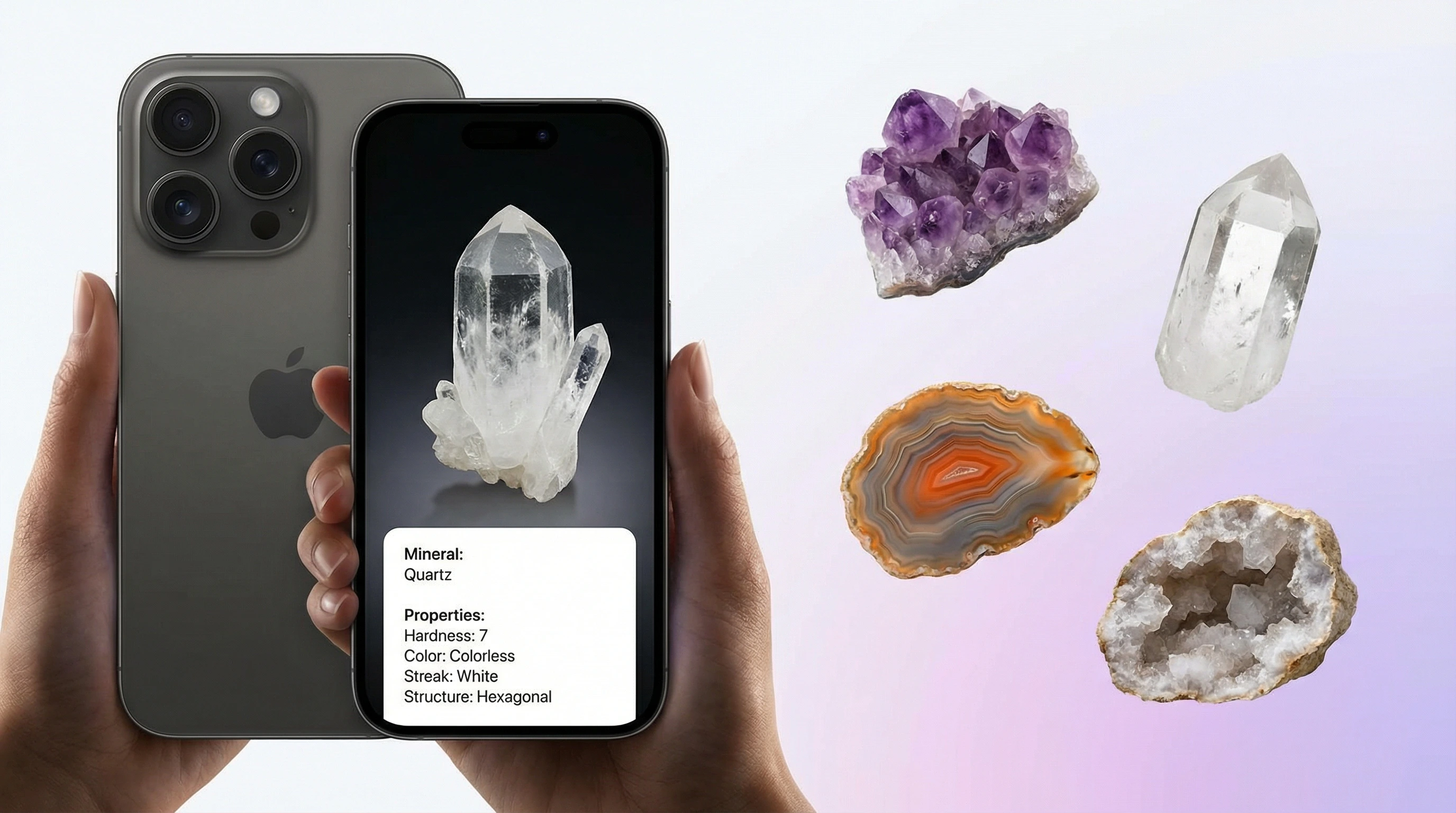
A Rock Identifier Free AI App uses a photo to suggest the likely rock, mineral, or gemstone name. It compares visible traits such as color, luster, grain, crystal habit, and fracture pattern against labeled geological examples. For privacy, your rock photos are removed after the analysis is complete.
What is a rock identifier?
A free online rock identifier is an image-search tool trained or configured to associate specimen photographs with possible rock, mineral, crystal, and gemstone names. An AI rock identifier examines visible characteristics, retrieves visually similar reference images, and ranks candidate matches. The result is a hypothesis for further checking, not a laboratory determination.
A useful result should give the likely name, whether the specimen is a rock or mineral, its broader group, diagnostic visual traits, and plausible alternatives. It may also describe typical hardness, streak, luster, cleavage, fracture, composition, and formation environment. Those fields come from reference information rather than measurements made through the camera. A good free rock identifier explains what evidence supports a match and makes uncertainty visible instead of presenting the first visual resemblance as certain.
How rock identifier apps read a photo
An AI rock identifier converts the photograph into a set of visual features. These can include boundaries between grains, crystal habit, surface pattern, color distribution, reflectivity, pores, layering, and the relationship between the specimen and its background. Visual search then compares that representation with indexed examples and ranks similar candidates.
The ranking is a probability judgment, not proof of composition. Weathering, polish, artificial lighting, image compression, coatings, and mixed mineral grains can shift the result. Accuracy generally improves when the specimen fills the frame, the surface is in focus, colors are neutral, and several natural faces are photographed. Adding locality, host rock, magnetism, streak, or hardness observations gives the app or a later manual check more useful evidence.
How to Use the AI Rock Identifier
Clean the specimen
Brush off dirt, sand, or mud so the surface texture, grain, luster, and color are visible. If the stone is dull, lightly dampen one side to reveal hidden bands or patterns.
Photograph in natural light
Place the rock on a plain background near a window or outdoors in shade. Avoid flash glare, harsh shadows, and colored lighting that can distort mineral color.
Show key surfaces
Capture the main face, a broken edge, and any crystal termination if available. For tumbled stones or gemstones, include both the polished surface and a side view.
Upload the image
Add the photo to the identifier and wait for the match. The app will return likely names, classification details, and visible evidence used for the result.
Verify important finds
Use scratch tests, streak plates, acid tests, or a gemologist when the stone may be valuable, rare, or legally significant. AI identification is a fast starting point, not a formal appraisal.
When to Use a Photo Rock Identifier (and When Not To)
Use it when
- Use it when you find an unknown rock while hiking, beachcombing, gardening, or sorting a collection.
- Use it when text search fails because you can describe the color but not the correct mineral name.
- Use it for common specimens such as quartz, granite, basalt, limestone, jasper, obsidian, calcite, pyrite, and amethyst.
- Use it before buying or trading a low-value stone so you can compare the seller’s label with an independent visual match.
- Use it to organize a classroom, hobby, or child’s rock collection with likely names and simple properties.
Skip it when
- Do not rely on it alone for expensive gemstones, jewelry valuation, insurance, or resale claims.
- Do not use it as a substitute for laboratory tests when minerals look visually identical.
- Do not make safety decisions from a photo when a specimen may contain asbestos, uranium minerals, or toxic dust.
- Do not trust one image if the specimen is dirty, wet, weathered, painted, dyed, or heavily polished.
- Do not use it for legal land, mining, or collecting decisions without expert confirmation.
Lens App vs AI Rock ID for rock identification
| Feature | Lens App | Rock Identifier | Crystal Identifier |
|---|---|---|---|
| Best fit | General rock, crystal, mineral, gemstone, and visual object lookup | Dedicated rock and mineral identification | Dedicated crystal points, clusters, and collector-piece ID |
| Photo identification | Yes, upload or scan a specimen photo | Yes, built around stone photo recognition | Limited compared with dedicated ID apps |
| Rock categories | Igneous, sedimentary, metamorphic, minerals, crystals, gems, and fossils in matrix | Broad rock and mineral database | Focuses more on crystals than field rocks |
| Value context | General estimated value range and collector context | Often includes reference details and collection features | Usually less appraisal-focused |
| Platform | Web, iPhone, and Android | iPhone and Android | Mobile app experience varies by platform |
| Best limitation to know | Needs clear photos and expert review for valuable stones | Can struggle with lookalike minerals and weathered samples | Not designed for broad geological field identification |
Lens App suits users who want one visual search tool for stones and other real-world objects. Rock Identifier is stronger as a dedicated geology database, For polished crystals and points, use the Crystal Identifier page instead.
Rock and Mineral Identification Use Cases
- Hiking and beach finds: Image-based identification is useful when vague descriptions like shiny black stone or purple crystal lead to confusing search results. A quick scan can separate likely basalt, quartz, sandstone, jasper, or limestone before you carry the specimen home.
- Rock collections: Collectors often use photo ID to label tumbled stones, field finds, and inherited boxes. The identifier can help separate common varieties such as quartz, jasper, agate, basalt, limestone, and slate.
- Gemstone screening: A photo scan can give early context for stones that might be sapphire, ruby, emerald, opal, garnet, or tourmaline. For high-value items, the result should lead to gemological testing rather than replace it.
- Classroom geology: Teachers and students can use visual lookup to connect specimens with rock cycles, mineral hardness, luster, and texture. It is especially helpful when students have a physical sample but lack the vocabulary to search for it.
- Estate and jewelry sorting: Photo identification can help sort inherited stones, loose cabochons, beads, and unmarked specimens into likely groups. It provides a practical first pass before paying for an appraisal.
Rock Identifier Limitations
- Visual matches can be wrong for rare species or altered samples, including weathered, river-worn, sun-bleached, iron-stained, dyed, polished, resin, or glass imitation pieces.
- Some minerals require non-visual tests such as streak, hardness, magnetism, specific gravity, ultraviolet fluorescence, or acid reaction.
- Estimated value is only general context and cannot replace a certified gemologist, mineral dealer, or laboratory report.
Igneous, sedimentary, or metamorphic: start with texture
The broad rock group is often easier to judge from a photograph than the exact rock name. Igneous rocks form when molten material cools, so useful clues include interlocking crystals, glassy surfaces, or gas bubbles. Sedimentary rocks commonly show layers, rounded grains, fossils, or fragments cemented together. Metamorphic rocks have been changed by heat, pressure, or reactive fluids and may show mineral alignment, banding, folding, or recrystallization.
Visible clues for the three major rock groups
| Rock group | Typical texture | Common examples | Useful photo clues |
|---|---|---|---|
| Igneous | Interlocking, glassy, fine-grained, or vesicular | Granite, basalt, rhyolite, obsidian | Crystals, glassy fracture, bubbles, no bedding |
| Sedimentary | Layered, clastic, fossiliferous, or crystalline | Sandstone, shale, limestone, conglomerate | Beds, rounded grains, fossils, cemented fragments |
| Metamorphic | Foliated, banded, recrystallized, or massive | Slate, schist, gneiss, marble | Aligned minerals, folds, bands, flattened grains |
Texture matters more than color alone. Granite and rhyolite can have related compositions but very different grain sizes because they cooled under different conditions. Sandstone may be red, tan, gray, or nearly white without changing its basic clastic texture. Some metamorphic rocks are foliated, while marble and quartzite usually are not. Use the table as a first sorting step, then inspect grain relationships and test properties that a camera cannot observe.
What a rock photo shows and what it cannot measure
A clear photograph can show grain size, layering, vesicles, crystal shape, weathering rind, visible fossils, metallic luster, and whether grains interlock or appear cemented. Scale is uncertain unless a familiar object or ruler is included. A photo also cannot establish whether the sample scratches glass, leaves a colored streak, feels unusually dense, reacts to a magnet, or breaks along repeated planes.
Quick home checks narrow the candidates. Try scratching an inconspicuous area with a fingernail, copper coin, steel nail, or glass edge, moving from softer to harder references. Mohs hardness is comparative rather than a precise linear measurement ((minsocam.org/msa/collectors_corner/article/mohs.htm)). Rub a fresh edge on unglazed porcelain to observe powdered streak. Turn the sample under light to distinguish flat cleavage faces from irregular or shell-like fracture. If safe to immerse, compare its dry weight with its apparent weight suspended in water to estimate specific gravity. Record observations without forcing a result: coatings, alteration, and mixed rocks can produce conflicting tests.
Quartz vs calcite and pyrite vs gold
Quartz and calcite can both be clear, white, or pale and may occur as attractive crystals. Quartz commonly has a glassy luster, lacks cleavage, and can break with curved conchoidal surfaces. Calcite has repeated rhombohedral cleavage and is softer. A hardness test on a hidden edge is more informative than color. Acid reaction can support calcite identification, but household acids may react weakly unless the surface is powdered, so use care and do not test a finished specimen.
Pyrite and native gold are both metallic yellow, but their behavior differs. Pyrite commonly forms cubes or striated crystals, is brittle, and produces a dark streak. Gold is malleable, often occurs as flattened flakes or irregular masses, and has a yellow streak. Pyrite is widely known as fool’s gold, yet crystal form, streak, and malleability provide better evidence than a photograph alone (geology.com). For a metallic yellow specimen, combine the photo result with gold identifier guidance rather than relying on brightness.
Obsidian vs slag, geode vs concretion, and meteorwrongs
Obsidian is volcanic glass and typically has conchoidal fracture, sharp edges, and a fairly uniform glassy body. Industrial slag can look similar but often contains abundant bubbles, flow textures, mixed colors, metallic inclusions, or material unlike natural volcanic rock. Bubbles alone do not settle the question because some volcanic glass is vesicular. Local geology and collection context matter.
A geode is a cavity lined or filled with inward-growing minerals, commonly quartz or calcite. A concretion is a compact mass formed by mineral cement within sediment and may have concentric structure without an open crystal-lined cavity. An unopened rounded stone cannot always be classified from its exterior.
Suspected meteorites are frequently magnetite, hematite, slag, or ordinary terrestrial rocks called meteorwrongs. Magnetism is only a screening clue because many Earth materials attract a magnet. Vesicles generally count against a meteorite interpretation, while a thin fusion crust, high apparent density, and metallic grains may justify expert follow-up. Do not grind, acid-test, or cut a potentially important specimen before documenting it.
How to photograph a rock for identification
Brush off loose soil but avoid wetting, oiling, polishing, or applying chemicals before taking the first photographs. Place the specimen on a plain matte background in indirect daylight. Fill most of the frame while leaving enough margin for the outline. Tap to focus on the grains rather than the background, and avoid digital zoom, deep shadows, colored lamps, and flash glare on metallic or glassy surfaces.
Photograph several views: the weathered exterior, a fresh broken face if one already exists, a close view of representative grains, and any unusual banding, crystals, pores, or inclusions. Add a ruler or coin for scale, but keep it beside rather than over the specimen. Photograph labels separately and record where the sample was found. If the first scan returns unrelated objects, crop away fingers, tools, patterned tables, and surrounding gravel. Consistent color and sharp texture give image search more reliable evidence than an artistically dramatic photograph.
Rock vs mineral vs crystal vs gemstone
A mineral is a naturally occurring substance with a characteristic chemical composition and ordered internal structure. Quartz and calcite are minerals. A rock is an aggregate of minerals, mineraloids, glass, or organic material; granite, basalt, sandstone, and coal are rocks. Because a rock can contain several visible components, a single mineral name may describe only one grain rather than the whole specimen.
A crystal is material whose atoms have an ordered structure, although collectors often use the word for a specimen showing visible geometric faces. A gemstone is material valued for beauty, durability, rarity, or use in jewelry; it may be a mineral, rock, or organic substance. Use a mineral identifier for individual grains, a crystal identifier for crystal habit, and a gemstone identifier for cut or gem-quality material. A suspected bone, shell, leaf impression, or trace belongs with a fossil identifier. These categories overlap, so describe what is visible before choosing a label.
Limits and accuracy of AI rock identification
There is no well-established field-photo accuracy percentage that can be applied to consumer rock identifier apps. Published image-classification studies usually use curated hand samples, drill cuttings, or microscope thin sections rather than uncontrolled phone photographs. Su and Xu reported 89.97% overall accuracy in 2020, but that figure came from petrographic thin-section images under laboratory conditions, not casual field photos (link.springer.com).
Consumer-app reviews tend to describe practical strengths and errors without formal sample sets or repeatable field accuracy measurements (gemsociety.org). Expect weaker results for weathered surfaces, fine-grained rocks, mixed specimens, polished stones, dyed material, slag, and uncommon local varieties. A result may also confuse a mineral inclusion with the host rock.
Treat the first match as a shortlist. Check alternatives against texture, hardness, streak, cleavage, density, locality, and geological setting. Identification from a photograph should not be used alone for valuation, hazard decisions, meteorite confirmation, or claims that a specimen contains precious metal.
Choosing between a general visual search app and a specialist rock app
Lens App is a general AI lens for iPhone and Android. It combines reverse image search, visual-similarity matching, an object identifier, OCR, camera translation, product search, homework help, and Scan and Ask AI. It can serve as an alternative to Google Lens when you want broad visual search around a specimen, label, locality card, tool, or associated object. It does not have a face database, people index, or Instagram access.
AI Rock ID is a specialist iOS option with free daily scans and an optional subscription. It focuses on specimen names, rock or mineral type, Mohs hardness, and estimated value ranges, and states that uploaded photos are not stored (airockid.com). A specialist app may provide more geology-specific fields, while a general object identifier is useful when the photo may show slag, glass, pottery, a fossil, or another non-rock object. For more choices, see best rock identifier apps compared. Valuation remains separate from identification; use is my rock valuable to assess the evidence a price estimate needs.
Can AI identify rocks and crystals?
Yes, but AI produces possible matches rather than a definitive composition. If you need to identify rocks and minerals, begin with a sharp photo and then compare the suggested names with texture, hardness, streak, cleavage, and locality. An app that identifies rocks may also return crystals, gemstones, slag, glass, or fossils when those objects are visually similar. Separate workflows for rocks and best crystal identifier apps can help when the specimen has well-formed crystal faces.
Is rock identifier accurate?
The answer to “is rock identifier accurate” depends on the specimen, photograph, reference collection, and level of detail requested. Broad groups and distinctive textures are generally easier than separating fine-grained or weathered lookalikes. AI vs manual rock identification is not an either-or choice: use AI to generate candidates, then use manual observations to reject poor matches. Ask what is this rock only after recording the specimen’s texture and simple test results.
Should collectors download a rock identifier app?
If you search “download rock identifier app,” check whether the listing explains subscriptions, data handling, result fields, and cancellation terms before installing it. A rock identifier for collectors should let you preserve several photographs, locality notes, test observations, and alternative names rather than saving only the top match. A web scanner is useful for a quick check, while a phone app is more practical in the field. Keep original labels because collection history can be more informative than visual similarity.
Rock, crystal, mineral and gemstone guides
Rock identifier by photo — mineral identification by picture
A rock identifier by photo suggests likely minerals from luster, grain, banding, and crystal habit. Lens App supports mineral identification by picture when you need to know what rock is this from a field find, jewelry, or collection photo. For crystal points and clusters, see the Crystal Identifier.
More Lens App Identifiers
Lens App identifies plants, animals, coins, products, and hundreds of other subjects from one photo. Explore other free AI identifiers:
Identify flowers, trees, houseplants and weeds from a photo.
Identify garden and wild flowers from bloom and leaf photos.
Identify trees from leaves, bark, fruit and canopy photos.
Identify plants and trees from a clear leaf photo.
Identify insects, spiders and common household bugs from a photo.
Identify spiders from markings, body shape and web photos.
Identify snakes from scale pattern, head shape and color photos.
Identify purebred and mixed dog breeds from a photo.
Identify cat breeds and mixed cats from a photo.
Identify wild and domestic animals from a photo.
Identify backyard and wild birds from a photo.
Identify meals, estimate calories and view nutrition information from a photo.
Identify wine labels and bottles from a photo.
Identify coins, mint marks and estimate collectible value from a photo.
Identify stamps by design, country, marks and era from a photo.
Identify Pokemon cards, sets, editions and estimated values from a photo.
Identify crystals from shape, color and surface detail photos.
Identify gemstones from cut, color and visual stone clues.
Identify minerals from crystal form, luster and color photos.
Identify mushrooms from a photo for reference only.
Find where an image appears online.
Find where a face appears in publicly available images.
Find public profiles, image sources and usernames from a photo.
Translate text from photos, signs, labels and menus.
Identify freshwater, saltwater and aquarium fish from a photo.
Identify antiques, pottery and collectibles from a photo.
Identify products and find buying options from a photo.
Identify sneaker models, brands and colorways from a photo.
Identify cars from badges, body shape and trim photos.
Identify brand logos from packaging, signs and screenshots.
Recognize landmarks, monuments and buildings from travel photos.
Find where to buy products and compare prices from a photo.
Identify currency and banknotes from a photo.
Frequently Asked Questions
Can a photo identify a rock exactly?
Not always. A photo can support a likely match by showing texture, grain size, layering, crystal form, luster, and weathering, but many rocks share those features. Exact identification may require hardness, streak, cleavage, density, chemical tests, microscopy, or laboratory analysis. Treat the image result as a shortlist and compare each candidate with observations from the physical specimen.
What part of a rock should I photograph?
Photograph both the weathered exterior and the freshest naturally exposed surface available. Include close views of grains, crystals, bands, pores, fossils, or metallic areas, plus a wider view with scale. Do not break a rare, valuable, or scientifically important specimen merely to improve a scan. Several focused views are more useful than repeated photographs of the same face.
How do I tell whether a specimen is a rock or mineral?
Look for whether the specimen is one uniform substance or an aggregate of different grains. A mineral may show consistent crystal form, cleavage, hardness, and streak, while a rock commonly contains several minerals or fragments. Fine-grained rocks can appear uniform, so magnification helps. The distinction may remain uncertain until a fresh surface or thin section is examined.
Why does the identifier give different answers for the same stone?
Different views expose different visual evidence. One face may emphasize quartz grains, another may show weathering, and a flash photograph may alter color or luster. Cropping and background objects can also affect similarity matching. Use neutral light, keep the specimen in focus, scan several representative faces, and compare the repeated candidates rather than accepting whichever name appears first.
Can a rock identification app tell whether a stone is valuable?
It can suggest a specimen type, but it cannot establish market value from a photo alone. Value depends on confirmed identity, size, condition, color, clarity, provenance, treatment, rarity, and current buyer demand. Common material may resemble a valuable gemstone or ore. For a structured valuation check, review how much is it worth before seeking an independent specialist.
Can a phone camera confirm a meteorite?
No. A camera can flag meteorite-like features, but magnetite, hematite, industrial slag, and ordinary rocks produce many false matches. Record the find location, photograph all surfaces, test magnetism cautiously, and avoid cutting or aggressive cleaning. A convincing specimen should be assessed by a museum, university geology department, meteoritics specialist, or laboratory using physical and compositional evidence.
Can polished stones be identified from a photo?
Sometimes, but polishing removes or obscures grain boundaries, weathering, fracture, and natural crystal surfaces. Dyed stones, composites, glass, and synthetic material can further confuse visual matching. Photograph the front, back, edges, drill holes, inclusions, and any unpolished area. Mounted material may also need jewelry identifier context, while a suspected diamond requires professional testing rather than image matching.