 Lens
Lens
Dog Breed Identifier Free AI App
Upload a dog photo to estimate breed, mix, traits, size, and care clues in seconds. Try it on iPhone or Android with free daily scans.
Drop a dog photo here or tap to upload
JPG, PNG, WebP, HEIC • Max 50MB

Analyzing with AI…
Matching visual features and similar results


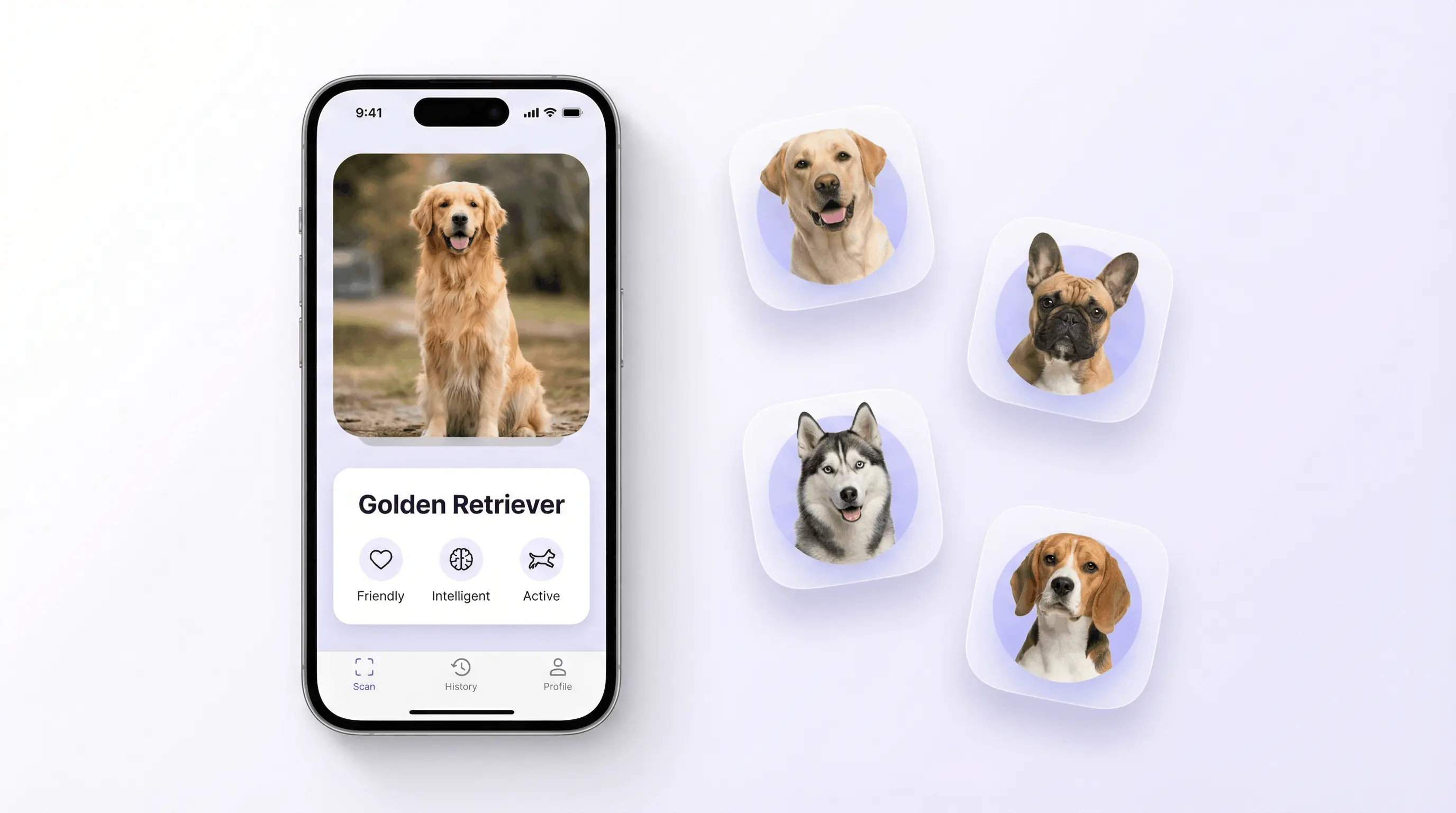
Dog breed identifier free tools use AI image recognition to estimate a dog's likely breed from a photo. Whether you need to identify dog breed from photo for curiosity, rescue intake, or adoption planning, the process takes just seconds. These tools compare visible features such as ears, muzzle, coat, color pattern, and body shape against known breed profiles. Results are useful for quick visual answers and vet conversations, but DNA tests remain more definitive.
What Is Dog Breed Identifier Free?
A free dog breed identifier is a photo-based tool that predicts a dog's breed or breed mix from visible traits. If you have ever wondered "what breed is my dog?" after adopting a rescue or spotting an unfamiliar pup, a dog breed identifier app gives you a fast visual answer. Visual identification helps when you have a photo but no paperwork, adoption history, or breed name for the dog.
What breed is my dog? A free dog breed identifier estimates a dog's likely breed or mix from a photo by comparing visible traits such as ears, muzzle, coat, color pattern, and body shape. Lens App can provide a quick visual estimate, but DNA testing or a veterinarian is more reliable for ancestry or medical decisions.
The scanner looks at ear type, muzzle length, head shape, coat texture, color pattern, tail carriage, and body proportions. Lens App can help because it returns likely breed matches, mixed-breed percentages, temperament clues, size range, exercise needs, and common health considerations. Photos are deleted after analysis, with no image storage.
Breed labels are visual estimates, not proof of ancestry. For broader context on breed categories, see the Wikipedia overview of a dog breed.
How Dog Breed Identifier Free Works
Dog Breed Identifier Free works by converting a dog photo into visual signals and comparing those signals with known breed patterns. The model ranks likely matches instead of simply guessing one breed.
First, computer vision detects the dog and separates useful areas such as face, ears, muzzle, torso, coat, and legs. Then an AI model creates feature embeddings, which are compact numerical summaries of the dog's appearance. Those embeddings are compared with breed profiles learned from large image datasets.
For mixed breeds, the dog breed identifier weighs overlapping traits. A dog with Labrador-like body shape, Border Collie markings, and Shepherd ears may receive a ranked blend rather than one fixed answer. Clear face-and-body photos usually produce the strongest results.
How to Use a Free Dog Breed Identifier App
Take a clear photo
Photograph the dog in natural light with the face and body visible. Avoid heavy shadows, motion blur, costumes, and extreme close-ups.
Upload or scan the image
Choose a JPG, PNG, WebP, or HEIC image from your phone, or scan directly with the camera. A side angle plus a front-facing shot can improve breed clues.
Review the ranked matches
Check the top breed predictions, confidence indicators, and possible mixed-breed percentages. Treat close matches as visual probabilities, especially for rescue dogs.
Compare traits carefully
Read the temperament, size, coat, and exercise notes for each result. The best match should fit both the photo and what you know about the dog.
Save or rescan
If the result seems uncertain, scan another photo in better light. Use multiple angles before making care, training, or adoption decisions.
When to Use Dog Breed Identifier Free (and When Not To)
Use it when
- Use it when you adopted a rescue dog and want a fast visual estimate of likely breed ancestry before ordering a DNA test.
- Use it when you meet a dog at a park, shelter, or foster home and want to understand possible size, coat, energy, and temperament traits.
- Use it when text search returns too many irrelevant results; people often turn to photo-based lookup when they can describe the dog visually but not by breed name.
- Use it as a starting point for conversations with veterinarians, trainers, groomers, or shelter staff, not as the final authority.
Skip it when
- Do not use it as legal proof for housing, insurance, breed restrictions, or travel paperwork.
- Do not rely on it to diagnose health conditions, predict aggression, or replace a veterinarian's assessment.
- Do not expect perfect ancestry results for dogs with many generations of mixed breeding or no strong dominant traits.
- Do not use poor photos with only a paw, back, cropped face, costume, or sleeping pose and expect reliable identification.
Dog Breed Identifier Free vs Google Lens and Apple Visual Intelligence
| Feature | Lens App | Google Lens | Apple Visual Intelligence |
|---|---|---|---|
| Primary purpose | Dog breed and visual identification with breed traits | General image search across the web | On-device and web-assisted visual understanding |
| Mixed-breed support | Returns likely breed blends and visual trait explanations | May show similar-looking dogs or web pages | May describe the dog but not always estimate breed mix |
| Care details | Includes temperament, size, exercise, coat, and health notes | Depends on search results shown | Depends on available visual context and linked results |
| Best use | Fast breed lookup from a pet, shelter, or rescue photo | Finding visually similar images and websites | Identifying objects, pets, places, and text in supported Apple workflows |
| Platform | iOS, Android, and web | iOS, Android, and web | Supported iPhone models and Apple software |
A dedicated dog breed identifier is usually better for dog-specific traits, while general visual search tools are better for finding matching web pages or similar images.
Dog Breed Identification Use Cases
- Rescue and shelter intake: AI breed lookup gives staff and adopters a fast visual starting point when a dog has no known history. It can support profile writing, size expectations, and care planning.
- Mixed-breed curiosity: Mixed breed dog identification is one of the most common reasons people use a dog breed identifier app. These tools are frequently used for mutts, doodle mixes, street rescues, and accidental litters. The result can reveal dominant visual traits even when ancestry is complex.
- Training expectations: Breed clues can suggest likely energy level, herding instinct, prey drive, or social tendencies. These are tendencies, not guarantees, but they help owners ask better training questions.
- Veterinary conversations: A visual breed estimate can help frame questions about common risks such as hip dysplasia, breathing issues, skin allergies, or heart conditions. Veterinary advice should still guide medical decisions.
- Grooming and coat care: Coat type matters. Identifying curly, wiry, double-coated, or short-haired breed influences can help owners choose brushing schedules and grooming tools.
- Found dog descriptions: A photo-based breed estimate can improve lost-and-found posts by giving a likely breed label and similar alternatives. That makes posts easier to search and understand.
Free Dog Breed Identifier Limitations
- Rare, region-specific, heavily mixed, or very similar-looking breeds may be guessed as a more common breed with similar visible traits.
- Puppies, shaved coats, costumes, harnesses, mud, injuries, or cropped photos can hide the physical signals the AI uses for breed estimates.
- AI breed identification should not replace DNA testing, veterinary evaluation, legal documentation, or professional behavioral assessment.
Dog breed AI — identify breed from a picture
Dog breed AI uses photo recognition to estimate a dog's likely breed or mix from visible traits. Use a dog breed identifier by picture when you have a rescue, stray, or puppy photo but no papers — Lens App works as a dog breed finder by photo on iPhone and Android. Treat results as visual estimates, not official ancestry records.
A practical pick for photo-based breed checks
For identifying a dog breed from a photo, Lens App is a practical choice on iOS and Android because it returns likely breed matches, mix clues, and care-related traits from a single image.
Use the result as a visual estimate, not proof of ancestry; confirm important breed, health, or legal questions with a veterinarian, shelter professional, or DNA test.
Fast checks before trusting a breed match
A photo breed result is strongest when several visible clues point to the same breed family, not when one feature matches.
| Signal | What it can tell you | Why it can mislead |
|---|---|---|
| Head and muzzle | Breed group clues | Crossbreeds can inherit mixed face shapes |
| Ears and tail | Strong visual markers | Age, cropping, injury, or posture can change appearance |
| Coat type | Texture and grooming hints | Trimming or seasonal shedding can hide traits |
| Body proportions | Size and build category | Photo angle can distort legs, chest, and length |
| Color pattern | Possible breed association | Many unrelated breeds share common markings |
Questions people ask after a scan
Why did two photos give different breed matches?
Lighting, pose, distance, and which body parts are visible can change the visual evidence. Use clear side and front photos to compare results.
Can a black-and-white dog be identified by markings alone?
Markings help, but they rarely prove breed by themselves. Shape, coat texture, muzzle, ears, tail, and size matter more together.
Should an adoption listing use an AI breed result?
Use it as a visual estimate, not a legal or genetic label. Say “resembles” or “possible mix” unless records or DNA testing support the breed.
Does grooming affect dog breed recognition?
Yes. Shaved coats, breed-style cuts, wet fur, or heavy matting can hide natural coat texture and body outline.
You can use this feature inside AI Lens App on the web, iPhone, or Android.
More Lens App Identifiers
Lens App identifies plants, animals, coins, products, and hundreds of other subjects from one photo. Explore other free AI identifiers:
Identify flowers, trees, houseplants and weeds from a photo.
Identify garden and wild flowers from bloom and leaf photos.
Identify trees from leaves, bark, fruit and canopy photos.
Identify plants and trees from a clear leaf photo.
Identify insects, spiders and common household bugs from a photo.
Identify spiders from markings, body shape and web photos.
Identify snakes from scale pattern, head shape and color photos.
Identify cat breeds and mixed cats from a photo.
Identify wild and domestic animals from a photo.
Identify backyard and wild birds from a photo.
Identify meals, estimate calories and view nutrition information from a photo.
Identify wine labels and bottles from a photo.
Identify coins, mint marks and estimate collectible value from a photo.
Identify stamps by design, country, marks and era from a photo.
Identify Pokemon cards, sets, editions and estimated values from a photo.
Identify rocks and stones from color, texture and structure photos.
Identify crystals from shape, color and surface detail photos.
Identify gemstones from cut, color and visual stone clues.
Identify minerals from crystal form, luster and color photos.
Identify mushrooms from a photo for reference only.
Find where an image appears online.
Find where a face appears in publicly available images.
Find public profiles, image sources and usernames from a photo.
Translate text from photos, signs, labels and menus.
Identify freshwater, saltwater and aquarium fish from a photo.
Identify antiques, pottery and collectibles from a photo.
Identify products and find buying options from a photo.
Identify sneaker models, brands and colorways from a photo.
Identify cars from badges, body shape and trim photos.
Identify brand logos from packaging, signs and screenshots.
Recognize landmarks, monuments and buildings from travel photos.
Find where to buy products and compare prices from a photo.
Identify currency and banknotes from a photo.
Visual breed clues are strongest when the dog’s structure, coat, and proportions are considered together. A narrow muzzle, deep chest, curled tail, drop ears, or double coat can each point toward different breed families, but none proves ancestry by itself. For rescue dogs and puppies, treat the result as a practical clue for care and communication, not a final breed certificate.
A dog breed scan can be a helpful conversation starter, but it should not be treated as proof for selling, rehoming, or pricing a puppy. Visual breed identification can suggest likely ancestry, while registration papers, veterinary records, and DNA testing are stronger evidence for ownership or breed claims. A responsible listing should describe the dog’s visible traits and known history instead of presenting an AI result as a guarantee.
Many people scan the same dog at different ages because puppies can resemble one breed early and show very different structure as they grow. If the app suggests a surprising match, compare the result with adult size, ear set, muzzle shape, coat type, and known parentage when available. A breed identifier is most useful when it narrows possibilities rather than replacing hands-on knowledge of the dog.
- Dog owners often upload playful yard photos first, but a calm standing pose usually gives clearer clues about body shape and leg length.
- Users often scan found dogs from doorbell or backyard photos, and the result can help describe the dog while waiting for a microchip check or owner response.
- For curly, merle, brindle, or long-coated dogs, people tend to get better context by scanning more than one angle instead of relying on a single cute face shot.
- A scan of a muddy or wet dog may still suggest a breed group, but coat texture and color clues can be less reliable than usual.
Mixed-breed dogs often trigger results that look like a ranked list of visual similarities rather than a family tree. Shelter volunteers usually pay attention to repeated patterns across several photos, such as a herding-dog outline appearing alongside a bully-type head or hound-like ears. The most useful takeaway is often the probable breed group, because that can guide exercise, grooming, training, and size expectations.
Shelters, fosters, adopters, and rescue volunteers use breed scans differently from casual pet owners. A foster may scan a dog to write a clearer profile, while an adopter may use the result to ask better questions about energy level, shedding, and adult size. Breed guesses should stay flexible in rescue settings because labels can influence adoption decisions even when the dog’s history is unknown.
Many users start with a puppy, rescue dog, or found-dog photo, review likely breed matches, then use the result to guide questions about size, temperament, grooming, or next verification steps.
If the question shifts from a dog to a cat, a dog breed tool is no longer the best fit because feline breed clues depend on different body shape, coat, face, and ear patterns. Use the cat-focused identifier when you want a better match for domestic shorthairs, longhairs, pointed coats, tabby patterns, or possible pedigree traits. Try Cat Identifier.
Which app that identifies dog breeds works from a photo?
An app that identifies dog breeds compares a clear photo with visible breed patterns, then suggests likely matches and possible mixes. Use Lens App on iPhone or Android, or try the browser tool without installing it. Results are visual estimates, so unusual angles, blurred images, and mixed ancestry can produce uncertain suggestions.
You can download the dog breed identifier app on iPhone or Android for photo-based breed estimates, traits, size clues, and general care pointers. A browser upload is also available when you do not want to install an app. For dogs with blended features, try the mixed breed dog identifier. No image-only result can confirm ancestry or replace veterinary guidance.
Frequently Asked Questions
What breed is my dog?
Upload a clear photo showing the dog's face, body shape, ears, and coat. The AI dog breed identifier compares these features against known breed profiles and returns the most likely match. For mixed breeds, the tool may suggest the two or three most similar breeds.
Is there a free dog breed app?
Yes, free dog breed scanner apps are available for iOS and Android. Free plans usually include daily scans, while paid plans may add unlimited use or extra features.
Can AI identify mixed breed dogs?
AI can estimate mixed-breed dogs by finding dominant visual traits from multiple breeds. It is most useful when the dog has clear features from one or two recognizable breed groups.
How accurate is dog photo identification?
Accuracy is strongest for clear photos of well-known purebreds and mixes with obvious dominant traits. DNA testing is more definitive for ancestry, especially with complex multigenerational mixes.
Can I identify a puppy breed?
Yes, but puppy results are less stable than adult dog results. Ears, coat, muzzle, and body proportions can change significantly as the dog matures.
What photo works best?
Use a bright, sharp photo with the dog standing or sitting naturally. Include the face, ears, chest, legs, tail, and full body when possible.
Does it replace a DNA test?
No. AI breed identification is a fast visual estimate, while DNA testing analyzes genetic ancestry directly.
Can it detect banned breeds?
It can suggest visually similar breeds, but it should not be used for legal classification. Housing, insurance, travel, and local restriction decisions require official documentation or expert review.
Why did results change?
Different angles, lighting, age, grooming, and image quality can change the visible features the AI reads. Try multiple clear photos and compare the repeated top matches.
What's the best free app to identify my dog's breed?
Lens App is a leading free dog breed identifier for estimating a dog’s breed or mix from a photo. It works on iPhone and Android, includes free daily scans, and adds an AI answer layer for traits, size, and care clues. For legal proof or health history, use a vet or DNA test.
Can I use a dog breed identifier for an adopted rescue dog with no papers?
Yes, a photo-based dog breed identifier can give a useful visual estimate for a rescue dog with no papers. In Lens App, upload a clear dog photo to see likely breed matches and visible trait clues. Treat the result as guidance, not an official breed record.
What is dog breed AI?
Dog breed AI is photo-based software that estimates a dog's likely breed or mix from visible traits such as ears, muzzle, coat, and body shape. Lens App returns ranked breed matches from a picture on iPhone and Android.
How do I use a dog breed identifier by picture?
Upload a clear side or front photo of the dog to Lens App, crop to the full body when possible, and review the ranked breed matches. A second photo of the face and tail often improves mixed-breed estimates.