 Lens
LensFree AI Shopping Finder. Find & Compare Prices
See something you want to buy? Snap a photo and find it online. Compare prices across stores in seconds, completely free.
Drop a photo here or tap to find where to buy
JPG, PNG, WebP, HEIC • Max 50MB • 1 free scan

Finding where to buy with AI…
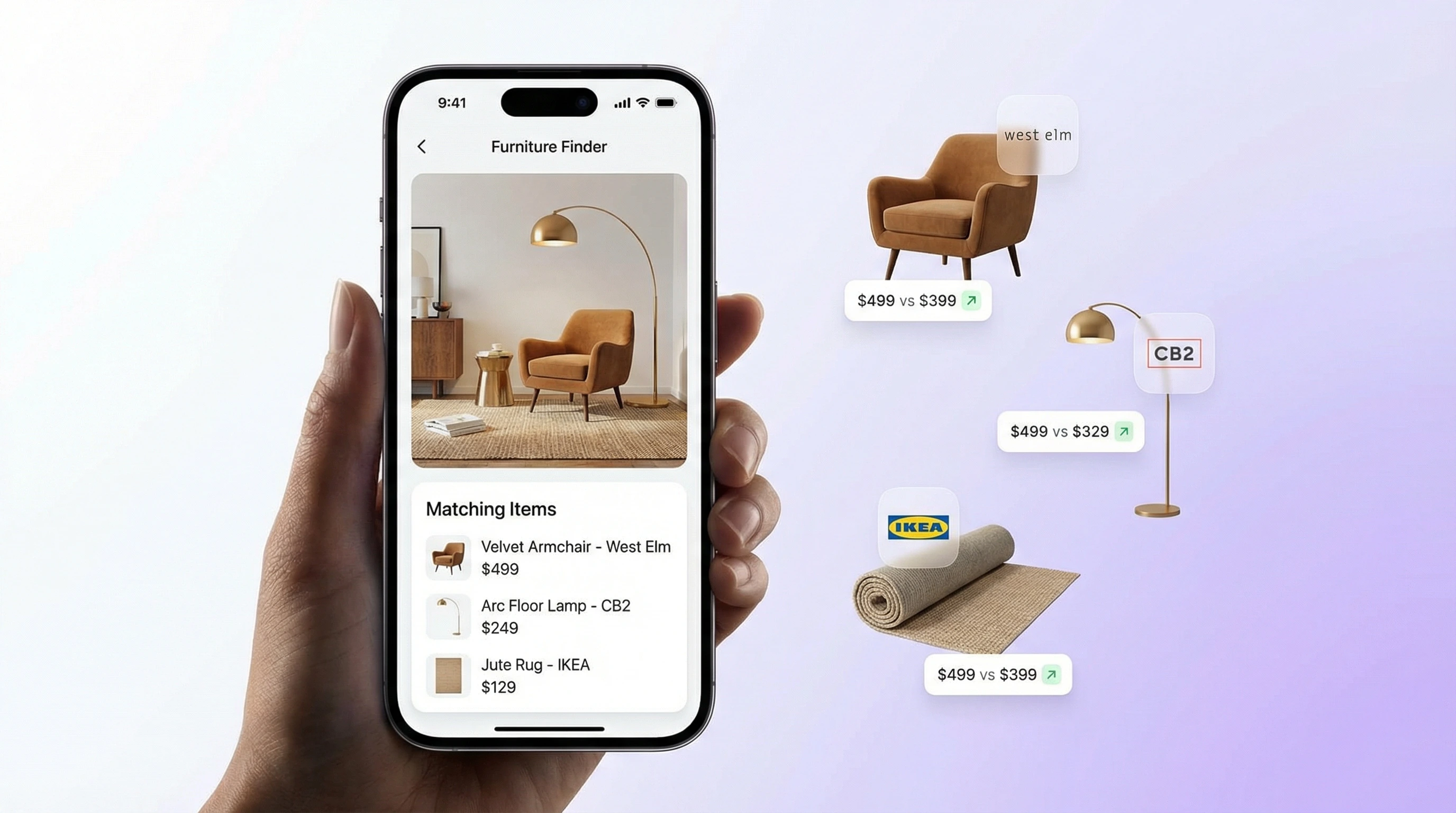
How the Shopping Finder Works
Snap or Upload a Photo
Take a picture of the item you want to buy, or pick one from your gallery. Clear photo, product in frame. That's all you need.
AI Finds Where to Buy
The AI identifies your product and checks retailer databases. Prices and links from multiple stores come back in one shot.
Compare Prices & Shop
Results show up side by side from different retailers. Compare prices, check availability, and tap straight through to buy.
How to Find Where to Buy Something from a Picture
Find Where to Buy
Finding where to buy something from a picture used to mean guessing keywords or asking around. Not anymore. Take a photo of the item, whether spotted in a store, at a friend's house, or in a magazine, and upload it. The AI analyzes the image and identifies the product or something very close to it. You get a list of retailers, each with a store name, price, and a direct link. No typing required. No keyword guessing.
Shopping Identification
This works for almost any physical product. A lamp. A pair of shoes. A kitchen gadget. A piece of jewelry. Snap it, upload it, get results. The AI matches against product catalogs from major retailers and marketplaces. Sometimes you get the exact item, sometimes close alternatives. Either way, you go from "I want that" to "here's where to buy it" in under a minute.
Visual Shopping Search
Lens App offers this as a free feature. One search per day on the web. The mobile app gives you additional free scans, which is handy when you're out shopping in person. Point your phone at something you like, and the app tells you where to find it online. It pairs well with the product search for finding similar items and reverse image search for broader visual lookup.
Price Comparison by Image
Price comparison is where this really pays off. Instead of checking each retailer separately, you see results from multiple stores in one place. The same item might be $45 at one site and $38 at another. Both show up. You pick the better deal without opening ten browser tabs.
Price Data
Prices come from retailer feeds when available. Not every result will show a price; some links go straight to the product page where the retailer displays it. But when prices are in the data, you see them upfront. Makes it much easier to spot deals, especially for items sold across many stores.
Compare Across Categories
It works across categories. Fashion, electronics, home goods, accessories: if it's sold online, the shopping finder can surface it. A lot of people use it in physical stores, too. Photograph the item on the shelf, then check if it's cheaper online. Happens more than you'd think.
Shopping Finder App
Lens App includes a free shopping finder on the web and on mobile. Upload a photo of any product and you'll get results with prices and links from multiple retailers. The web version gives you one free search per day. On iOS and Android, the mobile app offers additional free scans, useful when you're out browsing in person.
Larger Toolkit
The shopping finder is part of a larger toolkit. Lens App also includes product search for finding similar items, reverse image search for general visual lookup, and a coin identifier for collectors. Everything runs through one app. For best results, use clear photos with the product in focus. One good photo is usually enough to get useful shopping links across fashion, furniture, electronics, and home decor.
Frequently Asked Questions
How to find where to buy something from a photo?
Upload a photo of the item to a free AI shopping finder like Lens App. The AI identifies it and shows where to buy it online: retailer names, prices, and direct links included.
Is there a free visual shopping app?
Yes. Lens App is a free shopping finder on the web and on iOS and Android. One free search per day on the web; the mobile app gives you additional free scans daily.
How does AI shopping search work?
It uses computer vision to analyze your photo, then matches the image against product databases from multiple retailers. You get matching items with prices and links, all in one place.
Can I compare prices using image search?
Yes. Lens App's shopping finder pulls prices from different retailers when you search by image. You can see which store has the lowest price for the same or a similar item.
How to find a product I saw in a store?
Photograph the product in the store and upload it to an AI shopping finder. It identifies the item and shows where to buy it online, often at a lower price.
Can I find deals using a photo?
Yes. The shopping finder returns results from multiple retailers so you can compare prices side by side. Online prices are often lower than in-store for the same item.
How accurate is the shopping finder?
It depends on the photo and product type. Clear, focused photos work noticeably better. The finder handles branded products, fashion, electronics, and home goods well: you'll get the exact item or close alternatives.
What types of products can I search for?
Fashion, furniture, electronics, accessories, home decor, and more. If it's listed in online retailer catalogs, the shopping finder can find it.
Does the shopping finder show different retailers?
Yes. Results are aggregated from multiple retailers. You'll see the same or similar product at different stores with different prices and availability.
What is the best app to shop by image?
Lens App is a free AI shopping finder for iOS and Android. Snap a photo, get results with prices and links from multiple retailers. Daily free scans are included.