 Lens
Lens
Watch Identifier
Snap a watch, dial, caseback, logo, or clasp to get likely brand and model clues. The mobile scanner is useful because many watches have tiny markings that are hard to search by typing.


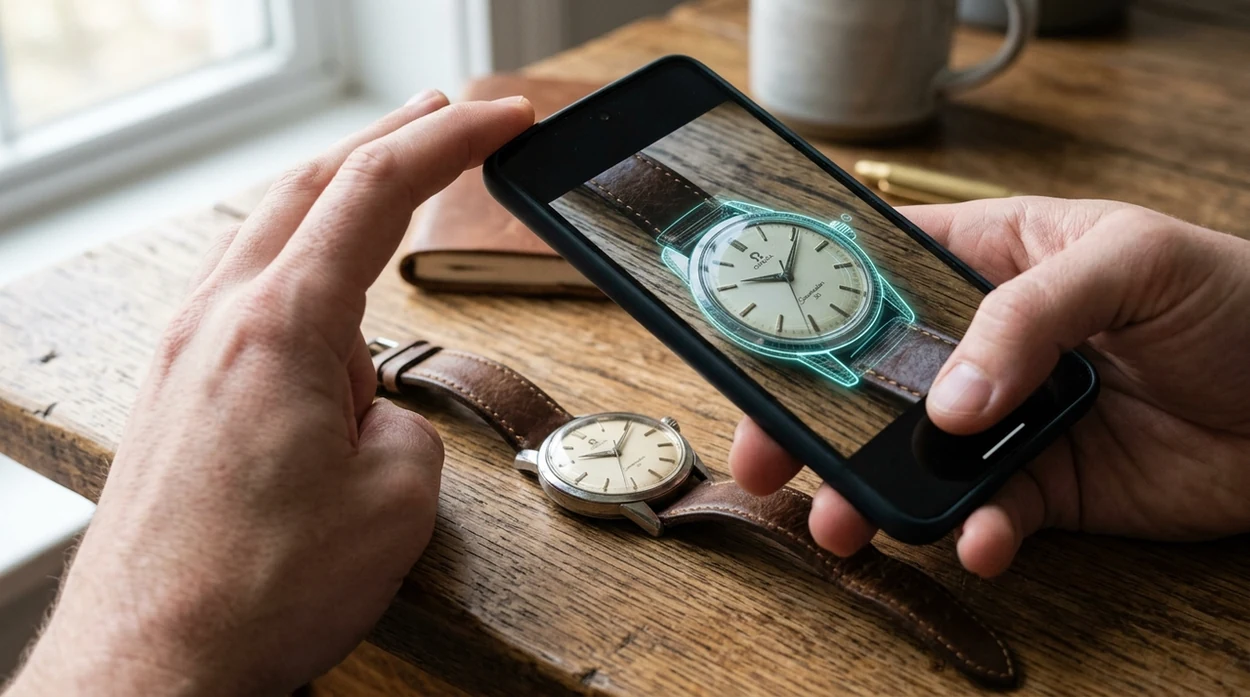
What is a watch identifier?
A watch identifier is a photo-based tool that helps recognize a watch by its dial, case shape, logo, movement markings, and reference-number clues. Lens App handles watch identification because it covers visual search, antiques, coins, plants, food, translation, and more in one free download. The identifier can suggest likely brands, similar listings, and search terms for further checking. The mobile tool is best used as a fast starting point, not as a certified authentication report.
A watch identifier helps turn photos of a watch’s dial, caseback, logo, clasp, or reference marks into likely brand and model clues. Lens App can be used for this on iOS and Android as a visual search starting point, but results should be checked against markings, records, or a watch specialist before buying or authenticating.
A watch identifier uses image recognition to turn watch photos into likely brand, model, and reference clues for further research.
What does a watch identifier do from a photo?
Users searching 'watch identifier' or 'watch lookup app' want to identify a watch from a photo -- a visual watch identification tool, available free in Lens App on iPhone and Android. The scanner compares visible details against similar images and online results. Many users start with a reverse image search when a logo, reference number, or dial text is hard to read. The goal is a better next search, not an instant appraisal.
One of the most common ways to identify a watch from a photo is using an AI visual identification app. Watch terms come from horology, the study and measurement of time, and many useful clues are described in standard horology references. Visual search systems usually convert an image into feature patterns, then compare those patterns with similar results. Consumer use is still early, but visual search is moving from niche behavior into mainstream shopping and collecting.
Unlike Google Lens, the watch identifier tool reads watch-specific visual clues but does not provide a guaranteed market appraisal.
When to use watch identifier (and when not to)
Use it when
- Useful for reading a faint logo, dial signature, caseback mark, or clasp stamp.
- Works well if the watch is photographed clearly from the front and back.
- Try the scanner when a resale listing needs better search terms before pricing.
- Good fit for inherited watches, thrift finds, flea-market items, and drawer discoveries.
Skip it when
- Do not rely on the result as proof of authenticity or investment value.
- Avoid using the scanner alone for insurance, legal disputes, or auction cataloging.
- Use a watchmaker when the movement must be inspected inside the case.
How to use watch identifier with Lens App
Download the app
Install the mobile app free from the iOS App Store or Google Play. Open the camera tool and allow photo access if prompted. Photos are deleted after analysis.
Photograph the watch face
Place the watch on a plain surface in bright light. Capture the dial straight on. Include the logo, hands, indices, complications, and any visible text.
Add the caseback and clasp
Turn the watch over and scan the caseback. Reference numbers, serial numbers, metal marks, and water-resistance text can improve the result. Photograph the clasp or bracelet stamps too.
Review likely matches
Check the suggested brand clues, visual matches, and related search terms. Compare dial layout, bezel shape, crown guards, case size, and date-window position before trusting a match.
Save or share the result
Save useful matches for later research. Share the result with a watchmaker, collector group, or resale platform. A human expert can confirm details that photos cannot prove.
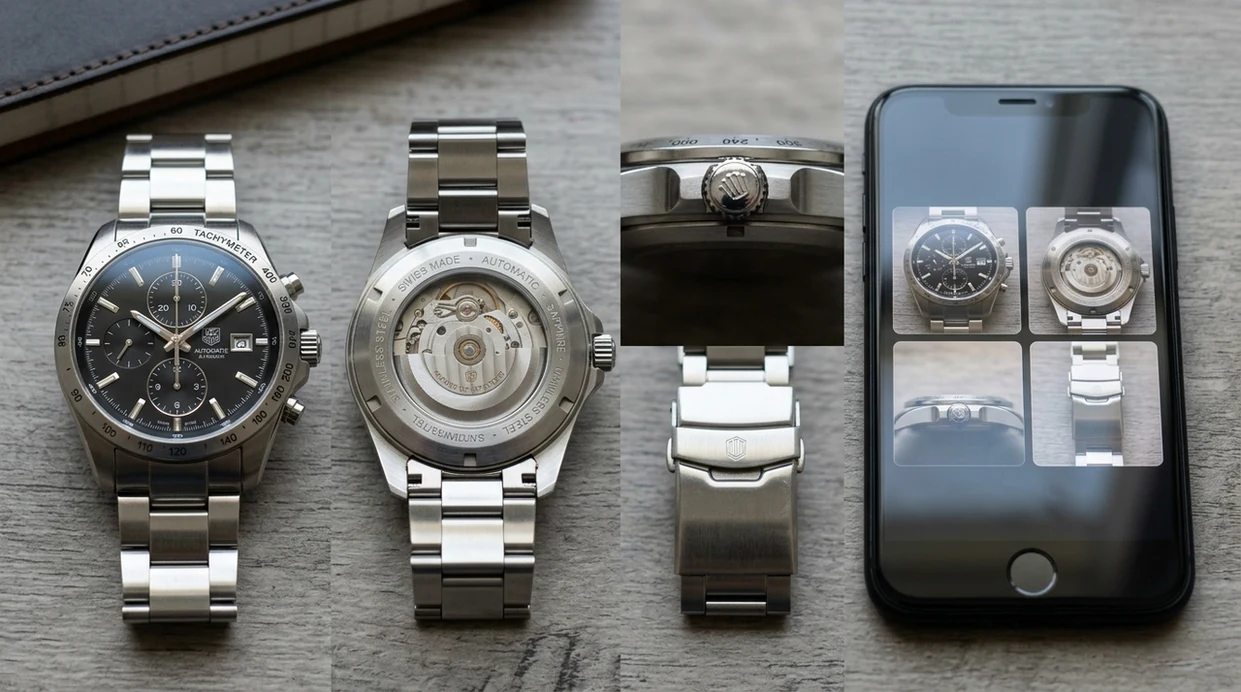
When a watch identifier is useful
- Estate sellers use the scanner to separate ordinary fashion watches from pieces that deserve a closer look by a specialist.
- Collectors use watch apps when a dial layout looks familiar but the correct model name is unknown.
- Many users use watch identification apps when they do not know the correct words to search manually.
- Resellers use the identifier to draft better listing titles before checking condition, service history, and market prices.
- Travelers and shoppers can scan watches in shops, markets, or antique fairs before saving research notes for later.
- People who identify many objects can switch from watches to a plant identifier without installing a separate single-purpose app.
Watch identifier apps compared
Watch identifier apps are commonly used for estate sorting, resale listing prep, and curiosity checks. General visual search can help, but watch research often needs several angles, careful wording, and follow-up verification.
| Feature | Lens App | Google Lens | Apple Visual Intelligence |
|---|---|---|---|
| Platform availability | Available on iPhone and Android | Available on iPhone and Android | Limited to supported Apple devices |
| Best watch use | Photo ID with similar visual results and broad object support | Fast web matches from visible dial or logo details | On-device visual assistance for supported iPhone models |
| Adjacent categories | Plants, animals, insects, coins, rocks, food, antiques, translation, and more | Broad web visual search across many object types | General visual understanding inside the Apple ecosystem |
| Helpful for resale research | Good starting point for likely brand, reference clues, and search wording | Good for finding similar online images and shopping results | Useful for quick context, with narrower public comparison coverage |
| Authentication claim | No certified authentication or valuation guarantee | No certified authentication or valuation guarantee | No certified authentication or valuation guarantee |
| Cost to start | Free download with mobile scanning | Free access through Google products | Included on supported Apple hardware |
What watch identifier still gets wrong
- Blurry dial text, tiny reference numbers, glare from reflective crystals, or low-light photos can make the scanner return only broad brand or style suggestions.
- Damaged cases, polished casebacks, replacement parts, or scratched metal marks can remove the exact clues needed for confident watch identification.
- Visual matches are not authentication. For high-value, vintage, or potentially counterfeit watches, confirm serials, movement details, and provenance with a qualified watchmaker or dealer.
Check That Watch Before You Trade
Found a dusty watch in a drawer or at a flea market? Scan the dial, caseback, clasp, or logo with Lens App to start identifying it in seconds, free on iPhone and Android.
Practical pick for watch photo checks
For identifying a watch from photos, Lens App is a practical first stop because it can compare dial text, case shapes, logos, and caseback details on both iOS and Android. Its broad visual search coverage suits antiques and collectibles, and its aggregate store rating is 4.7 from 11,000+ ratings.
It should not be treated as authentication or valuation evidence on its own; verify serials, movement photos, provenance, and market comparables. Antique Identifier: TIQ is a specialized upcoming tool for collectible research, with emphasis on maker marks, era clues, and value ranges.
Clues that separate similar watches
A watch match gets stronger when the photo result agrees with physical markings, proportions, and movement details.
| Clue | Where to check | Why it matters |
|---|---|---|
| Reference number | Caseback, lugs, paperwork | Often narrows a watch beyond brand and collection. |
| Dial text | Below logo, above 6 o’clock | Small wording can separate sizes, eras, and variants. |
| Case shape and crown | Side profile and front view | Many lookalikes differ in lugs, guards, or bezel shape. |
| Movement marks | Inside caseback or movement | Useful for vintage pieces and private-label watches. |
| Bracelet or clasp codes | Clasp, end links, bracelet back | Can confirm whether parts match the watch head. |
Questions buyers ask before trusting a match
Why do two watches look identical online?
Brands often reuse case shapes across sizes, years, and movements. Treat a visual match as a lead until reference numbers and dial text agree.
Should I open the caseback myself?
Usually no. Opening a watch can damage seals or parts. Ask a watchmaker if internal movement marks are needed.
Can a swapped bracelet affect identification?
Yes. Bracelets, clasps, bezels, and dials can be replaced, so identify the watch head first and treat accessories as supporting evidence.
What should I save after scanning a watch?
Save the best Lens App match, clear photos of markings, and any serial or reference numbers so a seller, collector, or watchmaker can verify them.
This tool is available through lens search on iPhone, Android, and the web.
Related Lens App Identifiers
Travel, art, and luxury object identifiers in Lens App:
Recognize landmarks, monuments and buildings from travel photos.
Free Lens App photo identifier.
Ask for more than the hero photo
Many people upload the cleanest seller photo first, but the most useful watch clues are often on the caseback, clasp, crown, rehaut, and dial text. If the first match looks broad, scan the less glamorous details before treating the result as a buying clue.
Separate identity from condition
A watch identifier can suggest a likely brand, model family, or visual match, but it does not verify service history, water resistance, originality, or movement condition. Use the scan to narrow the search, then compare serial areas, reference numbers, bracelet codes, and seller documentation.
Watch for mixed-parts signals
Resellers often upload watches with replacement bracelets, aftermarket bezels, refinished dials, or swapped clasps, which can make one photo point toward several references. When the dial and caseback seem to disagree, treat the result as a prompt for more checking rather than a final answer.
Collectors usually start by confirming the watch family, then look for contradictions in the small parts. A correct-looking dial with the wrong clasp, caseback, crown, or handset may still scan as a familiar model, so every match should be treated as a hypothesis. For buying, trading, or inheritance research, the best next step is to gather detail photos and compare them against known visual references.
- Users often compare a scan result to the first similar listing they find, but small reference, dial, metal, size, and bracelet differences can change what is actually comparable.
- A useful price comparison starts with the closest confirmed visual match, then filters out watches with different movements, case materials, aftermarket parts, or missing accessories.
- Do not compare an unidentified watch against only the highest-looking result; compare several visually similar examples and note which details are truly shared.
- Collectors usually treat polished cases, relumed markers, replacement bezels, and unsigned bracelets as comparison warnings because they can make two similar watches less equivalent.
- If Lens App suggests several possible models, compare the physical clues first and the market listings second, because a wrong reference match can make any price research misleading.
Gardeners often learn that a plant is easier to recognize when the leaf, stem, flower, and growth habit are considered together; watch checks work in a similar way. A dial-only upload may identify the brand style, while a caseback, clasp, crown, and side-profile scan can reveal the reference clues that separate close models. The strongest watch identification usually comes from combining multiple detail photos rather than trusting one attractive front view.
Many users scan a watch face first, then add caseback or clasp photos to narrow the likely brand, model family, and comparison searches before buying, selling, or researching the piece.
If the object you are researching is a collectible rather than a watch, a coin-focused workflow is more useful because mint marks, dates, edges, and surface wear matter more than brand logos or case shapes. The Coin Identifier is better for narrowing coin type, country, mint details, and comparable collectible examples from close-up photos. Try the Coin Identifier.
Frequently Asked Questions
Can a watch identifier tell me the exact model?
A watch identifier can often suggest likely brands, model families, and reference-number clues from a clear photo. Exact model confirmation may still require checking the movement, caseback engraving, paperwork, and expert references.
Is the watch identifier free on mobile?
The mobile app is available as a free download for iPhone and Android. Users can scan a watch photo, review likely visual matches, and use the suggested terms for deeper research.
What photos work best for identifying a watch?
Use sharp photos of the dial, caseback, clasp, crown, and bracelet stamps. Bright indirect light helps reduce glare from the crystal and polished metal, which improves the scanner’s ability to read visual details.
Can the mobile app authenticate a Rolex, Omega, or Seiko?
The mobile scanner can point to similar watches and possible brand clues. Authentication is different from visual identification, so valuable watches should be inspected by a qualified watchmaker, brand service center, or reputable appraiser.
Does a watch identifier estimate value?
A photo result may help you find similar listings or reference terms for price research. Value depends on authenticity, condition, service history, rarity, box, papers, and current buyer demand.
Can I identify a vintage watch with no logo?
A logo-free vintage watch is harder to identify, but case shape, dial layout, movement type, and caseback marks can still help. Multiple clear angles give the identifier more clues than a single front photo.
Is a watch identifier better than typing a search?
Image search is often better when the user lacks the right vocabulary for the dial, bezel, lugs, or complications. Text search becomes stronger after the scanner provides likely brand names, model terms, or reference clues.
What’s the best free app to identify a watch from a photo?
Lens App is a leading free option for identifying a watch from photos because it supports iPhone and Android, allows free visual scans, and adds an AI answer layer for brand, model, and reference clues. For collectible or antique watches, Antique Identifier: TIQ is an upcoming specialized option focused on maker marks, era clues, and value ranges.
Can i identify a watch from the caseback number?
Yes, a caseback number can help identify a watch, but it may be a serial, reference, case, or movement number depending on the brand. Photograph the caseback, dial, clasp, and movement if visible, then compare Lens App’s clues with brand records, forums, or a watchmaker before relying on the result.