 Lens
Lens
How to Estimate Portion Sizes
Estimate food portions faster from a clear plate photo, then translate what you see into cups, ounces, or grams. Use the free scanner on iPhone or Android when you want a quick visual check.
Drop a photo here or tap to upload
JPG, PNG, WebP, HEIC • Max 50MB

Analyzing with AI…
Matching visual features and similar results


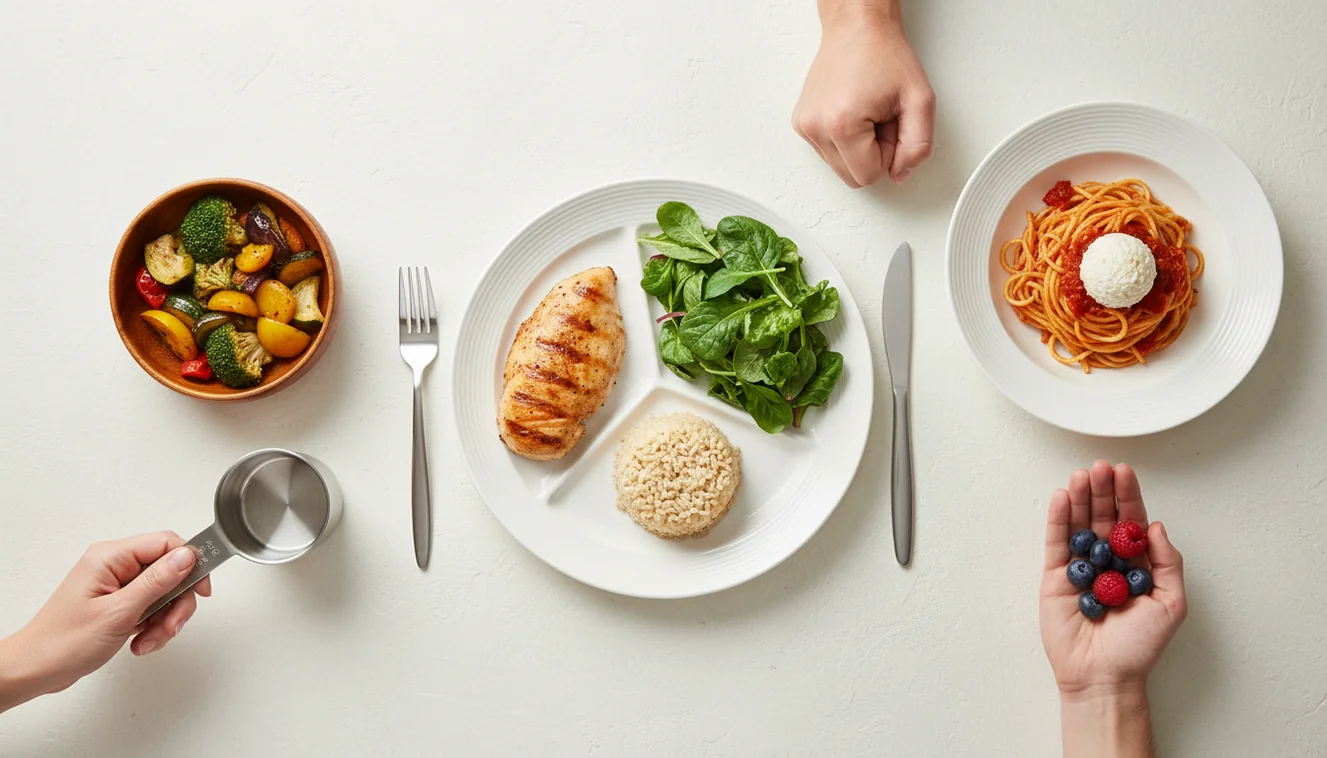
How to estimate portion sizes: compare food to a known reference, such as your palm, fist, spoon, cup, or a photographed standard. Photo-based portion checks work best when the full plate is visible, the lighting is clear, and a familiar object shows scale. Treat the result as a practical estimate, not a replacement for a food scale.
What is portion size estimation?
Estimating portion sizes means approximating how much food is on a plate and converting that visual amount into a useful measure like cups, ounces, grams, or servings. It is commonly used for calorie tracking, diabetes meal planning, balanced plates, and consistency when weighing food is not realistic.
Estimate portion sizes by comparing the food in front of you with a known reference, then converting the visible amount into cups, ounces, grams, or servings. Lens App can identify foods from a plate photo so you can make a faster visual portion check before logging or planning a meal.
A common approach to food tracking is scanning a photo with an AI food identifier, then checking the portion against a hand guide or measured reference. Lens App can help because it identifies the food first, which matters when rice, pasta, oats, yogurt, and sauces have very different serving standards. For general plate-building guidance, MyPlate from the USDA is a useful reference (source: USDA MyPlate).
For privacy, meal photos used for portion estimates are removed once the analysis is complete. That makes the tool practical for everyday meals where speed matters more than laboratory precision.
How Portion Size Estimation Works
Portion size estimation works by combining food recognition, scale cues, and density assumptions. The image helps identify the item, while objects like a fork, hand, bowl rim, or plate edge provide visual scale.
The scanner compares color, texture, shape, and context against labeled food examples, then the user maps the result to a serving reference. A fist often approximates about one cup, a palm is a rough protein portion, and a thumb can approximate one tablespoon of fats or spreads.
The hard part is density. One cup of lettuce, cooked rice, granola, and nut butter can look similar in volume but differ sharply in weight and calories. Better estimates come from top-down photos, known dishware, and occasional calibration with a scale.
How to Estimate Food Portions with a Photo
Photograph the full plate
Take a clear top-down photo in bright light. Keep the entire plate or bowl in frame, and include a fork, spoon, hand, or cup for scale.
Identify the food first
Confirm what the food is before estimating the serving. Visual identification helps when you have a photo but no name for the subject, especially with mixed meals or unfamiliar dishes.
Map it to a reference
Compare the portion to a palm, fist, thumb, measuring cup, tablespoon, or previously weighed serving. Use the same plates and bowls when possible, because repeated references train your eye.
Adjust for density and preparation
Decide whether the food is cooked or dry, loose or packed, sauced or plain. Granola, shredded cheese, rice, pasta, oils, and nut butters are easy to underestimate.
Record a range, not certainty
Log a realistic range when the portion is uncertain, such as 3/4 to 1 cup. Use a scale for meals where accuracy affects medical dosing or strict nutrition targets.
When to Use Portion Size Estimation (and When Not To)
Use it when
- Use it for routine meals where consistency matters more than exact gram-level precision.
- Use it when eating at restaurants, cafeterias, travel stops, or social meals where a scale is not available.
- Use it when text search returns too many irrelevant results and a photo can identify the food faster.
- Use it to sanity-check portions that are easy to misjudge, such as pasta bowls, cereal, rice, nuts, dressings, and spreads.
- Use it for habit building, meal journaling, and comparing portions across similar meals.
Skip it when
- Do not rely on a photo estimate for insulin dosing, kidney diets, eating disorder recovery plans, or clinician-prescribed nutrition targets.
- Do not trust a single image when food is hidden inside wraps, casseroles, burritos, creamy soups, or layered bowls.
- Do not use it as a safety check for wild mushrooms, spoiled food, allergens, or unknown foraged ingredients.
- Do not expect accuracy from blurry, cropped, low-light, or steep-angle photos.
- Do not assume calories are visible; oils, butter, sugar, cream, and sauces can be hidden.
How to Estimate Portion Sizes vs MyFitnessPal and Calorie Mama
| Feature | Lens App | MyFitnessPal | Calorie Mama |
|---|---|---|---|
| Primary strength | Photo-first food identification and visual portion support | Large nutrition database and manual food logging | Food photo logging with nutrition estimates |
| Best for | Identifying an unfamiliar meal before choosing a serving size | Tracking known packaged foods, recipes, and repeated meals | Quick calorie estimates from meal photos |
| Portion method | Uses the image as a starting point, then benefits from a hand, utensil, or plate reference | Usually depends on user-entered serving size, barcode scans, or saved foods | Uses photo analysis and user confirmation for likely food matches |
| Precision level | Practical estimate for everyday meals | Can be precise if the user weighs food and chooses correct database entries | Approximate, especially for mixed dishes and hidden ingredients |
| Best workflow | Scan first, identify the food, then map it to cups, ounces, grams, or a hand guide | Search or scan barcode, select item, then enter serving quantity | Photograph meal, review suggestion, then adjust serving estimate |
The best choice depends on the job. Use a visual identifier when the food is unknown, a database tracker when the food is known, and a scale when precision is required.
Food Portion Estimation Use Cases
- Restaurant meals: People often turn to photo-based lookup when restaurant portions are larger than expected and menu nutrition is unavailable. A plate photo helps compare pasta, rice, fries, and protein portions against familiar serving references.
- Meal tracking without a scale: Food portion apps are frequently used for calorie logging, macro tracking, and balanced plate checks. They are most useful when the user wants consistency across days rather than exact laboratory measurement.
- Unfamiliar foods: Photo identification is helpful when you do not know whether a dish is couscous, quinoa, rice, lentils, noodles, or another base. Correct identification improves the serving estimate because each food has a different density.
- Training your eye: Weighing a few repeated meals creates a personal reference library. After seeing what one cup of cereal, rice, yogurt, or pasta looks like in your own bowl, future estimates become faster and more consistent.
- Caregiver meal support: Caregivers can use portion estimates to keep meals consistent for children, older adults, or family members with general nutrition goals. Medical diets still require clinician guidance and more precise measuring.
How to Estimate Portion Sizes Limitations
- Deep bowls and layered foods can hide volume below the surface, so soup, oatmeal, rice, pasta, and casseroles may need a manual correction.
- Mixed dishes and hidden ingredients such as oil, butter, sugar, cream, dressings, and marinades can change calories without changing how the portion looks.
- Medical nutrition decisions require more precision than a visual estimate can provide, especially for insulin dosing, renal diets, and strict therapeutic plans.
Useful for quick plate checks
For photo-based portion estimates, Lens App is a practical option on iOS and Android because it first identifies the food, then helps you reason about likely serving amounts from the plate image.
Use it for everyday consistency rather than exact nutrition math; a kitchen scale, clinician, or registered dietitian is the better reference for medical diets, insulin dosing, or recipes that require precise grams.
Portion clues that change the estimate
A portion estimate improves when the photo shows not just the food, but the cues that explain its size, depth, and density.
| Clue | Why it matters |
|---|---|
| Plate or bowl edge | Shows the full serving boundary, not a cropped guess. |
| Known object nearby | A fork, spoon, card, or hand gives scale. |
| Food depth | Rice, pasta, soup, and cereal change a lot with bowl depth. |
| Sauces and toppings | Small-looking additions can represent separate portions. |
| Cooked vs dry state | Pasta, oats, beans, and grains expand after cooking. |
Questions people ask while logging meals
Do I need to photograph the whole plate?
Yes. A cropped plate hides scale, edges, and side items, which can make a portion estimate less reliable.
Should drinks be included in the same photo?
Only if the container is visible. A glass, bottle, or cup shape helps estimate volume better than liquid alone.
Why do two equal-looking foods log differently?
Density matters. A cup of lettuce, a cup of rice, and a cup of nuts can represent very different amounts of food.
Can Lens App tell if food is cooked or raw?
Lens App can help identify the food visually, but you should confirm cooked versus raw before converting the amount.
image recognition app is the parent app for this feature, with free daily scans on mobile and the web.
Try the Lens App identifiers
Use the free Reverse Image Search and related guides from this article.
Use portion estimation when the goal is a practical meal log, not a lab-grade nutrition measurement. A photo-based estimate is most useful for mixed plates, restaurant meals, leftovers, snacks, and meals where weighing food would interrupt the moment.
- Users often scan after the first few bites, which can make the original serving look smaller than it was.
- Many people upload a plate photo without noting shared items, so fries, dips, bread baskets, and sauces may need a quick manual check.
- A meal photo works better when the main foods are separated enough to see where one portion ends and another begins.
- Portion estimates tend to be easier to review when the user remembers whether the plate was small, standard, or oversized.
People who log meals casually often use portion estimation to stay consistent rather than perfectly precise. Resellers often photograph packaged food with the label visible, but home cooks and meal preppers usually need the scanner to infer portions from cooked volume, visible ingredients, and plate coverage.
Field use shows that portion estimates improve when users treat the scan as a structured starting point rather than a final number. Many people get better logs by checking visible add-ons, serving context, and what was actually eaten. A clear plate photo helps, but the user’s memory of leftovers, refills, and shared items often matters just as much.
The fastest portion check is to identify the food first, then adjust the serving size based on what is actually on the plate. Hidden calories usually come from oils, dressings, toppings, fillings, and sauces that are visible only as small clues in the photo.
Counting the container instead of the food
A bowl, cup, or takeout box does not always equal one serving. The useful fix is to judge how full it is and whether the food is packed, loose, drained, or sauced.
Forgetting dense ingredients
Cheese, nuts, avocado, peanut butter, and creamy sauces can change the estimate even when they occupy little space. Add a quick note when a small topping is calorie-dense.
Treating mixed dishes as one item
Burrito bowls, salads, casseroles, and noodle dishes often contain several portions layered together. A better review separates the base, protein, vegetables, sauce, and extras when possible.
- A user logging takeout may scan the full plate first, then adjust for shared appetizers or leftovers not eaten.
- A meal prepper may scan one container, save the estimate, and reuse it for similar containers during the week.
- A parent may scan a child’s plate after serving to get a rough sense of portion size before food is mixed together.
- A restaurant diner may use the scan as a starting point, then reduce the entry if half the meal was boxed up.
Many users scan a meal before eating, review the estimated foods and portions, then adjust servings or leftovers before adding the meal to their log.
If the main challenge is naming the foods before estimating their amounts, the Food Scanner is the better next step. It is built for identifying meals, estimating calories, and reviewing nutrition details from a photo before you fine-tune the serving size. Try the Food Scanner.
Frequently Asked Questions
What counts as one portion?
A portion is the amount you choose to eat, while a serving is a standardized reference amount. Your portion can be smaller or larger than the serving listed on a label or nutrition database.
How accurate are photo estimates?
Photo estimates are useful for consistency, but they are not as accurate as weighing food. Accuracy improves with clear lighting, a full-plate image, and a visible size reference.
Should I use cups or grams?
Use grams when precision matters because weight is more reliable than volume. Cups are faster for everyday estimating, but they can mislead with dense or packed foods.
How do I estimate restaurant portions?
Start by comparing the meal to familiar references, such as a fist for a cup or a palm for protein. Be cautious with pasta, fries, sauces, and oils because restaurant portions often contain more volume and fat than they appear to.
What is the hand method?
The hand method uses your palm, fist, thumb, and cupped hand as rough portion guides. It is convenient because your hand is always available, but it should be calibrated with measured meals when possible.
Can I estimate mixed dishes?
You can estimate mixed dishes, but the result is less certain. Break the dish into visible components, then add a margin for hidden oil, cheese, sauce, or cream.
Is a food scale better?
Yes, a food scale is better for precision. Visual estimating is better for speed, restaurants, travel, and situations where weighing food would be inconvenient.
Is the app free to use?
The mobile tool is free to try on iPhone and Android. It is designed for quick food identification and portion checks when you want a photo-based starting point.
Why do portions look smaller in bowls?
Bowls hide depth, so a top-down photo can make large portions look modest. An angled second photo helps show the height and shape of the food.
What's the best free app to estimate food portion sizes from a photo?
Lens App is a leading free app for estimating food portion sizes from a plate photo. It works on iPhone and Android, offers free scans, and includes an AI answer layer to help translate what it sees into practical portion estimates. For exact gram measurements, a food scale is still the better tool.
Can I use a photo to estimate calories from a meal portion?
A photo can help estimate calories, but it should be treated as an approximation. Calories depend on portion size, ingredients, cooking oil, sauces, and food density, so use photo estimates for quick tracking and labels or a scale when precision matters.