 Lens

Best barcode scanner app for iPhone and Android
Which barcode scanner app do you actually need? Here's the best one for quick scans, prices, food and products without a barcode. Want to try now? Scan a barcode right here.
The short answer
If you just want a fast, no-fuss barcode scanner app on Android, QR & Barcode Scanner by Gamma Play is the one half a billion people already use. If the point of scanning is to find a better price, use ShopSavvy. And if the thing has no barcode, or you want to know what it actually is and what it's worth, Lens AI works from a photo instead. For food, Product Scanner and Yuka turn the barcode on a package into ingredients and a health score.
On iPhone, the camera already reads QR codes, so you only need an app for prices, products or food. Here's what each barcode scanner app does well and where it falls short.
How we compared these barcode scanner apps
We grouped the apps by what you actually want after the beep: open a link or a Wi-Fi code, compare a price, find out what a product is, or check what's in your food. For each one we looked at how fast it scans, what it shows, what's free, ads and privacy, and what users complain about. Ratings and review counts are from the App Store and Google Play in November 2026.
1. QR & Barcode Scanner by Gamma Play: the best plain barcode scanner
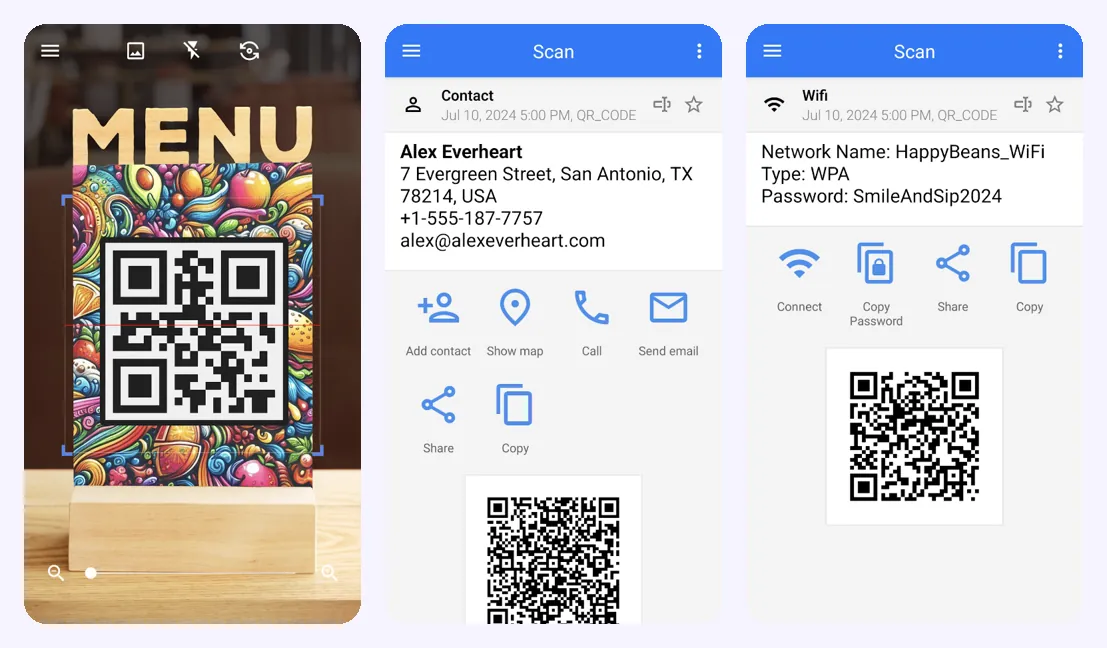
This is the classic scanner app: open it, point the camera, and it reads QR codes and the usual retail barcodes almost instantly. It also opens links, joins Wi-Fi networks from a code, saves contacts and lets you create your own QR codes.
- Works on: Android; the same developer has a QR reader on iPhone
- Rating: 4.8 on Google Play (4.8M reviews), 500M+ downloads; the iPhone version has 4.4 (6.8K ratings)
- Price: Free with ads; a paid version removes them
How it works in practice: Open the app and it starts scanning right away. Point the camera at a QR code or barcode and it shows what's inside: a link, a Wi-Fi network, a contact, an event or a product number, with a button to open, connect, save or search it.
Key features
- Reads QR codes and common retail barcodes (EAN, UPC and more)
- Opens links, joins Wi-Fi and saves contacts from codes
- Scan history
- Creates your own QR codes
Best for: people who scan lots of QR codes and want something fast and familiar. Not for: anyone who hates ads or wants prices and product details.
Tip: Read the link it shows before you tap Open. A QR code on a poster or a parking meter can lead to a fake site.
Why it's the best at this: It's quick, reliable and does exactly what a barcode scanner should, which is why it's one of the most downloaded apps of its kind.
The catch: The ads are the most common complaint, and it only reads the code: it won't tell you a price or anything about the product.
Get it: QR & Barcode Scanner for Android · Gamma Play QR reader for iPhone
2. ShopSavvy: the best barcode price scanner
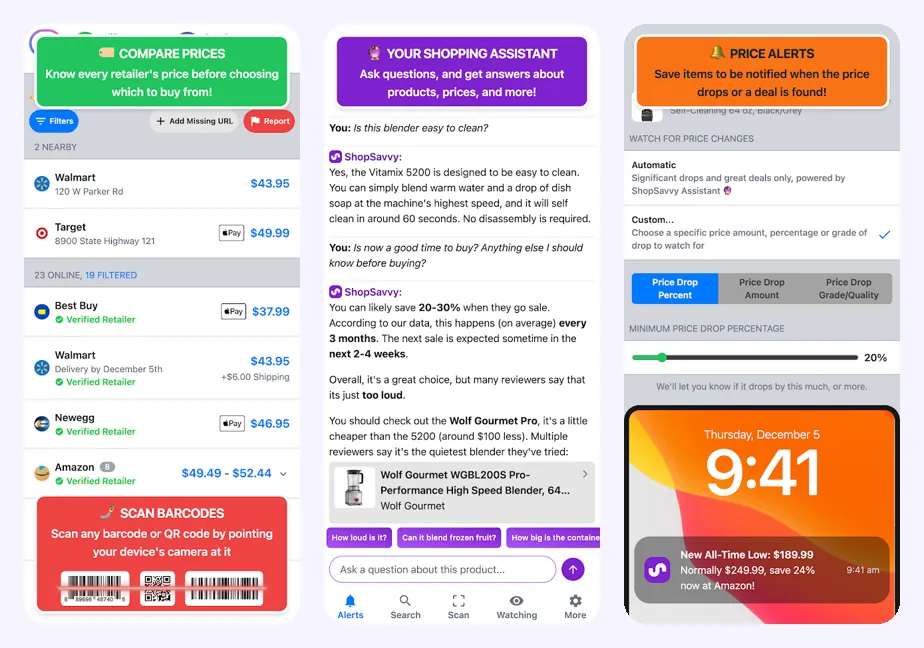
ShopSavvy is a barcode scanner built for shopping. Scan a UPC, EAN or ISBN and it lists the price at online stores and shops near you, with price history and alerts when it drops.
- Works on: iPhone and Android
- Rating: 4.4 on the App Store (10K ratings), 4.0 on Google Play (112K reviews), 10M+ downloads
- Price: Free with ads; ShopSavvy Pro removes ads and refreshes prices faster
How it works in practice: Scan the barcode and ShopSavvy looks up that exact product, then lists prices from online stores and nearby shops, cheapest first. Save it to a list and it tracks the price and alerts you when it drops.
Key features
- Price comparison across many online and local stores
- Price history and price-drop alerts
- Search by name when there's no barcode
- Shopping lists and watched items
- Works for UPC, EAN and ISBN barcodes
Best for: checking in a store whether you'd pay less elsewhere, especially for electronics, appliances and books. Not for: food nutrition or items without a barcode.
Tip: For bigger purchases, add the item to your watch list and wait a few days. The alert often beats buying on the spot.
Why it's the best at this: If you scan to answer "can I get this cheaper?", nothing else compares a barcode across this many retailers.
The catch: Ads in the free version, and price alerts can lag behind real changes.
Get it: ShopSavvy for iPhone · ShopSavvy for Android
3. Lens AI: the best scanner when there's no barcode
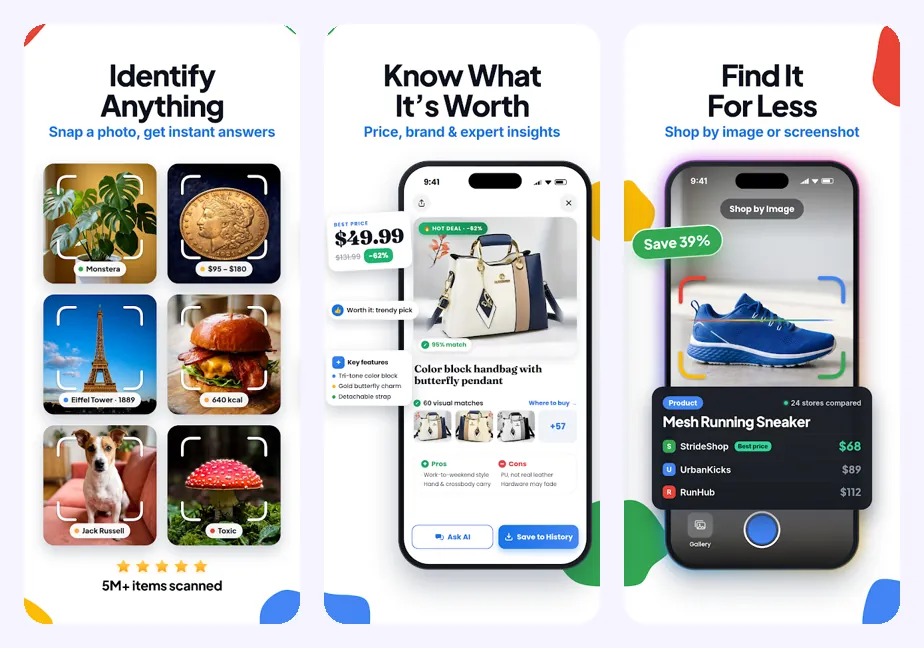
Barcodes are great until there isn't one: a lamp, a jacket, a vintage toy, a product you only have a photo of. Lens AI reads QR codes and barcodes too, but its real strength is the photo. Snap the item and it tells you what it is, the brand and model, where it's sold and roughly what it costs or is worth.
- Works on: iPhone and Android
- Rating: 4.5 on the App Store (1.6K ratings), 4.6 on Google Play (2.4K reviews)
- Price: Free download with free daily scans; a subscription gives you more scans and full results
How it works in practice: Take a photo of the item, or upload a screenshot. Lens AI identifies it, shows the brand and model, similar products, where to buy it and a price or value estimate. Point it at a QR code or barcode and it reads that too.
Key features
- Identifies products from a photo, no barcode needed
- Brand and model details
- Where to buy and price estimates
- Resale value estimates for used and vintage items
- Also reads QR codes and barcodes
Best for: furniture, clothes, decor, vintage and anything that lost its box. Not for: fast scanning of boxed products where a barcode app is quicker.
Tip: Photograph the item on a plain background in daylight. If it has a logo or label, take a second close-up of it.
Why it's the best at this: It covers the things a barcode scanner can't, so it's the best second app to keep next to a plain scanner.
The catch: For a boxed product with a clear barcode, a dedicated barcode price scanner like ShopSavvy is faster, and the free daily scans run out if you scan a lot.
Get it: Lens AI scanner for iPhone · Lens AI scanner for Android.
About Lens AI: Lens AI is a visual search app for iPhone and Android made by ATN Marketing SRL. You take a photo or upload a screenshot, and it identifies what is in it, from products and plants to coins, cards and text, shows similar matches, translates text it finds in the image, and gives price and value estimates. Besides photos, it reads QR codes and barcodes and links them to the product. It works with free daily scans, with a subscription for more scans and full results, and it is available on the App Store, Google Play and the web at lensapp.io.
4. Product Scanner: Food & Health: best food barcode scanner on Android
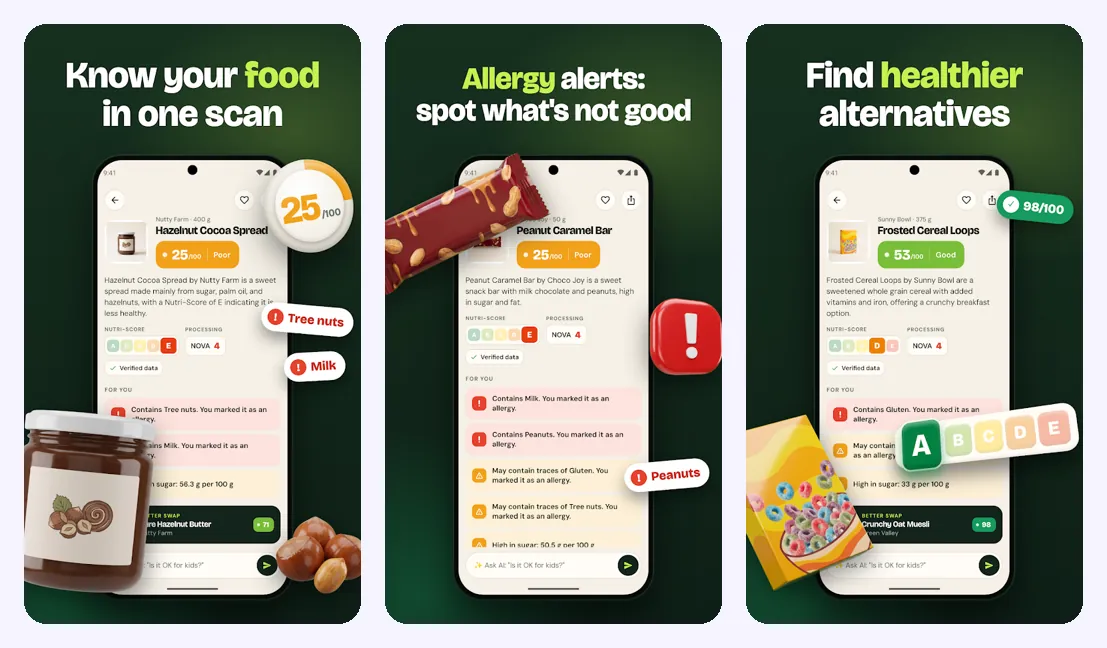
Scan the barcode on a food package and Product Scanner shows the ingredients, a health score, allergy warnings and healthier alternatives from the same shelf. It's built for the supermarket, not for links or Wi-Fi codes.
- Works on: Android
- Rating: 4.6 on Google Play, new app
- Price: Free to download
How it works in practice: Scan the barcode on a food package and the app shows the product with its ingredients, a health score, allergy alerts based on your preferences and healthier alternatives from the same category.
Key features
- Food barcode scanning
- Ingredient breakdown and health score
- Allergy alerts
- Healthier alternatives
- Scan history
Best for: shoppers who read labels, people with allergies and anyone trying to eat better. Not for: QR codes, links or price comparison.
Tip: Set your allergies and diet in the app first, so the alerts are about you, not general advice.
Why it's the best at this: It answers the questions people actually have in the grocery aisle: what's in this, is it good for me, and is there something better.
The catch: It's new, so there aren't many reviews yet, and it's only for food and groceries.
5. Yuka: best for food and cosmetics
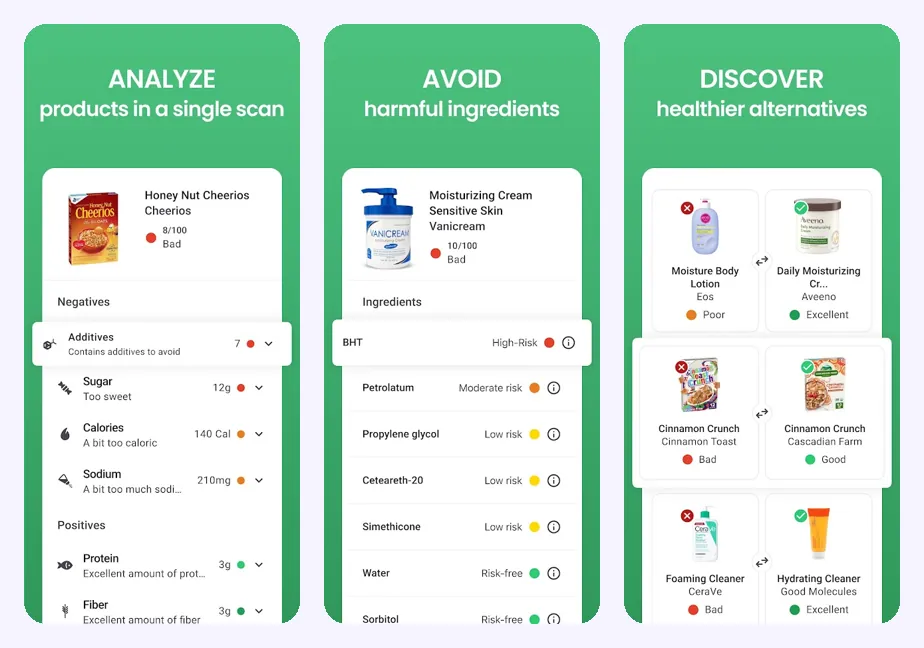
Yuka is the best-known food and cosmetics scanner. Scan a product and you get a score from 0 to 100, an explanation of the additives and ingredients, and better-rated alternatives.
- Works on: iPhone and Android
- Rating: 4.8 on the App Store (103K ratings), 4.7 on Google Play (191K reviews), 10M+ downloads
- Price: Free; Premium is about $10 a year in the US, with offline mode, search and history
How it works in practice: Scan a food or cosmetic product and Yuka gives it a score from 0 to 100 with a color, explains the good and bad points such as additives, sugar or salt, and suggests better products.
Key features
- 0–100 score for food and cosmetics
- Additive and ingredient explanations
- Healthier product suggestions
- History and search with Premium
- Offline mode with Premium
Best for: quick decisions in the supermarket and the bathroom aisle. Not for: people who want detailed nutrition data rather than a single score.
Tip: Don't stop at the score: read why a product scored low. Sometimes it's one ingredient you don't care about.
Why it's the best at this: Very polished, very fast, and the product swaps are genuinely useful.
The catch: The single score simplifies things and can be harsh on some products.
Get it: Yuka for iPhone · Yuka for Android
6. Open Food Facts: best free food scanner with no ads
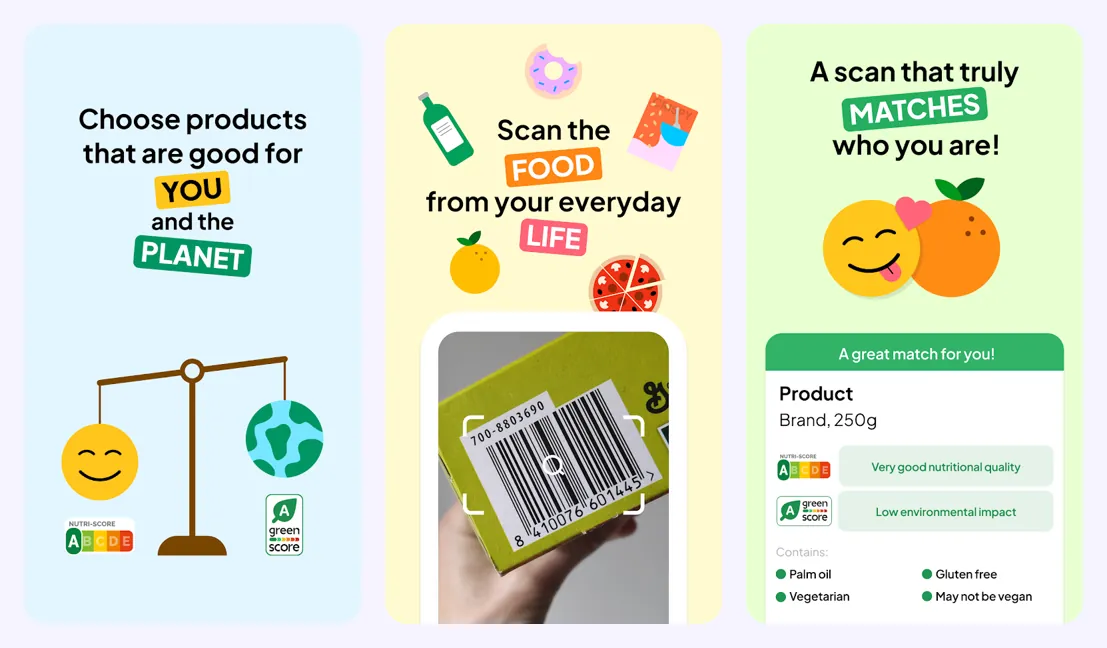
Open Food Facts is a free, open-source database of food products built by volunteers. Scan a barcode to see ingredients, Nutri-Score, processing level and environmental data, and add missing products yourself.
- Works on: iPhone, Android and the web
- Rating: 4.4 on the App Store (145 ratings), 3.9 on Google Play (7.8K reviews), 1M+ downloads
- Price: Free, no ads
How it works in practice: Scan a barcode and Open Food Facts shows what volunteers and manufacturers have entered: ingredients, Nutri-Score, how processed the food is and environmental data. If a product is missing, you can add it with a few photos.
Key features
- Ingredients and Nutri-Score
- Processing level
- Environmental impact data
- Open data you can contribute to
- No ads, no subscription
Best for: privacy-minded shoppers and people who like open data. Not for: anyone who wants a polished app with a single simple score.
Tip: If a product is missing, add it: it takes a minute and helps the next person who scans it.
Why it's the best at this: It's the most transparent and privacy-friendly option: no ads, no paywall and open data.
The catch: Less polished than Yuka, and some products have incomplete data until someone fills it in.
Get it: Open Food Facts for iPhone · Open Food Facts for Android
7. Amazon Shopping: best if you buy on Amazon anyway
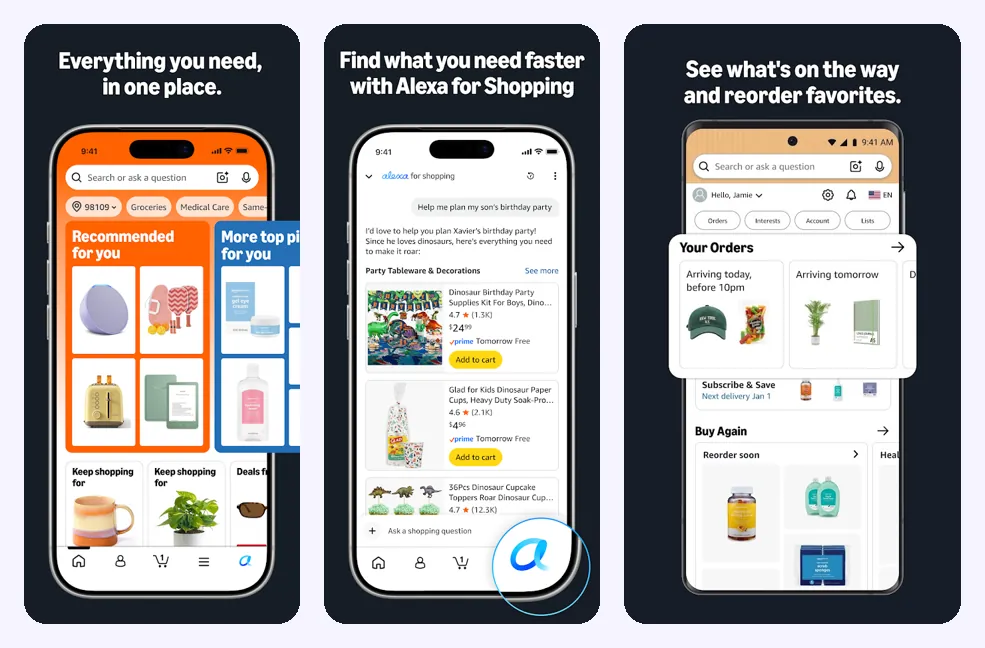
The Amazon app has a barcode scanner built in. Scan a product in a store and it opens the same item on Amazon with reviews, delivery and the buy button.
- Works on: iPhone and Android
- Rating: 4.8 on the App Store (8.4M ratings), 4.4 on Google Play (4.7M reviews)
- Price: Free
How it works in practice: In the Amazon app, tap the camera icon, scan a barcode or point at a product, and it opens the matching Amazon listing with price, reviews and delivery options.
Key features
- Barcode and photo search
- Amazon reviews and Q&A
- Prime delivery and buy button
- Lists and price tracking on Amazon
- Order tracking
Best for: checking whether Amazon has a product cheaper than the store shelf. Not for: comparing many different stores.
Tip: Check the seller and the exact model in the listing. A similar product isn't always the same one.
Why it's the best at this: It's the fastest way to compare a shelf price with Amazon's.
The catch: It only shows Amazon, so it won't tell you if another store is cheaper.
Get it: Amazon for iPhone · Amazon for Android
Barcode scanner apps compared
| App | Best for | Reads | iPhone / Android | Cost |
|---|---|---|---|---|
| QR & Barcode Scanner (Gamma Play) | Plain, fast scanning | QR, barcodes | Android (+ iPhone QR reader) | Free with ads |
| ShopSavvy | Comparing prices | Barcodes | Both | Free with ads, Pro |
| Lens AI | Items without a barcode | Photos, QR, barcodes | Both | Free daily scans, subscription |
| Product Scanner | Food on Android | Food barcodes | Android | Free download |
| Yuka | Food and cosmetics | Barcodes | Both | Free, Premium about $10/yr |
| Open Food Facts | Free, open data | Barcodes | Both | Free, no ads |
| Amazon Shopping | Checking Amazon's price | Barcodes, photos | Both | Free |
Best barcode scanner app for iPhone
On iPhone you don't need an app to open QR codes: the Camera app and the Code Scanner in Control Center do it. Install a barcode scanner app for what comes after the scan: ShopSavvy for prices, Yuka for food, and Lens AI for iPhone for products without a barcode.
Best barcode scanner app for Android
On Android, QR & Barcode Scanner by Gamma Play is the best plain scanner, and Google Lens (usually already on your phone) reads codes for free. Add ShopSavvy for prices, Product Scanner or Yuka for food, and Lens AI for Android for photos of anything without a barcode.
Barcode price scanner: does it really find the best price?
A barcode price scanner is the most accurate way to compare prices, because the barcode points to one exact product, size and version. ShopSavvy and the Amazon app do this best. Just remember to add shipping, and check that the store isn't selling a slightly different bundle. For things without a barcode, our guide to the best price scanner apps covers photo-based options too.
Is there a free barcode scanner app with no ads?
Yes. The iPhone camera and Google Lens read codes for free with no ads, and Open Food Facts is free and ad-free for food. Most dedicated scanner apps are free with ads and charge a small fee to remove them.
A quick safety tip for QR codes
A QR code can lead anywhere. Before you open one from a poster, a parking meter or a stranger's message, check the web address the scanner shows. Don't enter a password or card details on a page you reached from a random QR code. You can also scan codes on our online barcode scanner and look products up with barcode lookup.
How to choose a barcode scanner app
Ask yourself what you want after the scan:
- Just open QR codes? Use your phone's camera, or a plain scanner like Gamma Play.
- Compare prices? ShopSavvy, and the Amazon app if you shop there.
- Understand food? Product Scanner, Yuka or Open Food Facts.
- Identify things without a barcode? A photo scanner like Lens AI.
- Avoid ads? The built-in camera, Google Lens or Open Food Facts.
Most people end up with two: a plain or price scanner, and a food or photo scanner.
Tips for better barcode scans
- Hold the phone steady and flat to the barcode, about 10 to 20 cm away.
- Avoid glare on shiny packaging by tilting the product slightly.
- Use the flashlight in dark aisles; most scanner apps have a torch button.
- Curved barcodes on bottles and cans scan better if you rotate the product so the lines run straight.
- If it won't scan, type the number under the barcode into the search box.
Scanning groceries: what a food barcode tells you
A food barcode is only a number. The app looks it up in a database to show the product, its ingredients and nutrition. That's why results can differ between apps: each uses a different database. If a product looks wrong or missing, check the label itself, which is always the final word for allergies and diets.
Frequently asked questions
What is the best barcode scanner app?
QR & Barcode Scanner by Gamma Play is the best plain scanner on Android, ShopSavvy is the best for prices, and Lens AI is best for products without a barcode.
What is the best barcode scanner app for iPhone?
The iPhone camera already reads QR codes. For prices use ShopSavvy, for food Yuka, and for products without a barcode Lens AI.
Is there a free barcode scanner app without ads?
Yes. The iPhone camera and Google Lens read codes for free without ads, and Open Food Facts is free and ad-free for food.
Can a barcode scanner app show prices?
Yes. ShopSavvy compares the price of a scanned barcode across many stores, and the Amazon app shows Amazon's price.
Which app scans food barcodes for ingredients?
Product Scanner: Food & Health on Android, Yuka and Open Food Facts all show ingredients and a health or nutrition score.
Can I scan a product that has no barcode?
Yes. Photo-based apps like Lens AI identify the product from a picture and show where it's sold and for how much.
Do I need a barcode scanner app on iPhone?
Not for QR codes: the iPhone camera reads them. You need an app to compare prices, check food or identify products.
Why won't my barcode scanner app read a code?
Usually it's glare, a curved package or a damaged barcode. Hold the phone steady, avoid reflections, or type in the number printed below the barcode.
Are QR code scanner apps safe?
The apps are, but the codes can lead anywhere. Check the web address before opening it, and never enter passwords or card details on a page from a random QR code.
Can I scan a barcode from a photo?
Yes. Some scanner apps can read codes from saved images; Lens AI reads codes and products from photos you upload, and our online barcode scanner works with images too.