 Lens
Lens
Translate Spanish With Your Camera
Hold your phone over a menu, a street sign, a medicine box, or a handwritten note. Lens App reads the Spanish, keeps the layout in mind, and gives you plain English you can act on.
Drop a photo here or tap to upload
JPG, PNG, WebP, HEIC • Max 50MB

Analyzing with AI…
Matching visual features and similar results


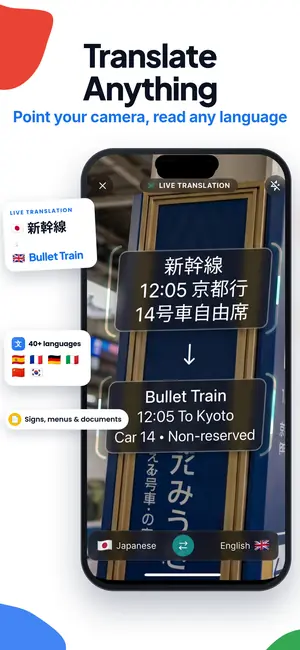

Spanish to English camera translation, step by step
Open a camera translation app, point it at the Spanish text, and take a photo or hold the frame steady. The app detects the words, runs optical character recognition, then returns an English version. Good lighting, a flat angle, and filling the frame with text produce the most accurate results.
It is an independent app and is not affiliated with Google.
What camera translation actually does
There are two steps happening behind one tap. First, text recognition finds the letters in your photo and figures out where one word ends and the next begins. Then a translation model converts that recognized Spanish into English. If step one misreads a letter, step two translates the wrong word, which is why photo quality matters more than most people expect.
Lens App runs both steps together and shows you the source text alongside the English. That matters when you are checking a price, an allergen, or a dosage line. If the Spanish it read looks off, you can retake the shot instead of trusting a translation built on a bad guess.
The same pipeline handles more than menus. Product packaging, museum plaques, bus timetables, rental agreements, warning labels on cleaning supplies, and the small print on a parking sign all come through the same way.
Menus, the most common Spanish camera translation job
Restaurant menus are a specific challenge. They mix regional dish names, cooking methods, and words that do not translate literally. A translation that reads "little ears" is technically right and practically useless, so context helps. Lens App tries to keep dish names recognizable and add a short description of what the plate usually contains.
A few habits improve results. Photograph one section at a time rather than the whole two-page spread. Skip the reflective plastic sleeve if you can, or tilt slightly to move the glare off the text. Menus printed in script fonts are harder than block text, so if a line comes back garbled, zoom in and shoot that line alone.
Prices and quantities usually survive translation cleanly, but check the currency and the decimal separator. Spanish menus often use a comma where English uses a period, so 12,50 is twelve fifty, not twelve thousand five hundred.
Signs, transit, and the outdoor stuff
Street signage tends to be the easiest camera translation because the fonts are large and high contrast. Metro maps, station names, platform directions, and no-parking notices come through quickly. The trouble spots are curved surfaces, signs photographed from far below, and text partly hidden behind a pole.
For transit schedules, take a photo rather than holding a live frame. Timetables are dense grids, and a still image lets the recognizer work through the columns without your hand shifting the alignment. Then you can pinch to zoom on the row you need.
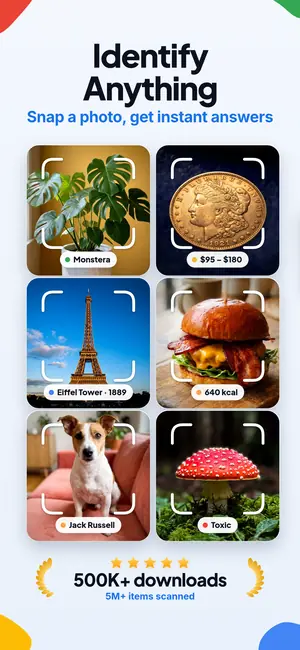
If you are unsure what an object even is before you translate the label on it, the identify feature can name it first. That combination is useful in hardware stores and pharmacies where the Spanish word alone does not tell you much.
Handwritten Spanish and older documents
Handwriting is harder than print, and honesty helps here. Cursive Spanish with connected letters, faded ink, or a slanted baseline will produce partial results. Recipe cards from a relative, notes on the back of a photograph, and old letters often need two or three attempts.
What helps: flatten the paper, shoot straight down, use indirect daylight instead of a flash, and crop to a few lines at a time. Long documents translate better in chunks because a single misread word affects a smaller area.
Historic documents with older spelling conventions or abbreviations can confuse the translation step even when the recognition is correct. Compare Lens App's extracted Spanish with the image. For abbreviations such as "Ud." or "Vd.", look up the shortened form before relying on the English translation.
Product labels, ingredients, and safety text
Grocery labels are a strong use case. Ingredient lists, allergen warnings, cooking instructions, and storage advice are all short blocks of text that photograph well. Nutrition tables are grids, so a still photo again beats a live frame.
One caution worth stating plainly. If you have a serious allergy or you are reading a medication label, use camera translation to orient yourself, then confirm with a pharmacist, a physician, or a packaging insert in a language you read fluently. A translation app is a reading aid, not a medical authority. The same applies to chemical warnings on cleaning products and pesticides.
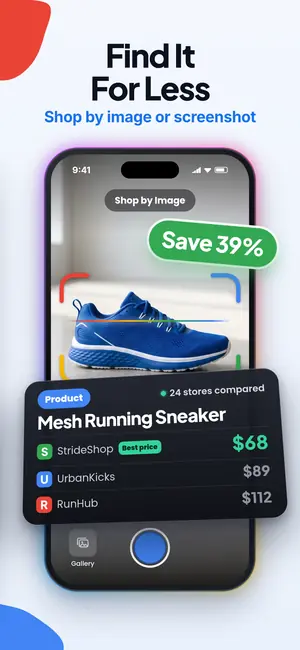
For shopping decisions, translated packaging often pairs well with a visual search. If you like a Spanish product and want to find it or an equivalent at home, the shopping side of the app can take that photo further.
Getting a clean shot every time
The single biggest gain comes from filling the frame. If the Spanish text occupies a third of your photo, two thirds of the resolution is spent on the table. Move closer or zoom before you shoot.
Angle matters next. Photograph text as close to perpendicular as you can. A steep angle stretches the letters and recognition accuracy drops fast, especially with condensed fonts. If you must shoot at an angle because of glare, take a second shot from the other side.
Lighting third. Avoid direct flash on glossy surfaces. Step into shade for outdoor signs at midday. If your hands are unsteady, brace the phone against a table edge or a wall. And if the only photo you have is soft, it can still be worth trying, since a slightly out of focus image sometimes carries enough letter shape to work with.
Latin American and European Spanish differences
Vocabulary shifts by country in ways a camera translation may or may not flag. A car is a coche in Spain and a carro or auto across much of Latin America. Food terms diverge more: the same vegetable has three or four names depending on where you are standing.
Translations handle the grammar consistently, so meaning usually carries. Where you may see friction is with slang, regional brand names, and menu items named after local traditions. If the English result reads oddly literal, the Spanish is probably regional. Searching the original phrase alongside the country name often clears it up.
Formal address also varies. Signage in Spain often uses vosotros forms that Latin American Spanish does not, but this rarely changes the practical instruction on a sign.
Where translation ends and identification begins
Not every question is a text question. Sometimes the label is missing, or the thing in front of you has no words on it at all. That is where photo identification takes over from translation, and Lens App handles both in the same camera.
Travelers use this constantly. A flower in a Sevilla courtyard, a bird on a Costa Rican fence post, a coin in change from a market stall, a beetle on a hotel windowsill, an unusual stone from a riverbed. None of those have Spanish text to translate, but all of them have identifiable features. And if you are curious whether a photo you already took can be matched to a source or a product page, an image based search is often the faster route than typing a description.
A note on mushrooms and wild plants: Lens App and every other visual tool can misidentify fungi, and lookalikes can be dangerous. Never eat a wild mushroom based on an app result. The same goes for identifying an insect bite. Use identification for curiosity and learning, and see a professional for anything that affects your health.
What Lens App costs
Free daily mobile scans can cover occasional Spanish signs and menu sections. The web tool includes one free scan per day; higher-volume use requires a paid upgrade.
If you translate constantly, for work or during a long trip, the listing includes weekly, monthly, yearly, and lifetime options. Pick the shortest one that covers your trip and cancel if you do not need it after. There is no requirement to upgrade to try the camera translation.
FAQ
Does camera translation work without internet?
Translation quality depends on server side models, so a connection gives the best results. When you are offline in a restaurant basement or on a train, take the photos anyway and process them once you have signal. Photos keep their detail, so nothing is lost by waiting a few minutes.
Can it translate Spanish handwriting?
Sometimes, and it depends heavily on the handwriting. Clear print style handwriting on flat paper often works. Connected cursive, faded pencil, or slanted lines will produce partial results. Flatten the page, shoot straight down in indirect light, and translate a few lines at a time for the best chance.
How accurate is it for restaurant menus?
Prices, categories, and common dish names come through reliably. Regional specialties and slang dish names are where errors show up, because the literal translation can be misleading. Lens App shows the original Spanish next to the English so you can spot a name that needs a second look.
Can Lens App translate English to Spanish with the camera?
Yes. Lens App can read English text from a camera photo and translate it into Spanish; a sharp, straight-on image helps it recognize each word.
What if the Spanish text is blurry?
Try again with the phone braced against something solid and the text filling the frame. If retaking is not possible, submit the blurry photo anyway. Recognition sometimes succeeds on soft images when letter shapes are still distinct, though results on very small print will be unreliable.
Can I translate a whole page of text at once?
Yes, but accuracy improves when you break long documents into sections. Dense pages spread resolution thin and a single misread word can affect the surrounding sentence. Photograph a paragraph or a menu section at a time, then move down the page.
Does it handle Spanish medication labels safely?
Use it to orient yourself, not to decide dosage. Translation can misread small print, and dosage errors carry real risk. Confirm anything medical with a pharmacist, a doctor, or official packaging information in a language you read fluently before taking or giving any medication.
Which Spanish varieties does it cover?
Both European and Latin American Spanish work with the same camera. Grammar and standard vocabulary translate consistently across regions. Differences show up in slang, regional food names, and local brand terms, where the English result may read oddly literal even when the recognition was correct.
Camera translation beyond Spanish
The camera translator hub lists other languages Lens App can read from signs, menus, and documents.