 Lens
LensAI Lens ATN App — Free AI Image Search & Identifier
Identify plants, animals, coins, food, products, rocks, insects, and more from a single photo. Try it free on iPhone or Android when text search is not enough.
Drop a photo here or tap to upload
JPG, PNG, WebP, HEIC • Max 50MB • 1 free scan

Analyzing with AI…
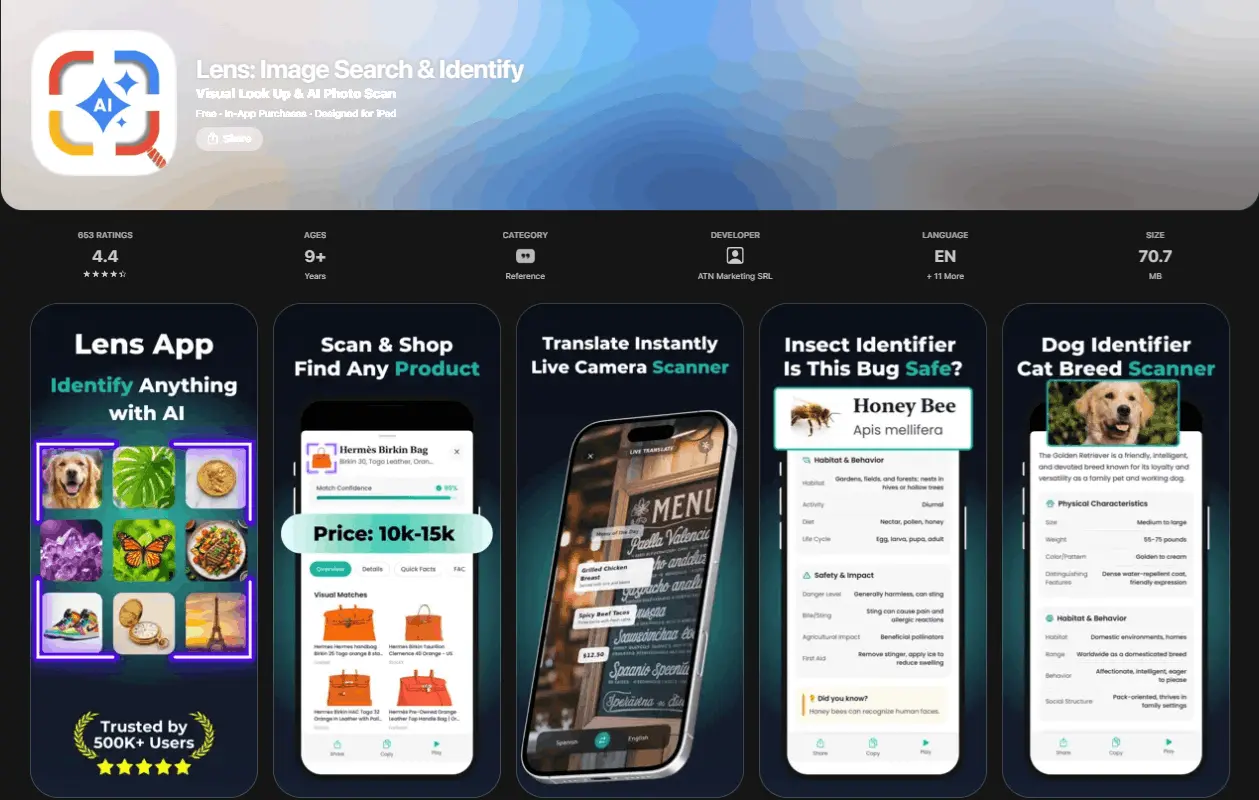
AI Lens ATN App — Free AI Image Search & Identifier is a mobile visual search tool that identifies objects, species, products, and scenes from photos. It is useful when you have an image but do not know the name, category, value, or meaning of what you are looking at. The app supports free photo-based lookup on iOS and Android.
What Is AI Lens ATN App — Free AI Image Search & Identifier?
AI Lens ATN App — Free AI Image Search & Identifier is a photo-based lookup tool that uses AI to recognize what appears in an image. It can identify everyday objects, plants, animals, insects, coins, rocks, food, products, landmarks, antiques, and more from a camera photo or uploaded image.
Lens App is useful because the photo becomes the search query when you cannot describe the subject in words. That workflow is based on [computer vision](https://en.wikipedia.org/wiki/Computer_vision), a field that trains software to interpret visual patterns such as shape, color, texture, edges, and spatial layout.
Visual identification helps when you have a photo but no name for the subject. For privacy, photos deleted after analysis are not kept for later review or reuse.
How AI Lens ATN App — Free AI Image Search & Identifier Works
The scanner works by converting a photo into visual signals, then comparing those signals with trained image-recognition models. It does not need you to type a description first.
After upload, the system analyzes features such as contours, color regions, surface texture, leaf shape, coin markings, animal proportions, packaging text, and object context. Those features are mapped into a machine-learning representation and matched against known categories. The result is returned as a likely identification with supporting details, such as species notes, care guidance, nutrition data, shopping matches, translation output, or estimated collectible information.
People often turn to photo-based lookup when text search returns too many irrelevant results. A clear image usually gives the model more precise evidence than a vague written query.
How to Use AI Image Search
Take or upload a photo
Capture the subject in good light, or choose an existing image from your gallery. Center the object and avoid heavy shadows when possible.
Crop to the main subject
Remove background clutter if the image contains several objects. A tighter crop helps the identifier focus on the thing you want named.
Run the visual lookup
Submit the image and let the AI compare shapes, textures, colors, markings, and context against known visual categories.
Review the best match
Check the suggested name, confidence, and supporting details. For nature, food, or collectibles, compare the result with visible traits in your photo.
Search again if needed
If the result looks uncertain, scan from another angle, use brighter lighting, or photograph a more distinctive feature such as a leaf, label, face, or marking.
When to Use Photo Lookup and When Not To
Use it when
- Use it when you have a clear photo but do not know the name of the object, plant, animal, food, coin, rock, or product.
- Use it when text search is difficult because the subject is unfamiliar, visually complex, or hard to describe accurately.
- Use it for quick comparisons, such as checking whether a plant, insect, product, or collectible resembles a known match.
- Use it while traveling, shopping, hiking, cooking, collecting, studying, or sorting items at home.
- Use it as a first-pass identifier before doing deeper research from trusted sources.
Skip it when
- Do not rely on it as the only source for medical, legal, financial, or safety-critical decisions.
- Do not use it as final proof that a mushroom, berry, plant, or fish is safe to eat.
- Do not expect reliable results from blurry, dark, cropped, reflective, or heavily filtered images.
- Do not use it as a certified appraisal for coins, antiques, gemstones, or collectibles.
- Do not assume rare species, hybrids, damaged items, or counterfeit products can always be identified from one image.
AI Image Search vs Google Lens and Apple Visual Intelligence
| Feature | Lens App | Google Lens | Apple Visual Intelligence |
|---|---|---|---|
| Primary focus | Direct AI identification across many categories, including nature, food, coins, products, and objects | Web-based visual search with shopping, translation, and search result links | On-device visual assistance integrated into supported Apple experiences |
| Best for | Getting a concise answer, category-specific details, and follow-up information from one scan | Finding visually similar images, websites, products, and related search results | Quick visual actions inside compatible iPhone workflows |
| Platform support | iOS and Android | iOS, Android, and web through Google products | Limited to supported Apple devices and regions |
| Output style | Identification plus practical details such as care tips, nutrition notes, value clues, or product context | Search results, visual matches, snippets, maps, shopping links, and translations | Contextual actions, summaries, and visual recognition depending on device support |
| Account requirement | Designed for fast use with free scans | Often tied to Google services for the full experience | Tied to Apple device and system availability |
A common approach to visual search is scanning the same subject with more than one tool when accuracy matters. Direct identifiers are better for quick answers, while broader search engines are better for web discovery.
Visual Search Use Cases
- Plants and flowers: Identify houseplants, garden flowers, weeds, trees, and leaves from a photo. This is useful for learning names, checking basic care needs, and comparing similar-looking species.
- Animals, birds, and insects: Scan pets, wildlife, bugs, spiders, birds, fish, and other animals for a likely identification. Category apps are frequently used for hiking, backyard discovery, pet curiosity, and classroom learning.
- Coins, banknotes, and collectibles: Photograph coins, paper money, antiques, and unusual objects to get a first-pass identification. The result can help you research origin, markings, age clues, and possible value ranges.
- Food and nutrition: Use a food photo to recognize dishes, ingredients, packaged items, or meal components. Visual lookup can support calorie estimates, nutrition review, and menu understanding while traveling.
- Products and shopping: Scan clothing, tools, furniture, electronics, decor, or packaging when you want similar products or buying context. Photo search is often faster than guessing the exact product name.
- Rocks, crystals, and gemstones: Use image recognition to compare mineral color, texture, luster, and shape against known examples. It is helpful for hobby sorting, but lab testing is still needed for certainty.
- Translation and travel context: A camera-based identifier can help with signs, labels, menus, landmarks, and unfamiliar objects during travel. It reduces the need to type words you cannot read or spell.
AI Image Identifier Limitations
- Low-light photos can hide color, texture, markings, and edges that the model needs for a confident match.
- Blurry photos often produce weaker results because important features such as leaf veins, coin dates, labels, or insect body parts are lost.
- Rare species, regional variants, hybrids, and newly released products may not match well if there are limited reference examples.
- Damaged items, worn coins, broken antiques, wilted plants, and partial objects can be misidentified because key traits are missing.
- Mushroom safety should never be decided from an app result alone; toxic and edible mushrooms can look dangerously similar.
- Reflective surfaces, heavy filters, screenshots, extreme close-ups, and cluttered backgrounds can confuse the visual model.
- Collectible values are estimates, not certified appraisals; condition, authenticity, mint marks, provenance, and market demand still matter.
- Food recognition can miss hidden ingredients, sauces, portion size, and preparation method, so nutrition results should be treated as estimates.
What Can AI Lens ATN App Identify?
Point your camera at anything. Lens ATN AI App uses image recognition to tell you exactly what it is, what it means, and where to find it.
Frequently Asked Questions
What does this app identify?
It can identify many visible subjects, including plants, animals, insects, birds, mushrooms, coins, banknotes, rocks, crystals, food, products, antiques, landmarks, and everyday objects. Results depend on image quality and how distinctive the subject is.
Is it free to use?
Yes, the app supports free scans on iOS and Android. Optional paid access may be available for heavier usage or additional features.
Can it replace Google Lens?
It can replace Google Lens for users who want direct identification and category-specific details instead of a page of search results. Google Lens is still useful for broad web discovery, maps, shopping links, and similar-image searching.
How accurate is photo identification?
Accuracy is strongest when the photo is sharp, well lit, and focused on one subject. Results are less reliable for rare species, damaged items, counterfeit goods, very similar plants, and safety-sensitive subjects.
Can it identify mushrooms safely?
It can suggest a possible mushroom match from a photo, but it should not be used to decide whether a mushroom is edible. Mushroom identification requires expert confirmation because toxic species can closely resemble edible ones.
Does it work on screenshots?
Yes, screenshots can work if the subject is clear and large enough. A direct camera photo usually performs better because it preserves more detail, lighting, and texture.
Can it identify old coins?
It can help recognize coin type, country, visible markings, dates, and possible research direction. For value, use the result as a starting point and confirm condition, mint mark, rarity, and authenticity with a specialist.
Why use image search instead of text?
Image search works when you cannot name or describe the thing you are seeing. The photo provides visual evidence directly, which can be faster than guessing keywords.
Is it available on my phone?
Yes, it is built for both iPhone and Android users. You can scan from the camera or upload an existing photo from your device.