 Lens
Lens
Translate German With Your Camera
Photograph printed Deutsch text to extract and translate it without typing every word. Clear, straight-on images work best for German menus, signs, product labels, letters, and forms.
Drop a photo here or tap to upload
JPG, PNG, WebP, HEIC • Max 50MB

Analyzing with AI…
Matching visual features and similar results



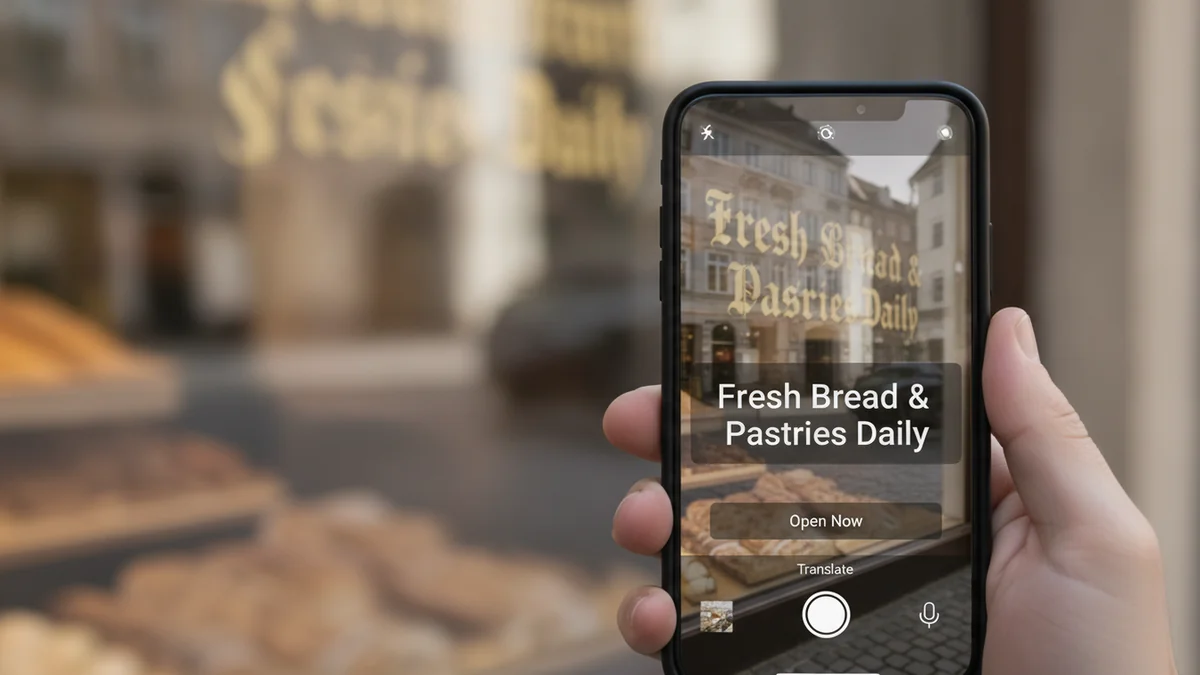
German photo translation at a glance
A German camera translator reads text in a photo, converts the visible characters into editable text, and translates the result. It works best with sharp printed text and even lighting. German umlauts, ß, compound words, decorative fonts, handwriting, and split words at line endings need extra review.
How to use this tool
Choose or capture the image
Take a new photo or select an existing image containing German text. Use the original image rather than a compressed screenshot when possible.
Frame the German text
Hold the camera straight, focus on the letters, and keep the relevant heading or sentence context. Avoid shadows, glare, and steep viewing angles.
Crop the text area
Remove unrelated pictures and surrounding text while keeping full sentences intact. Translate a dense menu or document in smaller sections.
Set the source language to German
Choose German or Deutsch when the option is available. This helps the recognition stage account for German spelling and characters.
Select the output language
Choose the language in which you want to read the result. Keep the original German visible for side-by-side checking.
Review and correct the result
Verify umlauts, ß, compound words, capitalization, line-break hyphens, numbers, and names. Retake the photo or correct the extracted text if the translation is unclear.
How camera translation reads German text
Camera translation combines optical character recognition with machine translation. The recognition stage identifies German words and punctuation in the image, while the translation stage converts the extracted text into your chosen language. A mistake during recognition can carry into the final translation, so image quality matters before translation begins.
Selecting German as the source language helps the recognition system expect characters such as ä, ö, ü, and ß. Automatic language detection can be convenient, but a manual German setting is useful when a photo contains only a few words, brand names, abbreviations, or several languages.
- Use printed German text with clear contrast whenever possible.
- Choose German or Deutsch as the source language.
- Crop unrelated logos, pictures, and multilingual text.
- Compare important translated details with the original image.
Extraction comes before translation
If the photo turns München into Munchen or Maße into Masse, the translation may change even when the translation engine works correctly. Check extracted German text before relying on names, quantities, instructions, or restrictions.
German characters and spelling that need attention
German uses the Latin alphabet, but several characters create specific recognition risks. Umlauts can appear as ä, ö, and ü, while ß may be confused with B, 8, or ss in small or stylized print. These differences can affect pronunciation, grammar, and meaning.
Capitalization also deserves attention because German nouns are normally capitalized. A camera translator may still communicate the general meaning if capitalization is missed, but names and sentence structure can become less clear. Closely inspect words printed in all caps, condensed type, or low contrast.
Umlauts are not always optional
Replacing an umlaut with its expanded form can be valid in some settings, such as ae for ä, but simply dropping the dots may produce a different word. Preserve the original spelling when checking a translation.
| German feature | Possible recognition issue | What to check |
|---|---|---|
| ä, ö, ü | Dots disappear in blur or glare | Zoom in and confirm both dots are present |
| ß | Read as B, 8, ss, or a decorative letter | Compare the extracted word with the photo |
| Capitalized nouns | Capitalization may be normalized or missed | Check names, headings, and sentence context |
| Compound words | A long word may be split into several parts | Rejoin fragments before translating again |
| Hyphenated line breaks | A formatting hyphen may be treated as part of the word | Determine whether the word continues on the next line |
Take a clearer photo before translating
Hold the camera parallel to the text so that letters remain consistent from one edge of the image to the other. Fill the frame with the relevant text, tap to focus, and keep the device still until the photo is captured. If the text is small, move closer rather than relying only on digital zoom.
Use soft, even light and watch for reflections on laminated menus, glass-covered notices, and glossy packages. For scanned letters or documents, 300 DPI or higher can preserve small punctuation and umlaut dots. A tight crop also reduces distractions from icons, illustrations, and nearby languages.
- Wipe the camera lens before capturing fine print.
- Photograph the text straight on rather than at a steep angle.
- Turn off flash if it creates a bright reflection.
- Capture long pages in overlapping sections.
- Retake the image if individual umlaut dots are not visible.
When one photo contains too much text
Divide a dense page into a few close images while preserving headings and sentence boundaries. Smaller sections usually make reading order clearer and reduce confusion between columns.
Translate German menus from a photo
German-language menus often combine dish names, regional terms, ingredients, preparation styles, and abbreviations. A literal translation may not fully explain a local food, so keep the original German name visible while reading the translated description. Prices, allergen markers, and portion notes should be checked separately.
Compound nouns are common in menu language. Words such as Kartoffelsalat or Rindfleisch may be recognized as one unit, while narrow columns can cause longer dish names to break across lines. Crop one menu section at a time and include the category heading so the translation has useful context.
- Look for headings such as Vorspeisen, Hauptgerichte, Beilagen, Getränke, and Nachspeisen.
- Check abbreviations and numbered allergen references against the menu legend.
- Do not assume a translated dish name reveals every ingredient.
- Use the dedicated menu workflow at /menu-translator/ for additional guidance.
Regional food names may remain untranslated
Names such as Spätzle, Maultaschen, Labskaus, or Kaiserschmarrn may be transliterated or left in German. Translate the surrounding description and ask restaurant staff about ingredients when allergies or dietary restrictions are involved.
Read German signs, notices, and transport information
Street signs and public notices usually contain short phrases, which can be quick to scan but harder to interpret without context. Include symbols, time ranges, arrows, and nearby headings in the photo. A single word such as frei, gesperrt, or Ausgang can take on a more precise meaning when paired with a traffic or building symbol.
Transport boards may contain platform numbers, scheduled times, destinations, and status terms in a compact layout. Translate the wording, then verify numbers directly from the original because OCR can confuse similar digits. Live announcements and official displays should take priority if travel conditions change.
- Include the full sign rather than one isolated word.
- Check dates, times, platform numbers, and arrows manually.
- Retake illuminated displays if scan lines obscure the letters.
- Treat safety, parking, and legal notices as high-review content.
Common short terms depend on setting
Words such as Einfahrt, Ausfahrt, Eingang, Ausgang, geöffnet, and geschlossen are usually straightforward, but nearby restrictions can change what you need to do. Keep qualifiers, days, and operating hours inside the crop.
Translate German labels and packaging
Product labels may mix German with English, French, Italian, or regulatory abbreviations. Set the source language to German and crop the panel you need, such as ingredients, preparation directions, washing instructions, or warnings. Curved containers often require several photos because text near the edges becomes distorted.
Fine print is especially sensitive to motion blur and glare. Place the package on a stable surface, rotate it until the text faces the camera, and use indirect light. Confirm units, temperatures, dosage wording, expiration information, and negative statements against the original.
- Photograph curved bottles in overlapping segments.
- Keep units such as g, ml, °C, and percentages visible.
- Do not crop out warning icons or reference marks.
- Verify allergen and medical information through authoritative packaging or professional help.
Separate brand names from ordinary words
A brand, model, or product line may resemble a German compound noun but should not be translated. If the result sounds unusual, compare the word with the front label or manufacturer information.
Translate German letters, forms, and documents
Letters and forms require more context than a short sign. Capture the heading, date, sender, subject line, and complete paragraphs so pronouns and formal expressions are easier to interpret. Preserve the page order when translating a multipage document.
Official German often uses long sentences, specialized vocabulary, and compound terms. Camera translation can help you understand the general content, but it should not replace qualified advice for legal rights, immigration matters, taxes, medical decisions, or binding contracts. For document capture guidance, visit /document-translator-from-photo/.
- Flatten folded pages and remove transparent sleeves that cause glare.
- Capture signatures and stamps only if they are relevant.
- Translate complete clauses rather than isolated fragments.
- Redact unnecessary personal information before uploading.
- Use a professional translator when an institution requires an official translation.
Preserve formal wording
German correspondence may distinguish between formal Sie and informal du forms. Keeping complete sentences helps the translation retain the intended level of formality and identify who is being addressed.
Handle Fraktur, handwriting, and difficult typefaces
Historical German books, certificates, newspapers, and family records may use Fraktur or other blackletter styles. Their letter shapes differ from modern type, so standard photo recognition may confuse characters or merge words. Faded ink, paper texture, and old spelling conventions add further difficulty.
Handwritten German is also less predictable than printed text. Cursive letterforms can vary by writer, and older handwriting systems may require specialist knowledge. Start with a high-resolution scan, increase contrast without erasing fine strokes, and expect to transcribe uncertain words manually.
- Scan flat historical pages instead of photographing them through glass.
- Keep original line breaks during the first transcription pass.
- Compare repeated names and place names across the document.
- Consult a specialist for archival handwriting or consequential records.
Modern spelling may differ from the source
Historical texts can contain spellings and vocabulary that are no longer common. A modernized OCR result may look plausible while differing from the printed page, so retain an image of the original for comparison.
Check a German photo translation before using it
Begin by comparing the extracted German with the photo rather than reviewing only the translated output. Check umlauts, ß, noun capitalization, punctuation, numbers, and words split at line endings. Correcting the source text and translating again often resolves an awkward result.
Read the translation in context and look for missing negatives such as nicht or kein. Pay extra attention to dates, decimal commas, measurements, names, addresses, and instructions. For a broader explanation of limitations, see /is-camera-translation-accurate/.
- Confirm that every visible line was captured.
- Check whether columns were read in the correct order.
- Review compound words that were separated unexpectedly.
- Compare critical facts with the original German.
- Ask a fluent speaker or professional translator to review consequential content.
Best use and practical limits
Photo translation is best for clear printed German text on menus, signs, labels, and everyday documents. Accuracy is lower with glare, blur, handwriting, curved surfaces, busy backgrounds, and historical fonts.
Example value ranges
These broad USD ranges are for triage only. Exact issue, condition, authenticity, and recent sold comps decide real prices.
| Example | Broad range (USD) | Main clues |
|---|---|---|
| Self-service menu, sign, or label translation | Check the tool's current price or free-use terms | Clear print, short text, and immediate everyday understanding |
| Long personal letter or multipage document | Varies by tool or service | Page count, text density, formatting, and review needs |
| Professional human translation | Quote required | Word count, language direction, subject matter, and deadline |
| Official or sworn translation | Quote required | Receiving institution, document type, jurisdiction, and required format |
| Historical German transcription and translation | Specialist quote required | Fraktur, handwriting, faded pages, old spelling, and archival complexity |
A practical German camera translation option
We recommend Lens AI: Scan & Image Search (LensApp.io) when you want to capture German text from a photo and translate it without manually typing each line. It is a practical fit for clear printed menus, signs, labels, travel notices, and everyday documents.
For stronger results, photograph the text straight on, select German as the source language, and crop closely around the relevant passage. Review umlauts, ß, long compound words, numbers, and line breaks before acting on important information. The main camera translation guide is available at /camera-translator/.
More camera translation languages
Part of the camera translator hub. Language pages: Spanish · French · Italian · Portuguese · Japanese · Chinese · Korean · Arabic · Thai · Russian · Vietnamese.
Frequently Asked Questions
Can Lens App translate German text from a photo?
Lens App can process visible German text in an uploaded or captured image and provide a translation in a selected language. Results are strongest when the text is printed, sharp, well lit, and photographed straight on.
Why does a camera translator miss German umlauts?
The dots above ä, ö, and ü are small and can disappear in blur, glare, low resolution, or decorative printing. Move closer, improve the lighting, focus carefully, and verify the extracted German before translating it again.
Does Lens App recognize the German letter ß?
Lens App can read printed German characters, including ß, when they are clearly visible. Small or ornate forms may still be confused with B, 8, or ss, so inspect important words against the original photo.
Can I translate a German restaurant menu with my camera?
Yes, clear menu headings, dish names, and descriptions are suitable for camera translation. Regional dish names may remain in German, and allergen markers should be checked against the menu legend or confirmed with restaurant staff.
How should I photograph a long German document?
Place the page flat and capture it in overlapping sections with complete paragraphs. Keep headings, dates, and page numbers visible, and preserve the correct page order. A scan at 300 DPI or higher is useful for small print.
Can Lens App translate German handwriting?
Lens App may identify neat handwriting, but handwritten recognition is generally less dependable than printed-text recognition. Cursive styles, connected letters, faded ink, and older handwriting systems may require manual transcription or specialist review.
Why are long German words translated incorrectly?
German compound words may be split by narrow columns, line breaks, or OCR spacing errors. Check whether the extracted text divided one word into several pieces or preserved a formatting hyphen that should have been removed.
Can camera translation handle Fraktur or blackletter German?
Results can be limited because historical letterforms differ from modern German type. Use a high-resolution, evenly lit scan and compare repeated words across the page. Archival handwriting and consequential historical records may need a specialist.
Is a Lens App translation suitable for official German documents?
Lens App can help you understand the general content of a clear document, but an authority may require a professional, sworn, or otherwise formally accepted translation. Check the receiving institution's requirements before submitting anything.