 Lens
Lens
Butterfly vs Moth: How to Tell the Difference
Identify a butterfly or moth from a photo using visible traits like antennae, wing posture, and body shape. Try the free scanner on iPhone or Android when a field guide takes too long.
Drop a butterfly vs moth photo here or tap to upload
JPG, PNG, WebP, HEIC • Max 50MB

Analyzing with AI…
Matching visual features and similar results


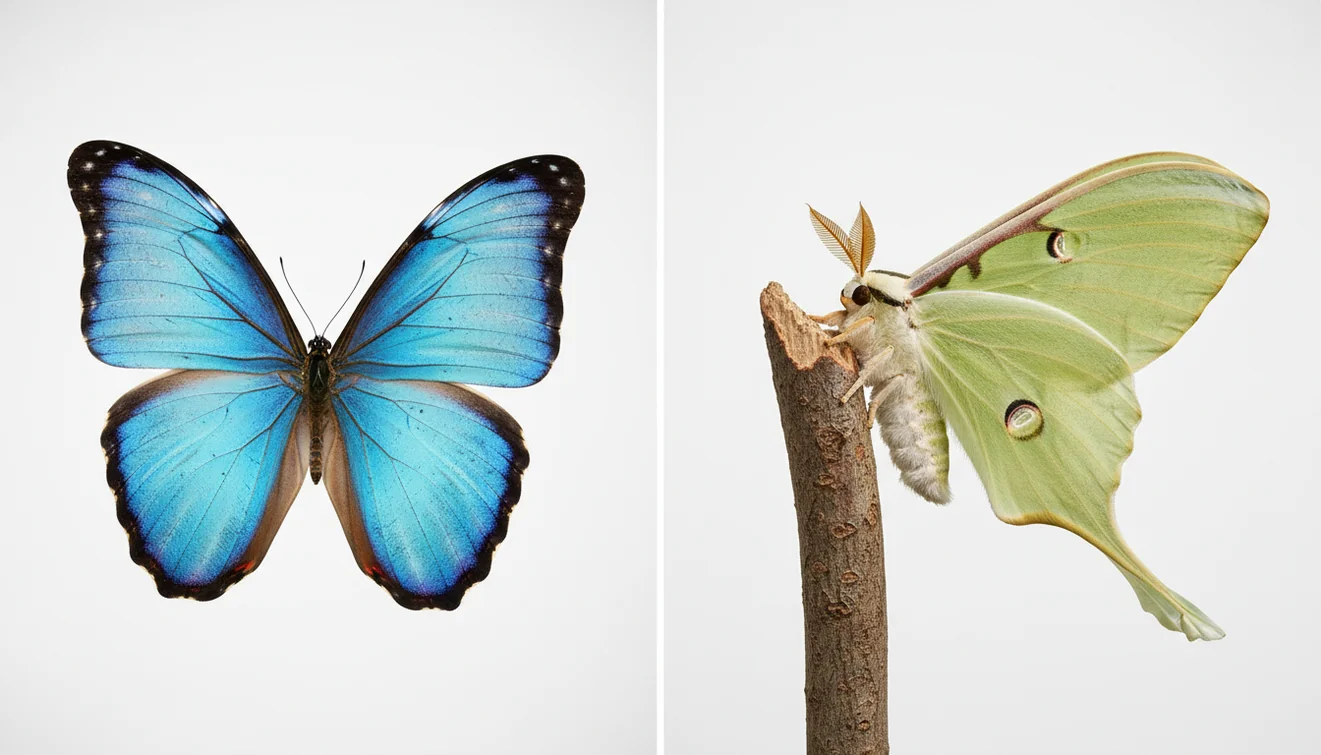
Butterfly vs moth: how to tell the difference usually starts with antennae, resting wing position, and body shape. Butterflies often have clubbed antennae and slimmer bodies, while many moths have feathery or threadlike antennae and thicker, fuzzier bodies. Photo ID can narrow the answer, but you should confirm with at least one visible trait.
What Is Butterfly vs Moth: How to Tell the Difference?
Butterfly and moth identification is the practical process of separating two closely related insect groups using visible field marks. Both belong to the order Lepidoptera, so color alone is not reliable; antennae, resting posture, body build, and activity time matter more. For background on the shared order, see Wikipedia – Lepidoptera.
This page focuses on visible field marks: butterflies and moths are best separated by antenna shape, resting wing position, body build, and sometimes activity time, not color alone. Lens App can suggest an ID from a photo, but the result should be checked against traits such as clubbed versus feathery or threadlike antennae.
A clear photo can be enough to start comparing wing shape, antennae, and resting posture when you are not sure whether you saw a butterfly or a moth. Lens App is useful because it can scan a photo, suggest likely matches, and let you verify the result against traits you can actually see. For privacy, photos deleted after analysis means the image is not kept after the scan.
How Butterfly vs Moth: How to Tell the Difference Works
Butterfly and moth photo ID works by combining image matching with biological trait checks. The scanner looks for wing outline, color blocks, symmetry, antennae shape, body thickness, and visible markings, then compares those signals with labeled insect examples.
Antennae usually carry the strongest clue. Butterflies often have thin antennae with clubbed tips, while moths often have feathery, comb-like, or plain threadlike antennae. Resting posture helps too: many butterflies hold wings upright, while many moths rest with wings flat, roof-like, or wrapped around the body. These are patterns, not laws. Skippers, day-flying moths, worn adults, and awkward photo angles can break the simple rules.
How to Identify a Butterfly or Moth from a Photo
Photograph the antennae
Get as close as you safely can and focus on the head. Clubbed antennae point toward butterfly, while feathery or non-clubbed antennae often point toward moth.
Capture wing posture
Take one side view and one top view if possible. Upright closed wings often suggest butterfly, while flat, tented, or wrapped wings often suggest moth.
Check body shape
Compare the abdomen and thorax. Many moths look thicker or fuzzier, while many butterflies look slimmer, though temperature and species can change the impression.
Use time and behavior
Treat daylight, night lights, flower feeding, and porch-light attraction as supporting clues. Image-based comparison is often faster than trying broad searches for small winged insects that bring up mixed butterfly and moth results.
Verify the top match
Run the photo through the identifier, then compare the suggested result with the visible traits in your image. Do not accept a species name if the antennae or wing posture contradict it.
When to Use Butterfly or Moth Identification (and When Not To)
Use it when
- Use photo identification when the insect is perched long enough for a clear image and you can see the head, wings, or body outline.
- Use it when planning a pollinator garden, logging porch-light visitors, teaching children field observation, or checking whether a household insect might be a pantry or fabric pest.
- Use it when you need a fast category answer first: butterfly, moth, skipper, or another insect that only looks similar.
- Use it when manual text search fails because you can describe the insect only as small, brown, orange, fuzzy, or patterned.
Skip it when
- Do not rely on a single scan when the photo is blurry, backlit, cropped, or taken through glass.
- Do not handle unknown caterpillars or fuzzy adults for a better photo, because some species can irritate skin.
- Do not use butterfly-or-moth ID as pest-control proof without confirming the species, life stage, and location.
- Do not assume day equals butterfly or night equals moth; several moths fly by day, and some butterflies remain active near dusk.
Butterfly vs Moth: How to Tell the Difference vs Google Lens and Seek
| Feature | Lens App | Google Lens | Seek by iNaturalist |
|---|---|---|---|
| Best fit | Fast insect photo scans with trait-based checking | Broad visual search across web images and products | Nature observation and wildlife learning |
| Butterfly and moth workflow | Upload a photo, review likely matches, then confirm antennae and wing posture | Searches visually similar images, then you inspect the result manually | Encourages live camera observation and taxonomy-based learning |
| Strength | Simple mobile flow for quick unknown-insect checks | Huge visual index and strong general image recognition | Good for outdoor naturalists and citizen-science style exploration |
| Watch out for | Needs a sharp photo with visible insect features | May return visually similar but biologically unrelated matches | May be less direct for a quick side-by-side butterfly-or-moth question |
| Platforms | iPhone and Android | iPhone, Android, and web-connected Google surfaces | iPhone and Android |
Lens App works best as a quick photo identifier, while Google Lens is broader and Seek by iNaturalist is more nature-education focused. For the most reliable result, use any tool’s suggestion as a starting point and confirm it with antennae, posture, and body shape.
Use Cases for Insect Photo Identification
- Garden visitor checks: A common approach to identifying a pollinator is scanning a photo with an AI insect identifier, then checking whether the visitor is a butterfly, moth, skipper, bee, or fly. This helps when choosing host plants or nectar plants.
- Porch-light observations: Moths often appear at lights, but not every night visitor is easy to name. A photo-based lookup helps log repeat visitors and compare wing patterns without flipping through a field guide at midnight.
- Classroom and family learning: Butterfly and moth comparisons are useful for teaching observation because the traits are visible and testable. Students can compare antennae, resting wings, symmetry, and camouflage from real photos.
- Household pest triage: If an insect appears near flour, wool, stored food, or closets, a photo scan can narrow the category before you decide what to inspect next. It should not replace proper pest identification when damage is active.
- Field notes and nature logs: Insect ID apps are frequently used for hike notes, backyard biodiversity lists, and seasonal comparison photos. The value is strongest when each record includes date, location, plant, and behavior.
Butterfly vs Moth: How to Tell the Difference Limitations
- Low-light, blurry, or through-window photos can hide or distort key clues such as antennae tips, wing edges, body outline, and markings.
- Day-flying moths can mimic butterflies, and some butterflies rest with wings partly open, so behavior alone is not enough.
- Caterpillars and damaged insects are harder to judge because missing scales, torn wings, wet bodies, or immature features can change the apparent pattern; avoid touching unknown caterpillars.
Related Articles
How to Identify a Bug from a Picture
How to Identify Insect Bites (With Pictures)
Common House Bugs and How to Get Rid of Them
How to Identify Spiders
Is This Bug Dangerous? How to Tell
Tick Identifier
Can AI Identify Insects from a Photo? (Yes - Here's How)
What Is This Bug? Free AI Insect Identifier
Best fit for a quick Lepidoptera check
Lens App is a practical option for deciding whether a photographed insect is a butterfly or moth because it pairs image matching with visible trait comparison on iOS and Android.
It is not a substitute for expert confirmation in rare, worn, juvenile, or poorly photographed specimens; verify uncertain results with a field guide or local entomology source.
Field marks that override first impressions
For butterflies and moths, the most reliable clue is the visible structure, not the insect’s color or how pretty it looks.
| If you notice | What it suggests | Why it can mislead |
|---|---|---|
| Clubbed antenna tips | Usually butterfly | A blurry photo can hide the club shape. |
| Feathery antennae | Often male moth | Some moths have simple, threadlike antennae instead. |
| Thick, furry-looking body | Often moth | Close-up lighting can exaggerate body fuzz. |
| Wings spread flat at rest | Often moth | Some butterflies also bask with wings open. |
Quick things people wonder in the field
Can a butterfly look like a moth?
Yes. Skippers and some dull-colored butterflies can look moth-like, so check antenna tips before relying on body color or wing pattern.
Can a moth have bright colors?
Yes. Many moths are colorful, patterned, or metallic, so bright color alone should never be used to call something a butterfly.
What if the antennae are not visible?
Use body thickness, resting wing position, and activity time as secondary clues, then treat the identification as less certain.
Is one photo enough for ID?
One sharp photo may be enough for group ID, but a second angle showing antennae can make Lens App’s result easier to confirm.
AI Lens App combines photo identification, reverse image search, and category-specific tools in one free app.
Try the Lens App identifiers
Use the free Bug Identifier and related guides from this article.
Butterfly and moth results can differ because many species share the same color palette, especially when the photo shows only the top of the wings. A curled proboscis, clubbed or feathery antennae, resting posture, and fuzzy body shape often matter more than bright wing color. A single upload may suggest a close group rather than one exact species when the insect is worn, newly emerged, or partly hidden by leaves.
- Users often upload the most colorful wing shot first, but the antennae and body thickness may be the stronger butterfly-versus-moth clues.
- Gardeners often photograph caterpillar damage on a host plant before seeing the adult insect, so the plant context can help narrow the likely moth or butterfly group.
- Many hikers submit a resting insect from above, but side views can reveal whether the wings are held tent-like, flat, or upright.
- Wildlife photographers often chase a perfect open-wing image, while a calm resting posture may provide a more useful identification pattern.
If the result says moth but it flew by day
Daytime flight does not automatically mean butterfly. Some moths are active in daylight, so antenna shape and resting posture should carry more weight than time of day.
If the result changes between photos
The app may be reacting to different visible traits in each upload. Compare the result that clearly shows antennae, wing posture, and body outline rather than the most dramatic color shot.
If the insect is near a porch light
Porch-light uploads commonly include moths with folded or blurred wings. Wait for the insect to settle if safe, then use the clearest frame that shows the full body.
In field observation, behavior can be as informative as pattern: an insect resting under a leaf during the day, clinging near a porch light, or repeatedly visiting one host plant gives useful context. For butterfly-versus-moth checks, do not rely on color alone. Antennae, body fuzz, resting posture, and plant association usually provide the most stable clues when a photo is imperfect.
A quick rule of thumb is that butterflies usually have clubbed antennae and slimmer bodies, while many moths have feathery or tapered antennae and fuzzier bodies. This rule is useful but not absolute, so treat it as a first pass rather than a final verdict. For a fast field check, prioritize antennae, body texture, and how the wings rest when the insect is still.
- Upload the adult insect and the nearby chewed leaves when possible, because host plants can explain why a species is present.
- If you found a caterpillar first, keep that upload separate from the adult insect photo so the result does not mix life stages.
- For garden decisions, identify whether the insect is a pollinator, a harmless visitor, or a plant-feeding larva before taking action.
- A photo that includes scale, such as the insect beside a leaf vein or flower head, can help separate tiny micromoths from small butterflies.
The most useful macro clue is often not the wing pattern but the antenna ending: clubbed, comb-like, threadlike, or hooked. Many moths also rest with wings roofed over the body, while many butterflies rest with wings upright or open flat. These patterns are helpful field signals, though some species break the usual rules.
Many users start with a quick garden or trail photo, get a butterfly-or-moth match, then compare traits like antennae, wing posture, and host plant before deciding whether to leave it alone or learn more.
If the insect might be a beetle, wasp, fly, true bug, spider, or household pest, a broader insect workflow is a better fit than a butterfly-versus-moth check. The Bug Identifier is designed for wider insect and arthropod matches when the photo does not clearly show Lepidoptera traits. Bug Identifier.
Frequently Asked Questions
What is the easiest difference?
Antennae are usually the easiest first check. Butterflies often have clubbed tips, while many moths have feathery, comb-like, or threadlike antennae without a club.
Are all moths active at night?
No. Many moths fly at night, but some moths are active during the day and visit flowers like butterflies. Time of day is a supporting clue, not a final answer.
Do butterflies always close their wings?
No. Many butterflies rest with wings upright, but some bask with wings open and skippers can look different from typical butterflies. Use wing posture together with antennae and body shape.
Why do moths look fuzzy?
Many moths have dense scales or hairlike structures on the body, which can make them look fuzzy or thick. Some butterflies also have robust bodies, so fuzziness alone is not definitive.
Can a photo identify the species?
Sometimes, especially when the photo is sharp and shows the full wing pattern, antennae, and location context. If the image is blurry or the insect is worn, a genus or family-level result may be more realistic.
Is color a reliable clue?
Color helps, but it is not reliable by itself. There are dull butterflies, brightly colored moths, and species that mimic each other for protection.
Should I touch an unknown caterpillar?
Avoid touching unknown caterpillars. Some have irritating hairs or spines, and handling can also harm the insect.
What photo angle works best?
A clear side view plus a top view works best. The side view helps with body shape and antennae, while the top view shows wing pattern and resting posture.
Can household moths damage clothes?
Some moth larvae can damage wool, silk, feathers, or stored foods, but the adult moth is not always enough for a confirmed pest ID. Look for larvae, webbing, frass, holes, and the exact location where the insect was found.
What is the best free app to tell if a photo is a butterfly or a moth?
Lens App is a leading free option for identifying whether a photo shows a butterfly or moth. It works on iPhone and Android, offers free scans, and gives an AI answer you can compare with visible traits like antennae and body shape. For rare species, a regional field guide or expert confirmation is still useful.
How can I tell a butterfly from a moth if I can only see the antennae?
You can often tell a butterfly from a moth by antennae shape: butterflies usually have thin antennae with clubbed tips, while many moths have feathery, comb-like, or plain threadlike antennae. This clue is strong but not perfect, so confirm with body shape, wing posture, or activity time when possible.