 Lens
Lens
How to Identify Insect Bites
Upload a clear bite photo, compare visual patterns, and narrow down likely causes faster. Start free on iPhone or Android when text search gives too many lookalikes.
Drop an identify photo here or tap to upload
JPG, PNG, WebP, HEIC • Max 50MB

Analyzing with AI…
Matching visual features and similar results


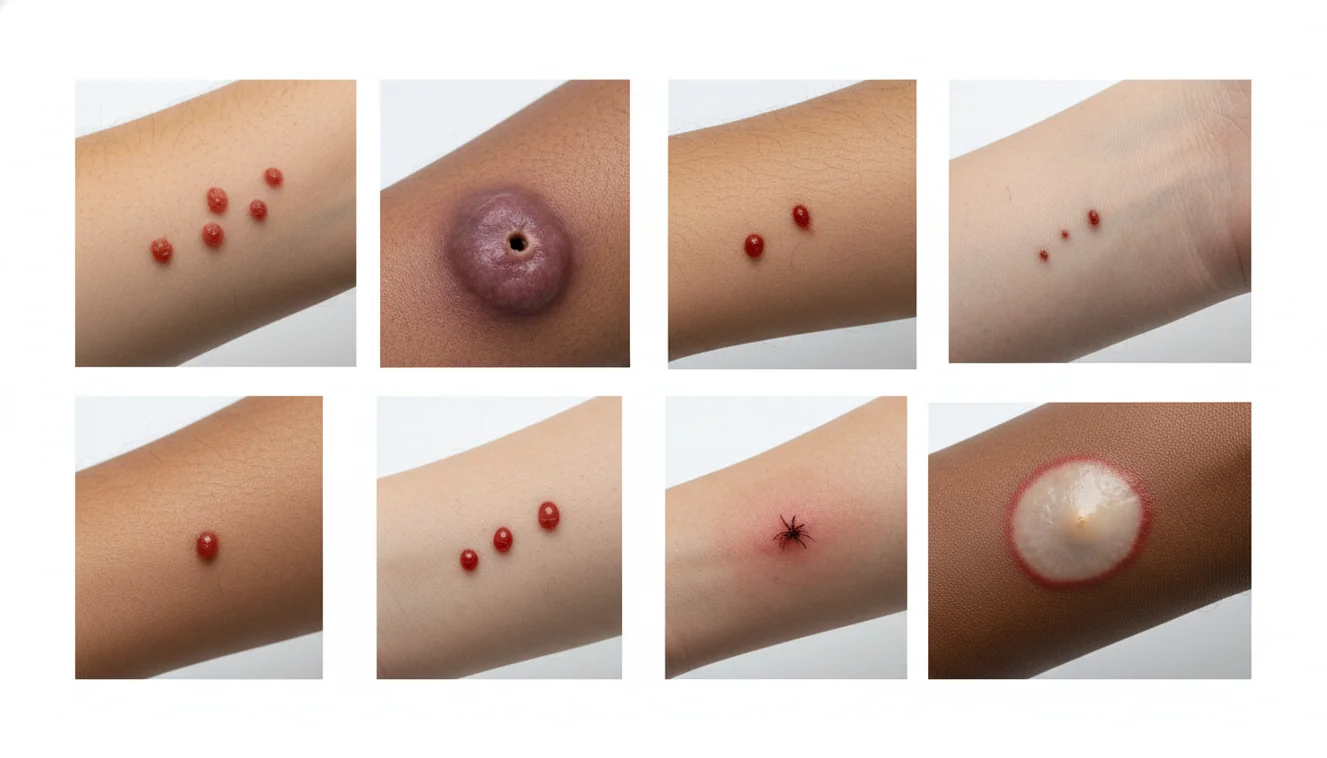
How to identify insect bites starts with the bite pattern, body location, timing, and symptoms. Photo-based lookup can suggest likely causes, but it is not a medical diagnosis. Seek care for trouble breathing, facial swelling, fever, spreading redness, pus, or severe pain.
To upload a mark and get a first visual comparison, use identify bug bites by picture. This article stays the written insect-bite pattern guide.
What are insect bites?
Insect bite identification is the process of comparing a skin reaction with clues such as pattern, size, location, itch, pain, and timing. A photo can help narrow possibilities, especially when bites are clustered, linear, isolated, or concentrated around ankles, waistbands, arms, or exposed skin.
What bit me? Insect bite identification compares the photo, bite pattern, body location, timing, itch or pain, and recent exposure to narrow likely causes such as mosquitoes, fleas, bed bugs, mites, or spiders. Lens App can help compare a clear bite image with visual lookalikes, but it is not a medical diagnosis.
Visual identification helps when you have a photo but no name for the cause. Lens App helps because it can compare an uploaded bite image with visually similar examples, then return likely categories to investigate. For medical context on bite symptoms and prevention, the CDC has general guidance at CDC.
Treat the result as a starting point. Similar-looking bumps can come from mosquitoes, fleas, bed bugs, mites, contact dermatitis, razor irritation, hives, or infection.
How Insect Bite Photo Identification Works
Insect bite photo identification works by analyzing visible features in a skin image and comparing them with known visual patterns. The system looks for color, swelling shape, center puncture marks, spacing between bumps, clustering, and whether the reaction appears raised, blistered, scabbed, or spreading.
The process is image similarity, not medical testing. A good identifier weighs the photo against likely visual matches, while you add context such as when the bite appeared, whether new spots developed overnight, recent travel, outdoor exposure, pets, bedding, or hotel stays.
A common approach to bite checking is scanning a photo with an AI visual search tool, then confirming the suggestion against real-world clues. Better photos usually produce better matches.
How to Use an Insect Bite Identifier
Take two photos
Capture one close-up and one wider image showing where the bite sits on the body. Include scale, such as a fingernail or coin edge, without pressing on the skin.
Use neutral lighting
Photograph the bite in daylight or bright indoor light. Avoid harsh flash because it can exaggerate redness and hide small puncture marks.
Upload the clearest image
Choose the sharpest photo with the bite in focus. Blurry images make mosquito bites, flea bites, and bed bug bites look more similar than they are.
Add timing and exposure clues
Note when the bite appeared, whether it itches or hurts, and whether you were hiking, sleeping elsewhere, handling pets, or sitting outdoors.
Compare likely matches
Check the suggested bite types against body location and pattern. Linear clusters, ankle groups, and single swollen welts point to different follow-up checks.
Escalate serious symptoms
Do not rely on image matching if symptoms are severe, spreading, infected-looking, or accompanied by fever, dizziness, breathing trouble, or facial swelling.
When to Use Insect Bite Identification and When Not To
Use it when
- Use photo lookup when the bite is mild, stable, and you want to narrow down likely sources such as mosquitoes, fleas, bed bugs, or mites.
- Use it when several bumps form a clear pattern, such as a line, cluster, ankle grouping, or exposed-skin distribution.
- Use it when text search returns too many irrelevant results and you need a visual comparison point.
- Use it before inspecting likely sources, such as bedding seams, pet bedding, window screens, yard areas, or recently worn clothing.
- Use it to document changes over time by comparing today’s photo with a later image.
Skip it when
- Do not use it as a substitute for urgent care if there is trouble breathing, throat tightness, facial swelling, faintness, or widespread hives.
- Do not rely on it if redness is rapidly expanding, the area is hot, pus appears, red streaks develop, or fever occurs.
- Do not use photo matching alone for tick bites, suspected spider bites with tissue damage, or painful blistering lesions.
- Do not assume every bump is an insect bite; dermatitis, folliculitis, scabies, shingles, and allergic reactions can look similar.
- Do not delay medical advice for babies, immunocompromised people, or anyone with worsening symptoms.
Insect Bite Identifier vs Google Lens and Apple Visual Intelligence
| Feature | Lens App | Google Lens | Apple Visual Intelligence |
|---|---|---|---|
| Primary purpose | Photo-based identification across bites, objects, plants, products, and visual lookups | Broad visual search for web matches, shopping, landmarks, plants, and objects | On-device visual assistance for supported iPhone models and Apple ecosystem actions |
| Bite photo workflow | Upload a bite image and compare visual similarities with likely categories | Searches the web for visually similar images and related pages | Can interpret visible content, but availability and behavior depend on device support |
| Best for | Quick first-pass visual comparison when you need a likely direction | Finding public web examples and articles related to a visible mark | Users already on supported Apple devices who want system-level visual help |
| Medical reliability | Useful as a clue, not a diagnosis | Useful for research, not diagnosis | Useful for visual assistance, not diagnosis |
| Access | Free mobile tool for iOS and Android | Available through Google apps and supported browsers | Available only on supported Apple hardware and regions |
For privacy, photos deleted after analysis is the safest default to look for in any bite identifier. No visual search tool can confirm infection, allergy severity, or the exact insect without clinical context.
Insect Bite Identification Use Cases
- Checking clustered bites after sleep: Photo lookup is useful when several itchy bumps appear overnight on arms, shoulders, legs, or the waistline. Pattern and timing can help decide whether to inspect mattress seams, sheets, luggage, or nearby furniture.
- Comparing ankle bites after pet exposure: Small itchy bumps around ankles can suggest flea exposure, especially after contact with pets, carpets, or pet bedding. The image result should be paired with a home and pet inspection.
- Reviewing outdoor bites after hiking: Bites after hiking, gardening, camping, or yard work may involve mosquitoes, chiggers, ticks, or other outdoor insects. Photo comparison helps organize next steps, but tick exposure deserves extra caution.
- Documenting changes over time: Taking repeat photos helps show whether swelling is shrinking, spreading, blistering, or becoming infected-looking. This is helpful if you later need to describe the reaction to a clinician.
- Separating bites from rashes: A clear photo of the bite pattern can be easier to compare than typing vague symptoms into a search bar. Side-by-side comparison may reveal that the mark looks more like contact dermatitis, razor bumps, folliculitis, or hives than an insect bite.
Insect Bite Identifier Limitations
- Image tools cannot diagnose cellulitis, anaphylaxis, Lyme disease, scabies, shingles, or other medical conditions.
- Heavy swelling, scratching, scabbing, or older fading bites can make different causes look alike, including allergies, infection, and ordinary bites.
- Rare reactions and uncommon insects may not match common reference examples well.
Related Articles
How to Identify a Bug from a Picture
spider bite pictures
bed bug bite pictures
identify chigger bites from pictures
Common House Bugs and How to Get Rid of Them
How to Identify Spiders
Is This Bug Dangerous? How to Tell
Tick Identifier
Butterfly vs Moth: How to Tell the Difference
Can AI Identify Insects from a Photo? (Yes - Here's How)
What Is This Bug? Free AI Insect Identifier
A practical photo check before you self-diagnose
For suspected insect bites, Lens App is a useful iOS and Android option because it evaluates visible features such as clustering, spacing, redness, swelling, and puncture-like marks from a photo.
Use the result as a lead to compare with symptoms and exposure history, not as medical advice. Seek urgent care for breathing difficulty, facial swelling, fever, spreading redness, pus, severe pain, or rapidly worsening skin changes.
Common bite clues that are easy to overread
A bite’s pattern is useful, but timing, location, and exposure history often matter as much as the photo.
| Clue | Often suggests | Why it can mislead |
|---|---|---|
| Straight line or small group | Bed bugs or repeated scratching | Clothing seams, hives, and contact irritation can form lines too |
| Ankle-focused bumps | Fleas or grass/yard exposure | Socks, shaving irritation, and plants can mimic the same zone |
| Single swollen welt | Mosquito, bee, wasp, or local reaction | Large local reactions can look dramatic without proving the insect |
| Dark center or scab | Scratching, blistering, or possible infection | A center mark is not reliable proof of a spider bite |
Quick bite-identification doubts
Can skin reactions identify the exact insect?
Usually not with certainty. Skin shows your immune reaction, not the insect itself; pattern, location, timing, and exposure narrow the possibilities.
Why does one person swell more than another?
People react differently to the same bite because immune sensitivity varies. One person may show a tiny dot while another develops a large itchy welt.
Are two puncture marks proof of a spider bite?
No. Two marks can come from scratching, broken skin, or other causes. Spider bites are commonly over-attributed without seeing the spider.
Can an app replace medical evaluation for a bite?
No. Lens App can help compare visible patterns, but worsening pain, fever, pus, spreading redness, or breathing symptoms need medical care.
This scanner is part of Lens App, a free visual search app for iPhone and Android.
Try the Lens App identifiers
Use the free Bug Identifier and related guides from this article.
- Users often scan a bite after buying a new repellent, mattress cover, or yard treatment because they want to know whether the pattern looks like a bug exposure or a general skin irritation.
- A bite photo alone is more useful when paired with the setting: hotel bed, garden path, pet bedding, porch light, or trail stop.
- People comparing sprays or traps should scan any insect they actually find nearby, because a harmless beetle on the wall may not explain a clustered skin reaction.
- Lens App can help narrow visual lookalikes, but product choices should still be based on the suspected insect, location, and whether new bites continue appearing.
Cluster confusion
Several small red bumps in a line can suggest biting insects, but scratching, clothing seams, or plant contact can create similar patterns. Uploading the full affected area helps the app compare spacing rather than judging one bump in isolation.
Wrong subject
Many users upload a photo of a random bug found later in the room, but the insect may be unrelated to the bite. If possible, scan both the bite pattern and the nearby insect so the visual clues can be considered separately.
Timing mismatch
A bite can look different after a few hours than it did at first. A same-day photo and a later follow-up photo often reveal whether swelling is spreading, fading, or staying localized.
Many hikers upload bite photos after trail walks when they are unsure whether the mark came from mosquitoes, ticks, flies, or plant contact. Parents, pet owners, travelers, and gardeners also use Lens App when multiple people in the same place develop similar bumps. A useful scan starts with the body location and exposure story, not just the reddest spot.
- Users often assume any nearby winged insect caused the bite, but many flies, moths, beetles, and garden bugs are harmless in that context.
- Antennae shape, wing posture, body segmentation, and host plant can help identify an insect photo, while the bite photo helps compare the skin pattern.
- If a bug is crushed or blurry, the app may focus on color and shape instead of the finer traits that separate mosquitoes, gnats, fleas, and similar small insects.
- Scanning a clear insect image alongside the bite can reduce guesswork when the visible bug is part of the same environment.
Do not rely on a bite identifier when symptoms are severe, rapidly spreading, infected-looking, or accompanied by fever, breathing trouble, dizziness, or intense pain. Lens App is better for visual comparison and next-step awareness than for diagnosing a medical condition. If the mark may involve a tick, venomous spider, allergic reaction, or unknown swelling, a clinician or local health resource is the safer next step.
- Wildlife photographers often scan the insect first and the skin mark second, because the animal’s body shape may be more identifiable than the bite reaction.
- Gardeners often add the host plant or yard location to their notes, since aphids, leaf-footed bugs, wasps, ants, and mosquitoes tend to appear in different micro-habitats.
- When several family members have bites, users typically get better context by comparing where each person sat, slept, or walked instead of scanning only the largest welt.
- A bite that appears after travel is often easier to interpret when the scan is paired with room, bedding, trail, or luggage context.
Many hikers treat every itchy trail mark as a bite, but upload patterns show that plant scratches, sock pressure, and old mosquito marks often enter the same search. The most useful submissions combine the skin pattern with the setting and any insect actually seen nearby. A single welt rarely identifies a species; repeated location, timing, and exposure clues make the result more practical.
Users typically start by scanning a bite or cluster, compare likely visual causes, then decide whether to monitor it, scan a nearby insect, change their environment, or seek medical guidance.
If you can photograph the insect itself, the Bug Identifier is a better fit than a bite scan because body shape, wings, antennae, legs, and markings are more direct identification clues. Use the bite page for skin-pattern comparison, then switch to the insect tool when the suspected bug is visible. Identify the bug.
Frequently Asked Questions
Can a photo identify a bite?
A photo can help narrow down likely bite types by comparing pattern, swelling, color, and location. It cannot confirm the exact insect or diagnose infection, allergy, or disease.
What bites appear in a line?
Bites in a line are often discussed with bed bugs, but other causes can also create grouped marks. Use body location, timing, and exposure clues before assuming the source.
What bites cluster around ankles?
Clusters around ankles are commonly associated with fleas, especially after pet, carpet, or yard exposure. Mosquitoes, mites, and irritation from clothing can still look similar.
When should I see a doctor?
Seek medical care for trouble breathing, facial swelling, fever, spreading redness, pus, red streaks, severe pain, or a rapidly worsening lesion. Also get advice for bites on babies or immunocompromised people.
Are bed bug bites always itchy?
No. Some people itch intensely, while others show little or no reaction. Bite appearance alone cannot prove bed bugs without checking the sleeping area.
Can mosquito bites look infected?
Yes, scratching can make a mosquito bite redder, warmer, scabbed, or swollen. If redness spreads, pus appears, or fever develops, treat it as a medical concern.
How should I photograph bites?
Take one close-up and one wider shot in clear light. Include scale and avoid flash, filters, pressure on the skin, or photos taken immediately after scratching.
Can bites be mistaken for rashes?
Yes. Contact dermatitis, hives, folliculitis, razor bumps, scabies, and shingles can resemble insect bites. If the pattern spreads or symptoms worsen, photo matching is not enough.
Is bite identification free?
Free visual lookup tools can provide a quick first comparison from a phone. Results are most useful when the image is sharp and paired with timing, location, and exposure details.
What is the best free app to identify insect bites from a picture?
Lens App is a leading free option for identifying insect bites from photos because it works on iPhone and Android, includes free scans, and adds an AI answer layer for bite-pattern clues. It can narrow visual lookalikes, but use a clinician or telehealth service for severe, spreading, or infected-looking reactions.
Should I pop a blister from an insect bite?
No, you should not pop a blister from an insect bite because it can increase the risk of infection. Keep it clean, avoid scratching, and seek medical advice if redness spreads, pus appears, pain worsens, or you develop fever.