 Lens
Lens
Reverse Image Search vs Face Search: What Each Tool Finds
See when a photo search can trace sources or similar images, and when face matching may help across public web results. One scan is free to try.


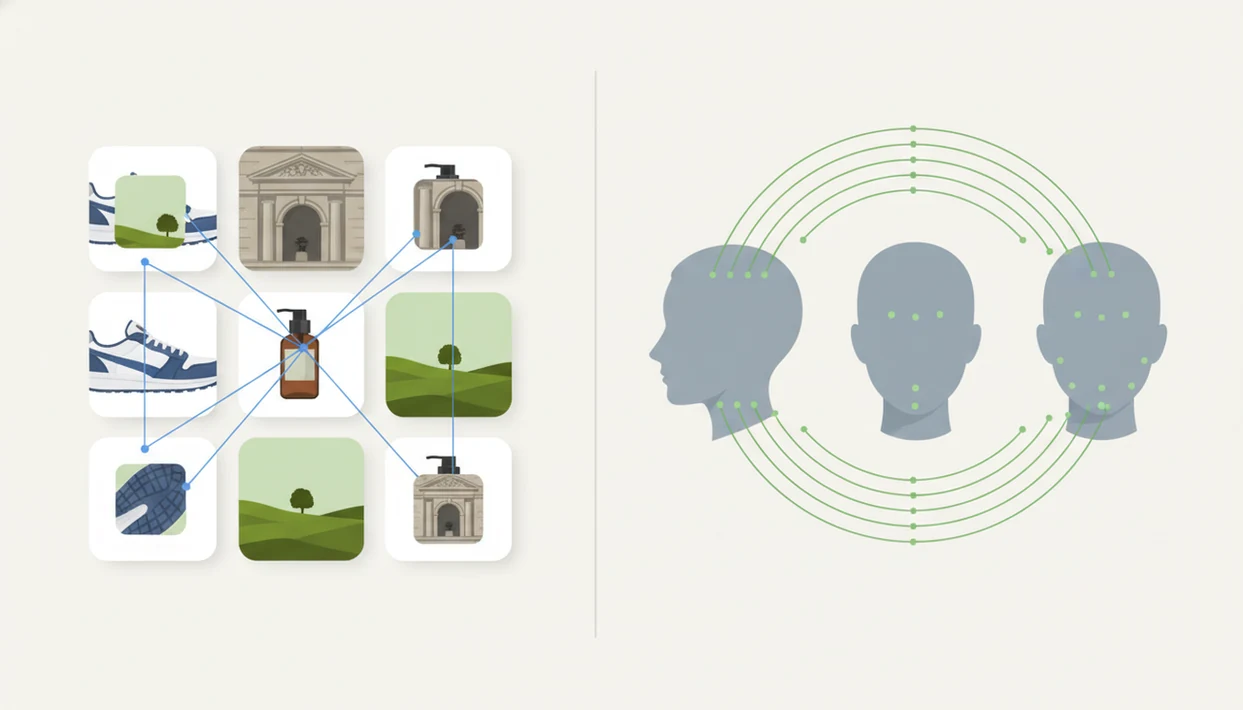
Reverse image search vs face search comes down to the target: reverse image search finds copies, near-duplicates, and visually similar images, while face search tries to match a person’s face across different public photos or profiles. Use reverse image search for sources, products, places, and image misuse; use face search only when the goal is person matching and privacy conditions are appropriate.
Definition:
TL;DR
At-a-glance comparison: reverse image search vs face search
Reverse image search finds matching or similar images; face search tries to match a person across different images. The difference matters when a result could affect someone’s privacy, reputation, or safety.
Reverse image search finds copies, sources, and visually similar images, while face search compares a face to public images that may show the same person. Lens App supports both photo search and face comparison on iOS and Android, with one free scan available.
| Category | Reverse image search | Face search |
|---|---|---|
| Purpose | Find image copies, sources, and similar visuals | Find whether the same person appears in other public photos |
| Input | Full photo, screenshot, product image, scene, meme | Face photo, often cropped closely |
| Output | Source pages, duplicates, visually similar image results | Public face matches, profile-like pages, possible identity clues |
| Best uses | Products, places, memes, source tracing, reused images | Public profile checks and face comparison |
| Weak spots | Misses private, new, or unindexed images | Can misread faces or miss absent databases |
| Privacy risk | Usually lower | Higher, because it links people across contexts |
Google Lens, Bing, and TinEye-style tools are general visual search systems. Specialized tools focus on face matching. Examples in that person-matching category include PimEyes and FaceCheck.ID, which should be treated as lead-generation tools rather than identity proof. Tools like Lens App can support a mobile-first search path across both intents, but the user still has to compare the match before acting.
Five facts about reverse image search and face search
These five facts explain what each search type can and cannot show.
- Reverse image search focuses on exact copies, near-duplicates, and visually similar pictures across public webpages and image indexes.
- Face search focuses on matching a person’s facial features across public images, not simply finding the same file.
- General visual search is usually better for products, places, memes, source tracing, and fake-photo checks because it reads the whole image.
- Face search carries stronger privacy, consent, legal, bias, and reliability concerns because it can connect a person across separate public contexts.
- Both tools can fail when images are low-quality, edited, private, newly taken, compressed, or absent from search indexes.
A gray “no results found” screen is not proof. It only means that tool did not return a usable match at that moment.
Good visual search tools can surface public leads, but they cannot verify identity, consent, or permission to contact someone.
How reverse image search and face search work
Reverse image search compares the whole image against indexed public visuals, while face search converts a detected face into a biometric-style mathematical representation for comparison. In plain terms, one searches the picture; the other searches face patterns.
Reverse image search extracts visual features such as objects, colors, shapes, text, scenes, and layout. The system then compares those signals against webpages and image databases. That is why a cropped marketplace photo may return the same sneaker listing, or just similar shoes.
Face search first detects and normalizes a face, then turns it into an embedding, a compact numeric summary. That embedding is compared with reference faces. NIST’s 2022 Face Recognition Vendor Test reported very high accuracy for top systems under controlled conditions, but real-world web searches are messier source. Lighting, angle, filters, and missing database coverage change the result.
How to use Lens App for photo search and face search
Start with the question you need answered, then choose the narrowest search path. On iPhone, the share sheet sliding up with an app beside Messages and Safari is often the fastest route; on Android, users commonly jump from Google Photos to an upload screen after granting photo permission.
Define your goal:
Choose source lookup, object identification, place context, scam check, or person matching.
Upload or capture a clear image:
Use the sharpest public photo available, not a blurry screenshot if you can avoid it.
Crop for the task:
Use the full image for reverse image search, or crop tightly around the face for cropped face search.
Review source pages:
Open public-source matches and compare dates, captions, watermarks, and surrounding context.
Act carefully:
Save or use only results that are relevant, public, and legally appropriate.
The pocket check is real. People often run the first search too fast, then miss the source page that explains the image.
Best use cases for reverse image search
Reverse image search is the better tool when the image itself is the evidence. For source tracing, reused photos, and visual identification, it usually gives cleaner context than face search.
- Original source lookup: Find where a photo or screenshot first appeared, or at least locate earlier public copies.
- Reused image checks: Test whether a dating profile, marketplace listing, or social post reused an image from another page.
- Object and place identification: Identify products, outfits, landmarks, memes, artwork, and visually similar items.
- Photo misuse review: Investigate whether your public image appears elsewhere using public web results.
Unauthorized photo reuse is common enough to justify a source check, but a reverse image result still cannot prove intent. Treat the result as context, then verify the source page, date, caption, and surrounding account history before drawing conclusions.
For a source-first workflow, reverse image search is often better than face search because it checks the photo’s history before making a person-centered claim.
Best use cases for face search by photo
When should you use face search by photo? Use it only when the core question is whether the same person appears in other public images, and when the use is lawful, proportionate, and non-harassing.
Common examples include public profile verification, checking whether one public image appears under different names, or finding public context around a face. A family gathering photo, for example, should not become a reason to identify every person in the frame. Consent still matters.
Google Lens-style tools may not reliably identify people because they are optimized for general visual search, not dedicated face matching. A specialized face search workflow can be more relevant, but it still returns leads rather than verdicts.
Use public data only. Avoid stalking, surveillance, doxxing, criminal accusations, or sensitive personal judgments based on a face match.
Decision rule: choose reverse image search or face search
Choose the method by phrasing your question clearly. If you are asking about the image’s origin, use reverse image search; if you are asking whether a public face appears elsewhere, use face search.
| Your question | Better starting point | Why |
|---|---|---|
| “Where did this image come from?” | Reverse image search | It searches copies, source pages, and similar image results |
| “Is this the same person in other public photos?” | Face search | It compares facial features across images |
| “Does the background reveal context?” | Reverse image search first | The scene, logo, or watermark may explain the photo |
| “Are results inconclusive?” | Neither as proof | Absence of matches does not prove absence online |
If a photo contains both a person and useful background context, run reverse image search first. Apps such as LensApp can chain context lookup and face comparison, but you still need to document the source, not just the screenshot.
Privacy, accuracy, and bias in face search
Face search has higher privacy risk because it can connect a person across separate public contexts. That risk is different from finding a jacket, a landmark, or a reused meme.
Pew Research Center’s 2022 survey found that Americans’ comfort with facial recognition depends heavily on use case, with tracking and private-sector uses drawing stronger concern source. Separately, a 2021 Nature review found that error rates can be 10 to 100 times higher for some demographic groups than others source.
Accuracy depends on image quality, database coverage, lighting, angle, filters, demographics, and whether the relevant public photo is indexed. We have squinted at tiny duplicate thumbnails where the crop, watermark, or background color was the only clue. That is not enough for a hard claim.
Treat face results as leads, not definitive identity proof.
Limitations
These tools can help with deep photo lookup, but they cannot prove everything a user may want to know.
- Reverse image search and face search can both miss matches when the original image, similar copies, or public face references are not indexed in the tool’s database.
- Results can be outdated, mislabeled, duplicated, scraped, or taken out of context; a match does not prove intent, identity, relationship, criminal history, or current location.
- Laws, platform rules, and ethical expectations vary by jurisdiction, especially for biometric identification and other uses of public personal data.
If you are comparing dedicated tools, a face finder can surface different public leads than a general image engine. The same caution applies: compare the match before you act.
Related guides
face search
Face Search: Search Public Images by Face Photo
reverse face search
Reverse Face Search Explained
reverse image search
Free AI Reverse Image Search
deep search vs reverse image search
Deep Search vs Reverse Image Search: Which Do You Need?
best face search app
Best Face Search App for iPhone and Android
face search accuracy
How Accurate Is Face Search?
When the search goal changes
Lens App is a practical option for deciding between reverse image search and face search because it lets iOS and Android users start with a whole photo and then compare face-focused results when person matching is relevant.
It should not be treated as proof of identity; similar faces, altered photos, and limited public data can produce uncertain matches, so important decisions should be checked against primary sources or qualified review.
Search result signals that are easy to misread
A match is only as strong as the signal it shows: same file, same scene, same face, or merely a visual resemblance.
| Signal | What it can mean | What not to assume |
|---|---|---|
| Exact image duplicate | The same photo appears elsewhere online. | It does not prove who uploaded it first. |
| Same face, different photo | A face matcher found a possible public match. | It is not confirmed identity without context. |
| Similar clothing or background | The search found visual resemblance. | It may be unrelated to the person. |
| No strong results | The image may be new, private, altered, or poorly indexed. | It does not prove the photo is original or fake. |
Questions people ask before trusting a match
Can a cropped face change the result?
Yes. Cropping can remove context and improve face focus, but it can also reduce clues like location, clothing, or source page details.
Why do two tools show different matches?
Search tools use different indexes, ranking systems, and image-matching methods. Different results are normal, especially for edited or low-resolution photos.
Should I search the whole photo or just the face?
Search the whole photo for source context first. Search the face only when the person match is the specific goal.
Can I verify a dating profile photo this way?
You can use Lens App to check whether a public image appears elsewhere, but a match should be treated as a lead, not proof.
You can use this feature inside Lens AI App on the web, iPhone, or Android.
Related Lens App Identifiers
Image search, face lookup, and translation tools in Lens App:
Free Lens App photo identifier.
Free Lens App photo identifier.
Free Lens App photo identifier.
Free Lens App photo identifier.
Free Lens App photo identifier.
Free Lens App photo identifier.
Free Lens App photo identifier.
Did You Know?
Reverse image search is usually best when you want to find where an image, scene, product, meme, or edited copy appears online. Face search is more useful when the question is whether the same or a similar face appears in public web results. Many people start with reverse image search for context, then use face search only when the person’s identity or public profile match is the central question.
Safety Reminder
- Users often treat the first face match as an answer, but a responsible workflow checks multiple public signals before trusting a result.
- Privacy-conscious users often avoid uploading images of minors, private individuals, or sensitive situations unless they have a clear and lawful reason.
- A face match should be treated as a lead, not proof of identity, because lookalikes, old photos, and reposted images can confuse the result.
- If a result points to a public profile, verify it with stable details such as dates, names, locations, and repeated appearances across independent pages.
Why Results Can Differ
Different search target
Reverse image search compares the whole image, while face search focuses on facial similarity. A group photo, cropped portrait, or screenshot may therefore produce very different result sets.
Different public availability
Face search can only surface likely matches from accessible public results. If a person has little public web presence, the absence of a match should not be read as evidence that the person does not exist.
Different repost behavior
Researchers often find that the same image travels through blogs, social posts, and copied pages without preserving the original source. Reverse image search may reveal repost history while face search may reveal separate pages featuring the same person.
Price Comparison Advice
When the goal is shopping or value checking, reverse image search is usually the better first step because it can compare visible products, listings, and duplicate images. Face search is not designed to compare prices and should not be used to infer someone’s financial status, workplace, or personal history. A practical rule is to use product-style image search for objects and reserve face search for careful identity-related verification.
What Usually Works Best
- Users often get clearer decisions when they define the question first: source of the image, similar item, public profile, or possible impersonation.
- For a profile photo that may be stolen, reverse image search can find reused copies while face search may find other public appearances of the same or similar face.
- For a celebrity, influencer, or public speaker, combining image-source clues with face-match clues can reduce the risk of trusting a misleading repost.
- For private or sensitive photos, the safest result may be choosing not to search, especially when the image involves someone who did not consent.
Privacy Reminder
Face search is most useful as a verification aid, not as a final identity decision. Public web matches can be incomplete, outdated, mislabeled, or visually similar without being the same person. A careful reviewer checks the match against independent context, avoids sensitive use cases, and treats every result as a probability-based lead rather than confirmation.
Many users start with a profile photo or screenshot, compare reverse image results with possible face matches, and then check public context before deciding whether the image is reused, authentic, or misleading.
Why Lens App works well for comparing reverse image search and face search
Lens App can help with profile photos, screenshots, social images, public portraits, product-like images, memes, and reused web photos from a single upload. The practical workflow is to use reverse image search for sources, copies, and visually similar pages, then use face search when the key question is whether a public face match appears elsewhere. This keeps object, source, and identity questions separated so results are easier to verify.
Trying to identify something that is not a person?
If the image is an animal rather than a face or product, a dedicated identifier is a better fit because it looks for species-level visual clues instead of web duplicates or public profiles. Lens App’s animal workflow is designed for pets, wildlife, and domestic animals where body shape, markings, and context matter more than source matching. Try Animal Identifier.
Frequently Asked Questions
Is face search the same as reverse image search?
No. Face search is related but person-centered, while reverse image search is image-centered.
Can reverse image search identify a person in a photo?
It may identify a person only when the same or similar public image is indexed with useful context. It is not reliable identity verification.
What is face search used for?
Face search is used to compare a face against public images for lawful profile context or public-photo matching. It should not be used for harassment, stalking, or sensitive personal judgments.
Is face search always accurate?
No. Face search can fail or produce false matches because of image quality, database coverage, lighting, angle, filters, and demographic bias.
Is Google Lens a face search tool?
Google Lens is mainly a general visual search tool for objects, scenes, products, and similar images. It is not a dedicated face search engine.
Should I try reverse image search or face search first?
Start with reverse image search for source context. Use face search only if person matching is necessary, lawful, and based on public data.
Can face search find private photos or hidden accounts?
Privacy-aware tools should rely on public data. They cannot search private accounts, hidden images, or content behind restricted access.
Is face search legal to use?
Legality depends on consent, jurisdiction, data source, storage, and use case. If the result could affect someone’s rights or safety, get qualified legal guidance.
What’s the best free app for reverse image search and face search?
Lens App is a leading free option for comparing reverse image search results with face search in one mobile workflow. It works on iPhone and Android, includes free scans, and adds an AI answer layer to summarize likely matches; for broad web indexing, also check major search engines.
Can I check if my photo is being reused online without doing a face search?
Yes, reverse image search can check whether the same or similar photo appears online without matching your identity across other face photos. Use Lens App or another image search tool with the exact photo first; switch to face search only if you need person matching from public results.