 Lens
LensAI vs Manual Rock Identification: Pros and Cons
Compare AI photo matching with hands-on geology checks before you label a rock. Scan a sample on iPhone or Android, then verify it with simple field tests.
Scan & Download Lens App

Drop a photo here or tap to upload
JPG, PNG, WebP, HEIC • Max 50MB • 1 free scan

Analyzing with AI…
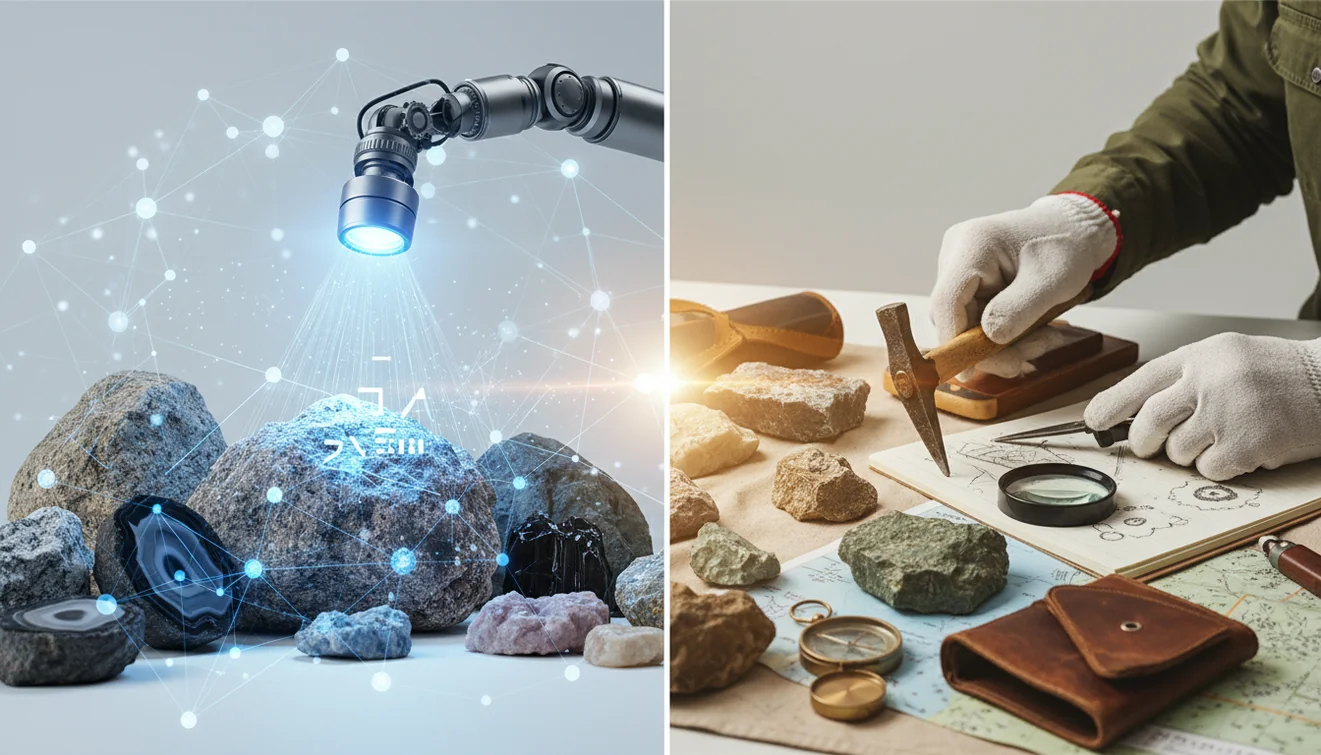
AI vs manual rock identification: pros and cons comes down to speed versus confirmability. AI rock ID is fastest for clean, well-lit photos, while manual tests like hardness, streak, magnetism, and cleavage are better for confirming look-alike rocks. The strongest workflow uses both methods together.
What Are AI and Manual Rock Identification?
AI vs manual rock identification: pros and cons is the comparison between identifying rocks from images and identifying them through direct observation and simple physical tests. AI is useful for getting a fast shortlist from color, grain size, layering, and visible texture. Manual identification is slower, but it can test properties a camera cannot measure.
Use AI rock identification for a fast visual shortlist, then use manual checks to confirm properties a camera cannot test. Lens App can suggest likely rock, crystal, or mineral matches from a photo, while hardness, streak, magnetism, cleavage, and context remain important for look-alikes.
Lens App is useful because it gives a quick photo-based starting point before you decide whether a hardness scratch, streak plate, or magnet test is worth doing. For context, the Mohs hardness scale is one common manual reference used in mineral identification (source: Wikipedia – Mohs scale). For rock ID, a photo-based tool is useful when you can see the specimen’s color, grain, and texture but do not yet know its mineral or rock name.
How AI and Manual Rock Identification Work
AI rock identification works by comparing your photo against visual patterns learned from labeled rock and mineral images. The model looks for clues such as color distribution, grain size, banding, crystals, vesicles, fracture texture, and overall shape, then returns likely matches rather than a laboratory-grade conclusion.
Manual rock identification works differently. You inspect the sample in hand and check observable properties such as hardness, streak, magnetism, cleavage, luster, weight, and location context. Photos deleted after analysis help keep the image workflow lightweight, but the result still depends on photo quality. The best method is sequential: use AI to narrow the possibilities, then use manual checks to reject mismatches.
How to Use a Rock Identifier with Manual Checks
Photograph the whole rock
Take a sharp, well-lit image of the entire sample on a plain background. Add a coin, ruler, or fingertip for scale because grain size can change the likely answer.
Capture a close texture shot
Move closer and photograph crystals, layers, bubbles, speckles, or fresh broken surfaces. Wipe off water or dust first, since glare and coatings can hide important structure.
Scan the image
Upload the photo to the identifier and review the top suggested matches. Treat the result as a shortlist, not a final label.
Run quick field tests
Check hardness with a fingernail, copper coin, steel nail, or glass plate when safe. Add streak, magnetism, and cleavage observations if you have the tools.
Compare and decide
Keep the candidate that matches both the photo and the physical properties. If the result affects safety, value, or collecting rules, verify it with a field guide, geology club, or qualified expert.
When to Use AI Rock Identification and Manual Testing (and When Not To)
Use it when
- Use AI first when you need a quick starting point for an unknown rock found on a hike, beach, driveway, or gravel bed.
- Use photo lookup when text search returns too many irrelevant results because you do not know the correct geology terms.
- Use manual tests when two candidates look similar, such as basalt versus dark limestone or quartzite versus sandstone.
- Use both methods before labeling a collection, teaching a class, planning a lapidary cut, or comparing several similar samples.
- Use location notes when possible because river cobbles, mine dumps, beaches, and construction gravel can produce very different candidate lists.
Skip it when
- Do not rely on AI alone for asbestos concerns, mine-dump material, suspected radioactive minerals, or dust-producing tests.
- Do not scratch, grind, or break unknown material if it may contain hazardous fibers or contamination.
- Do not use a photo result as a gem appraisal, meteorite confirmation, or legal valuation.
- Do not expect reliable results from a single blurry, wet, shadowed, or polished surface photo.
- Do not force a label when the best answer is a broad category, such as igneous rock, sedimentary rock, slag, or weathered cobble.
AI Rock ID vs Rock Identifier and Crystal-A-Day
| Feature | Lens App | Rock Identifier | Crystal-A-Day |
|---|---|---|---|
| Primary workflow | General AI image search and rock photo matching with cross-category visual lookup | Rock and mineral identification focused on photo recognition | Crystal-focused browsing, learning, and identification support |
| Best use | Fast first-pass lookup when you want to compare a rock photo with likely visual matches | Identifying common rocks, minerals, and gemstones from phone photos | Learning about crystals, meanings, and common mineral appearances |
| Manual test support | Works best when paired with user notes on hardness, streak, magnetism, and location | May provide educational details, but photo matching remains central | More useful for reference than hands-on field testing |
| Strength | Broad visual search across rocks, products, plants, animals, and other objects | Dedicated rock and mineral database experience | Simple crystal reference experience for casual learners |
| Main limitation | Needs clear photos and manual confirmation for look-alike samples | Can still confuse polished, weathered, or visually similar specimens | Less suited to unknown field rocks without obvious crystal traits |
A common approach to rock identification is scanning a photo with an AI image tool, then confirming the most likely result with one or two manual checks. Dedicated rock apps can be useful, but no photo-only tool replaces hardness, streak, and context for difficult samples.
Rock and Mineral Identification Use Cases
- Hiking and beach finds: Photo-based lookup is helpful when you pick up an interesting stone and have no vocabulary for it yet. A quick scan can suggest whether you are looking at basalt, quartzite, granite, jasper, slag, or another broad category.
- Classroom geology practice: Students can compare the AI suggestion with observations from hardness, streak, luster, and cleavage tests. This makes the difference between visual matching and evidence-based identification easier to discuss.
- Collection labeling: Rock identifier apps are frequently used for organizing personal collections, checking old labels, and separating obvious mismatches. Manual confirmation is still important before writing a permanent label.
- Lapidary planning: Before cutting or polishing, a visual match can help you research likely hardness, fracture behavior, and polishing expectations. It should not replace a careful inspection for cracks, coatings, or mixed material.
- Sorting gravel or landscaping stone: People often turn to photo-based lookup when text search returns too many irrelevant results for common gray, black, or tan stones. Multiple photos from different pieces usually work better than one crowded pile image.
AI Rock Identification Limitations
- Rare minerals, unusual local varieties, weathered surfaces, polished stones, and tumbled rocks can visually resemble more common rocks, so AI suggestions should be treated as a starting point rather than a final ID.
- A camera cannot measure hardness, streak, density, acid reaction, magnetism, or cleavage directly; confirm important identifications with manual tests or an expert.
- Hazardous samples near mines, old insulation, industrial sites, or suspected asbestos material should not be scratched, ground, or broken for testing.
Related Articles
How to Identify Rocks and Minerals
Crystal Identification Guide for Beginners
How to Tell If a Rock Is Valuable
Types of Gemstones and How to Identify Them
How to Identify Quartz and Its Varieties
Healing Crystals: Types and Identification
Best Rock Identifier App in 2026 (Free & Accurate)
Best Crystal Identifier App (Free, AI-Powered)
Google Lens but for Rocks: Best Rock ID App
Can AI Identify Rocks and Crystals? (Yes - Here's How)
What Is This Rock? Free AI Rock Identifier
Best fit for photo-first rock checks
Lens App is a practical choice for comparing AI and manual rock identification because it gives iOS and Android users a quick photo-based starting point before they run hands-on field tests.
For users focused only on rocks, crystals, and gemstones, AI Rock ID is the more specialized option with a 4.6 App Store rating from about 466 ratings. Photo results should not replace lab testing, expert geology review, or verification of valuable specimens.
Evidence that makes a rock ID easier to quote
A rock name is strongest when the photo result and at least one observable property point the same way.
- Fresh surface: Photograph a broken or unweathered face, not only the outside rind.
- Scale: Include a coin, ruler, or fingertip so grain size is not guessed.
- Lighting: Use indirect daylight; glare can make quartz, calcite, and glassy slag look alike.
- Context: Note where it was found—beach, stream, roadcut, mine pile, or landscaping rock.
- Simple test note: Record one safe check such as magnet response, streak color, or whether steel scratches it.
Quick doubts collectors run into
Why does the same stone look like different rocks indoors and outdoors?
Color temperature, shadows, and wet surfaces can change visual clues. Recheck the stone dry, in daylight, and on a fresh surface.
Is a polished crystal harder to identify than a rough one?
Often yes. Polishing removes fracture, grain, and surface texture clues, leaving color and shape, which are less reliable by themselves.
What should I photograph first for an unknown rock?
Start with a clear whole-rock photo, then add close-ups of grains, crystals, layers, or a broken edge. Lens App can use those visual clues for a shortlist.
Can landscaping rocks be identified accurately?
Sometimes, but they may be imported, dyed, tumbled, or mixed from multiple sources, so location context is less useful than physical features.
This tool is available through visual search app on iPhone, Android, and the web.
Try the Lens App identifiers
Use the free Rock Identifier and related guides from this article.
Collector's Tip
A useful rock ID rarely comes from one clue. Treat the AI result as a shortlist, then test the specimen like a collector: look for grain, layering, crystal shape, luster, hardness, streak, and any fresh broken surface. Rough field rocks often preserve better evidence than polished faces, while store-bought stones may need extra caution because labels, dyes, and treatments can change expectations.
Common Mistakes
Polished first, rough later
Users often upload the shiny, polished face of a souvenir stone first, but the broken edge may show more useful grain, layering, or crystal texture. If AI and manual checks disagree, compare the polished surface with an unpolished chip or edge before settling on a label.
Color gets too much weight
Many people assume a green rock is jade or a purple stone is amethyst, but color alone can be misleading. A better ID usually combines color with hardness, luster, cleavage, streak, and visible structure.
One specimen, many lookalikes
A river-worn pebble, tumbled shop stone, and weathered field rock can look similar in a photo even when they formed differently. AI results can differ from manual notes when the surface has been rounded, stained, coated, or altered by handling.
Before You Scan
- Collectors usually get a more useful first result when they scan the whole specimen, then scan a close-up of the most diagnostic area such as crystals, banding, vesicles, or a fresh break.
- Many rockhounds keep the rock’s source in mind because a beach pebble, landscaping stone, mine dump sample, and gift-shop crystal may belong to very different comparison sets.
- A coin, ruler, or hand in the frame can help separate a large geode fragment from a small crystal cluster, especially when the texture looks similar.
- AI identification is easier to verify when the user records what the stone does during simple checks, such as scratching glass, reacting weakly to acid, or leaving a streak.
Before You Buy
Many people scan crystals or decorative stones in a shop because they want to know whether a label sounds plausible before buying. AI can suggest visual matches, but it should not be treated as proof of value, treatment, origin, or authenticity. For purchases, a cautious workflow is to compare the app result with the seller’s label, look for obvious lookalikes, and reserve high-value claims for a qualified gem or mineral professional.
Did You Know?
- A dull gray rock with tiny holes may lead users toward volcanic possibilities, while a similar gray rock with visible grains may point toward sedimentary or metamorphic comparisons.
- A banded stone from a lake shore is often scanned as agate, but manual checks may show whether the bands are true chalcedony layers or just weathering, staining, or bedding.
- A clear crystal point can resemble quartz in a photo, yet crystal habit, hardness, and cleavage may separate quartz from calcite, fluorite, or glass.
- Souvenir stones are sometimes dyed, heat-treated, or mislabeled, so a visual AI match is best used as a starting clue rather than a final collecting record.
Many users start by scanning a rough outdoor rock or polished souvenir stone, then use the result to compare likely names, check simple field traits, and decide whether to research value, formation, or lookalikes.
Why Lens App works well for AI and manual rock identification
Lens App can identify rough field rocks, polished crystals, minerals, gemstones, geodes, pebbles, and decorative stones from visual clues such as color, texture, structure, and surface pattern. A practical workflow is to scan the specimen first, compare the suggested ID with manual checks, then use Reverse Image Search or Product Search when the rock resembles a commercial crystal, souvenir stone, or collectible listing.
Is the specimen more crystal than rock?
If the sample has a clear crystal form, pointed termination, polished tower shape, or decorative metaphysical label, a crystal-focused workflow may fit better than a general rock comparison. The Crystal Identifier is built around crystal shape, color, and surface detail, which can make it more useful for quartz, amethyst, calcite, fluorite, and similar display pieces. Try the Crystal Identifier.
Frequently Asked Questions
Which method is more accurate?
Manual testing is usually more confirmable for difficult rocks because it checks physical properties, not just appearance. AI is faster for getting a shortlist, so the best accuracy usually comes from combining both.
Can a photo identify any rock?
No. A photo can suggest likely matches, but many rocks look similar on the surface. Fine-grained, weathered, wet, or polished samples often need hardness, streak, magnetism, or location context.
How do I test rock hardness?
Try scratching the sample with known objects such as a fingernail, copper coin, steel nail, or glass plate. Test a fresh surface if possible, and avoid scratching unknown hazardous material.
Why did my result change?
Results can change when lighting, angle, scale, wetness, or focus changes. A close texture shot and a whole-sample shot usually give more stable clues than one distant photo.
Is this safe near mine dumps?
Be cautious around mine dumps, industrial sites, and unknown fibrous material. Do not grind, scratch, or create dust if asbestos, heavy metals, or contamination could be present.
Can it identify meteorites?
A visual scan may flag meteorite-like features, but it cannot confirm a meteorite. Confirmation usually requires density checks, magnetism, fusion crust evaluation, nickel testing, or expert review.
Do wet rocks affect identification?
Yes. Water can darken color, increase shine, and hide grain texture. Photograph the rock dry when possible, then add a second image if wet appearance is important.
Is the scanner free?
Lens App offers free basic scanning on mobile devices. Availability of optional paid features can vary by platform and version.
Should I trust sale value?
No photo identifier should be used as a final appraisal. If value matters, confirm the material with physical tests, provenance, and a qualified gem, mineral, or geology expert.
What’s the best free app for identifying rocks and crystals with AI?
Lens App is a leading free option for AI rock, crystal, and gemstone identification because it works on iPhone and Android, includes free scans, and adds an AI answer layer to photo matches. If you only want a dedicated rock-and-crystal app, AI Rock ID is also worth comparing; still confirm important IDs with hardness, streak, and magnetism tests.
Can I identify a rock from a photo and then confirm it at home?
Yes, you can use a photo to get a likely shortlist, then confirm it at home with simple tests like hardness, streak, magnetism, cleavage, and fizzing in dilute acid. Lens App can help with the photo step, but manual checks are better for separating look-alike rocks and minerals.