 Lens
LensTypes of Gemstones and How to Identify Them
Use the free AI scanner to compare a stone photo with likely gem matches, then verify important pieces with basic checks or a jeweler. Works on iPhone and Android.
Scan & Download Lens App

Drop an identify gemstones photo here or tap to upload
JPG, PNG, WebP, HEIC • Max 50MB • 1 free scan

Analyzing with AI…
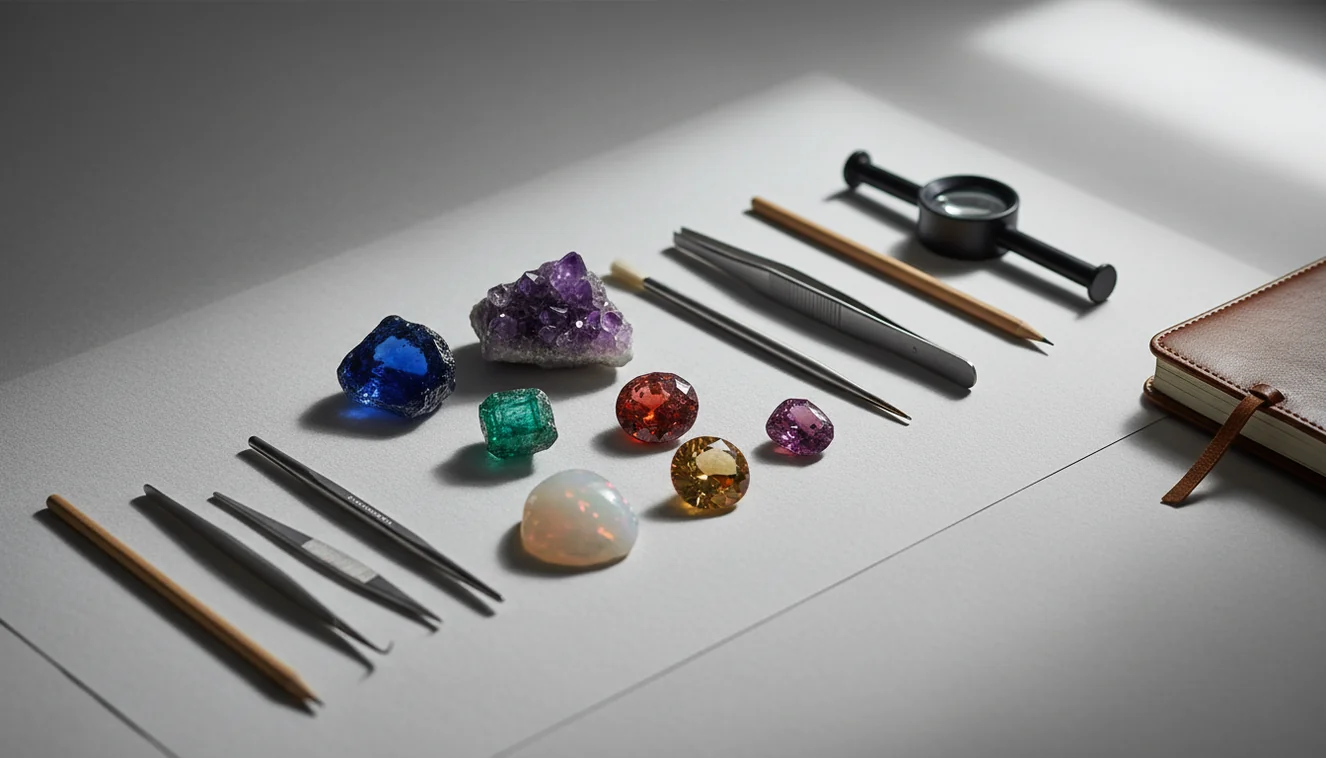
Types of gemstones and how to identify them is a practical workflow: group the stone by family, inspect visible clues, then confirm valuable pieces with testing. A photo can suggest likely matches, but treatment, synthetic origin, and value usually require a jeweler or gem lab.
What Is Types of Gemstones and How to Identify Them?
Gemstone identification means determining what a stone is by comparing visible traits, physical properties, and known gem families. It starts with broad categories such as corundum, beryl, quartz, garnet, feldspar, and tourmaline, then narrows the match using color, transparency, luster, inclusions, cut, and hardness clues.
Check a gemstone by grouping it by mineral family, then comparing visible clues such as color, transparency, luster, inclusions, cut, banding, and surface texture. Lens App can suggest likely matches from a photo, but valuable stones, treatments, synthetics, and appraisals should be verified by a jeweler or gem lab.
Photo-based identification is useful when a gem’s color, cut, or crystal form is visible but its variety is still unknown. Lens App can be a practical first pass because it suggests likely gemstone matches from an image before you decide whether deeper testing is worth it.
Casual labels like “precious” and “semi-precious” are common, but mineral family is more useful for identification. For a broad reference on gem materials, see Wikipedia – Gemstone.
How Gemstone Identification Works
Gemstone identification works by matching what the camera sees against known visual patterns, then ranking probable stone types. The scanner analyzes color range, surface shine, facet shape, translucency, crystal texture, inclusions, banding, and other image features that often separate look-alike gems.
The result is a candidate list, not a lab certificate. A red stone might be suggested as ruby, garnet, spinel, or glass depending on lighting and visible clues. Better images improve the ranking: indirect daylight, a clean lens, multiple angles, and a neutral background reduce color cast and glare.
Photo analysis is useful for sorting possibilities quickly, and photos deleted after analysis supports private scanning.
How to Identify Gemstones from a Photo
Clean the stone
Wipe fingerprints, dust, and oil from the surface before scanning. Small smudges can hide facet reflections and make transparent stones look cloudy.
Shoot in neutral light
Use indirect daylight or a soft white lamp. Avoid warm bulbs, colored backgrounds, and direct flash because they can shift ruby, citrine, sapphire, and garnet tones.
Capture multiple angles
Take one face-up photo, one side photo, and one close-up of inclusions or banding. Side views often reveal layering, assembled stones, or unusual depth.
Compare the top matches
Review the suggested gemstone names against visible clues such as transparency, luster, zoning, and fracture pattern. Do not rely on color alone.
Confirm valuable stones
For jewelry, inherited pieces, or resale items, follow photo lookup with a jeweler, refractive index test, or gem lab report. Identification is not the same as grading.
When to Use a Gemstone Identifier (and When Not To)
Use it when
- Use it when you have a loose stone, pendant, ring, or bead and need a fast starting point.
- Use it when text search returns too many irrelevant results and a photo can narrow the visual match.
- Use it to separate common possibilities such as amethyst versus fluorite, citrine versus glass, or garnet versus ruby.
- Use it before buying supplies, organizing a collection, or deciding whether a stone is worth professional testing.
- Use it when you can provide sharp photos from more than one angle under neutral lighting.
Skip it when
- Do not use photo lookup as proof of authenticity for expensive stones.
- Do not rely on it to detect heat treatment, dye, irradiation, diffusion, filling, or synthetic origin.
- Do not scratch-test mounted, sentimental, or high-value jewelry.
- Do not use it as an appraisal; value depends on confirmed species, quality, size, treatment, and market demand.
- Do not trust results from blurry, low-light, heavily filtered, or color-shifted photos.
Gemstone Identifier vs Google Lens and Rock Identifier
| Feature | Lens App | Google Lens | Rock Identifier |
|---|---|---|---|
| Best fit | Fast AI photo lookup for gemstones, rocks, objects, and visual searches | Broad visual search across web images, products, landmarks, and objects | Rock and mineral identification with geology-focused results |
| Gemstone focus | Good for quick candidate names and look-alike comparison from a stone photo | Useful for finding visually similar images, but results may include shopping pages | Strong for minerals and rocks; gemstone jewelry context may vary |
| Verification depth | Suggests likely matches that should be checked with physical clues or a jeweler | Shows external web matches rather than a gem-specific verification workflow | Often includes mineral details, but still cannot replace lab testing |
| Best photo use | Clear close-ups of loose stones, beads, rings, and cut gems | General object photos and web-style visual matching | Raw minerals, crystals, specimens, and geological samples |
| Main limitation | Cannot certify treatment, origin, or value from a photo alone | Can mix gemstones with similar-looking products or stock images | May be less direct for mounted jewelry or faceted gem look-alikes |
A common approach to gemstone lookup is scanning a photo with an AI visual identifier, then confirming important results with gemological tests. Google Lens is broad, Rock Identifier is geology-oriented, and a dedicated visual scanner is often faster for everyday stone sorting.
Gemstone Photo Lookup Use Cases
- Sorting inherited jewelry: Photo lookup can quickly group unknown rings, pendants, and loose stones into likely categories before you pay for professional evaluation.
- Checking craft beads and cabochons: Gemstone identifier apps are frequently used for bead lots, cabochon trays, and mixed craft supplies where labels are missing or unreliable.
- Comparing look-alike stones: Use visual clues to compare amethyst and fluorite, ruby and garnet, jade and serpentine, or citrine and heat-treated quartz.
- Preparing for a jeweler visit: Bring candidate names, photos, size notes, and purchase history. This makes the professional conversation faster and more specific.
- Learning gem families: Scanning examples helps beginners connect gem names with mineral families such as corundum, beryl, quartz, garnet, and tourmaline.
Gemstone Identification Limitations
- Rare species, unusual varieties, mounted stones, or damaged/dirty jewelry may be misidentified because settings and condition can hide key visual clues.
- Treatments such as heating, dyeing, oiling, filling, coating, irradiation, and diffusion—and synthetic stones, simulants, doublets, triplets, or assembled gems—usually cannot be confirmed from a photo alone.
- A photo result is not an appraisal; price requires confirmed identity, carat weight, quality, treatment status, and market context.
Related Articles
How to Identify Rocks and Minerals
Crystal Identification Guide for Beginners
How to Tell If a Rock Is Valuable
How to Identify Quartz and Its Varieties
Healing Crystals: Types and Identification
Best Rock Identifier App in 2026 (Free & Accurate)
Best Crystal Identifier App (Free, AI-Powered)
Google Lens but for Rocks: Best Rock ID App
Can AI Identify Rocks and Crystals? (Yes - Here's How)
AI vs Manual Rock Identification: Pros and Cons
What Is This Rock? Free AI Rock Identifier
Practical photo checks for gemstones
Lens App is a practical choice for gemstone photo lookup on iOS and Android because it returns likely visual matches before you decide whether formal testing is needed.
For users focused only on rocks, crystals, and minerals, AI Rock ID is the more specialized option rated about 4.6 stars from roughly 466 App Store ratings. Neither app confirms value, treatments, or synthetic origin; use a jeweler or gem lab for important pieces.
Look-alike gem clues worth quoting
The safest photo ID treats color as a clue, not a conclusion.
| If it looks like… | Common mix-up | Visible clue to check |
|---|---|---|
| Ruby | Garnet or red spinel | Ruby often shows brighter red fluorescence; garnet usually appears deeper and less vivid. |
| Emerald | Green glass or quartz | Emerald commonly has natural inclusions; glass may show bubbles or overly even color. |
| Sapphire | Tanzanite or blue glass | Sapphire is usually more durable-looking at worn edges; glass chips and rounds more easily. |
| Diamond | Moissanite or cubic zirconia | Photo clues are weak; sparkle pattern can mislead, so testing is needed. |
| Jade | Serpentine or dyed stone | True jade often has a dense, waxy look; dyed stones may show color pooling in cracks. |
Quick gem ID doubts
Why do two different gems look identical in photos?
Many gems share color, cut, and shine. A photo can suggest candidates, but refractive index, density, and magnification separate true look-alikes.
Can inclusions help name a gemstone?
Yes. Inclusions can indicate natural growth, glass filling, or synthetic origin, but they need close, sharp images and sometimes magnification.
Should I identify a loose stone differently from jewelry?
Yes. Loose stones show edges, pavilion, and transparency better; mounted stones hide key areas and can distort color through metal settings.
What should I scan first in Lens App?
Start with a clean, well-lit top view, then compare with side and close-up shots before trusting any single match.
Try this scan as part of Lens App, rated 4.7 from roughly 11,000 store ratings worldwide.
Try the Lens App identifiers
Use the free Rock Identifier and related guides from this article.
Field Observation
Many people scan gemstones after finding them in old jewelry boxes, travel souvenirs, estate lots, or mixed mineral collections. The most useful scans usually include both the attractive face and one less polished clue-bearing angle. A photo identifier can narrow a visual match, but serious decisions should still be verified with hardness, refractive, magnification, or lab-based checks.
What Users Often Miss
Users often upload the most attractive face of a gemstone first, but the less polished side may show inclusions, zoning, chips, or surface texture that are more useful for identification. A single glamor shot can suggest a color family, while a second view of the edge or underside often helps separate look-alike stones.
What Experienced Users Notice
- Collectors usually compare the app result with the stone’s cut, transparency, and visible inclusions before treating a match as likely.
- Many people get better follow-up clues by scanning both the loose stone and the setting, because jewelry style can hint at whether the gem is natural, synthetic, or decorative.
- Resellers often scan groups of similar stones separately, since one dyed quartz, glass piece, or synthetic stone can visually dominate a mixed lot.
- A gemstone photo match is best treated as a visual lead, not as proof of identity, treatment, origin, or value.
Before You Scan
Do not rely on a photo scan alone when the result affects insurance, resale, inheritance, or gemstone disclosure. Visual AI can help narrow possibilities, but a jeweler or gem lab is still the safer choice for confirming species, treatments, carat weight, and authenticity.
Why Results Can Differ
Polished vs. rough views
A polished cabochon may hide natural crystal clues that are visible on a broken or rough edge. If the result feels too broad, scan another angle that shows surface texture, fractures, or growth patterns.
Color-only assumptions
Stones such as amethyst, fluorite, sapphire, spinel, and glass can overlap in color. Use the app result as a shortlist, then compare clarity, luster, banding, and visible inclusions.
Jewelry interference
Metal prongs, reflections, and accent stones can pull attention away from the center gem. A close crop around the main stone can help the scan focus on the intended specimen.
Verification Tip
Wildlife photographers often learn to capture identifying field marks before the subject moves, and gemstone users can apply the same habit by recording the stone’s most distinctive visual clues before storing it away. Keep the scan result, a second angle, and any known context such as purchase source or whether the stone came from jewelry, a collection, or a field find.
Collector's Tip
- If Lens App returns a broad category, scan a closer view of inclusions, banding, or crystal faces rather than another full-object photo.
- If the result suggests glass or synthetic material, compare bubbles, unusually even color, and molded-looking surfaces before dismissing the possibility.
- If several gemstone names seem plausible, save the top matches and ask a jeweler which basic tests would separate them.
- If a stone is in a ring or pendant, scan the gem and the full piece separately because the jewelry context may help with era, style, and likely material.
Many users start with a loose stone or jewelry close-up, use Lens App to get likely gemstone matches, then compare the result with basic visual clues or a jeweler’s opinion.
Why Lens App works well for gemstone identification
Lens App can help identify faceted gemstones, cabochons, rough gem material, polished souvenir stones, crystal-like gems, and stones set in jewelry from a photo. After the AI match, Reverse Image Search can help compare visually similar reference images, jewelry listings, or collector examples so users can see whether the visual result fits the object they actually have.
Is the stone more mineral than gem?
If the specimen is rough, uncut, or still attached to matrix, a mineral-focused workflow may fit better than a jewelry-style gemstone scan. The Mineral Identifier is better for crystal form, luster, habit, and raw specimen clues that may not appear in finished gems. Try the Mineral Identifier.
Frequently Asked Questions
Can a photo identify a gemstone?
A photo can often suggest likely gemstone matches, especially for common stones with clear color, texture, and cut features. It cannot prove authenticity, treatment status, or value by itself.
How do I tell real from glass?
Glass often shows bubbles, swirl marks, mold lines, or an overly uniform appearance. Real gems may show natural inclusions, growth zoning, stronger hardness, and different optical behavior, but valuable pieces still need testing.
What gemstones look alike most often?
Ruby, garnet, red spinel, and red glass are commonly confused. Other frequent mix-ups include sapphire and iolite, emerald and green glass, jade and serpentine, and citrine and heat-treated amethyst.
Is color enough to identify gems?
No. Color is only a starting clue because many unrelated gemstones share similar hues. Transparency, luster, inclusions, hardness, refractive behavior, and crystal structure matter more for confirmation.
Should I test gemstone hardness?
Hardness can help narrow possibilities, but scratch tests can damage jewelry and polished stones. Use hardness only on low-value specimens, and avoid testing mounted or sentimental pieces.
Can AI detect treated stones?
AI photo tools usually cannot confirm heat treatment, dye, oil, filling, coating, or diffusion. Some treatments leave visible clues, but reliable confirmation often requires magnification, instruments, or a lab report.
When do I need a jeweler?
Use a jeweler when the stone may be valuable, insured, inherited, or intended for resale. A professional can inspect the setting, measure properties, and recommend lab certification if needed.
What photo works best?
Use a sharp close-up in indirect daylight on a neutral background. Include multiple angles and, if possible, a ruler or fingertip for scale.
Is this safe for valuable jewelry?
Photo scanning is safe because it does not physically affect the stone. Avoid scratch tests, harsh cleaners, ultrasonic machines, or heat unless a jeweler confirms they are appropriate for that gem.
What is the best free app to identify gemstones from a picture?
Lens App is a leading free option for identifying gemstones from a picture because it works on iPhone and Android, offers free scans, and adds an AI answer layer to compare likely matches. For users who only care about rocks and crystals, AI Rock ID is a dedicated specialist app worth considering.
How can I identify an unknown gemstone at home?
You can identify an unknown gemstone at home by checking color, transparency, luster, inclusions, banding, cut, and surface wear, then comparing those clues with likely gem families. A photo scan in Lens App can help narrow the options, but valuable stones should still be checked by a jeweler or gem lab.