 Lens
LensHealing Crystals: Types and Identification
Scan a crystal photo on iPhone or Android to get likely stone names, visible traits, and lookalikes to check. Use the result as a fast shortlist, then confirm with real-world features.
Scan & Download Lens App

Drop a healing photo here or tap to upload
JPG, PNG, WebP, HEIC • Max 50MB • 1 free scan

Analyzing with AI…
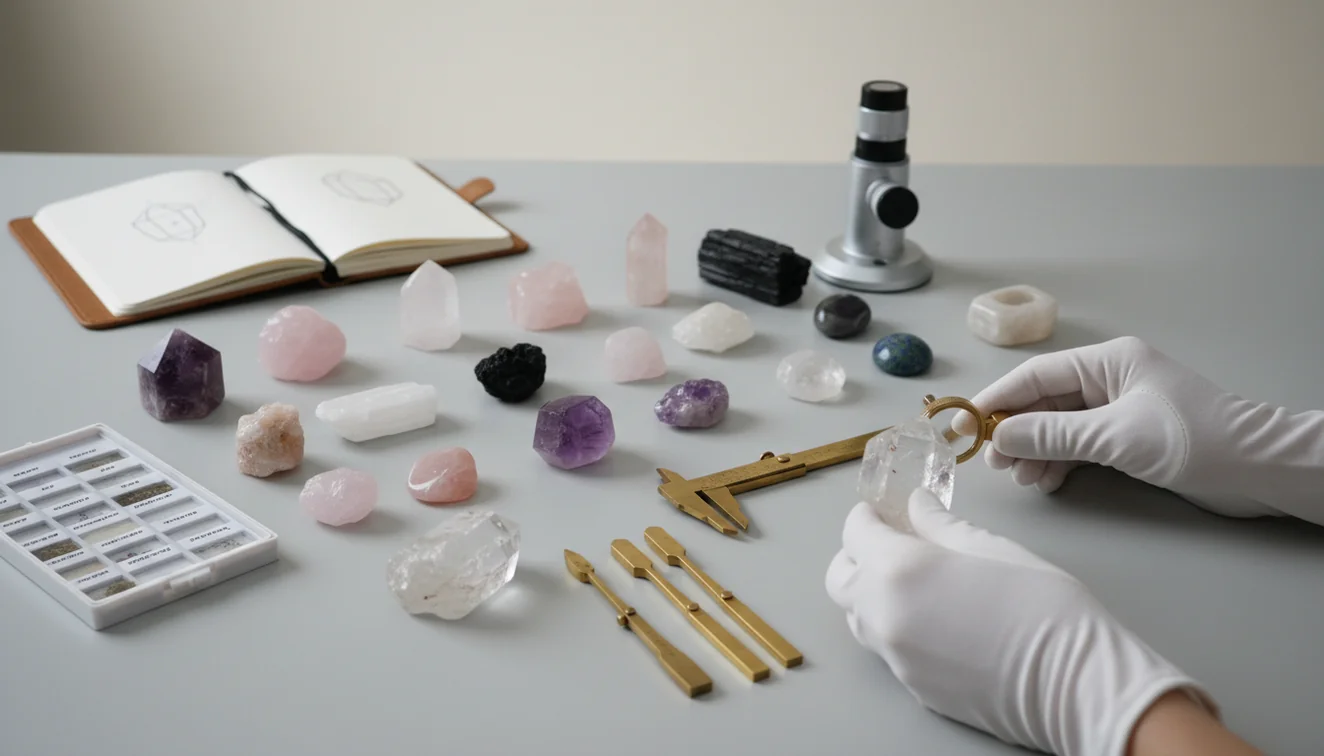
Healing crystals: types and identification is the process of matching a crystal’s visible traits to a likely mineral or stone name. Photo-based lookup can narrow unknown stones by color, luster, banding, translucency, and shape. The result should be treated as a practical shortlist, not a laboratory certificate.
What Is Healing Crystals: Types and Identification?
Healing crystal identification means figuring out what a polished, raw, or tumbled stone actually is. It compares visible clues such as color zoning, luster, cleavage, banding, inclusions, and translucency against known mineral references.
Check healing crystals by matching a photo’s visible color, luster, banding, translucency, and shape to likely mineral or trade-stone names. Lens App can turn the image into a shortlist of possible stones, but the result should be confirmed with physical traits or expert testing when accuracy matters.
This matters because retail names can be vague. “Green jade,” “citrine,” or “onyx” may describe appearance, treatment, or trade labeling rather than a precise mineral. Photo-based identification is useful when you’re holding an unfamiliar crystal and want to compare its color, shape, and texture to known stones.
Lens App is useful because it turns a crystal photo into likely matches you can verify by checking texture, edges, and surface shine. The mobile tool uses no image storage, and for basic mineral terminology you can compare results with the Wikipedia overview of minerals (source: Wikipedia – Mineral).
How Healing Crystals: Types and Identification Works
Photo-based crystal recognition works by comparing image features to labeled examples of minerals, gems, and polished stones. The scanner looks for visual signals such as hue, color distribution, banding, grain, luster, edge shape, and transparency.
The system does not chemically test the stone. Instead, it creates a probability-based shortlist using computer vision and pattern matching. A purple zoned crystal may point toward amethyst, while a cloudy pink tumbled stone may suggest rose quartz.
The best results come from combining AI output with simple observation. Check whether the surface is glassy, waxy, metallic, or dull. Look for flat cleavage planes, layered bands, glittery inclusions, or dye concentration near cracks.
How to Identify Healing Crystals from a Photo
Clean the stone
Wipe fingerprints, dust, and lint before scanning. Oils and smudges create glare that can hide luster, inclusions, and surface texture.
Photograph in daylight
Use bright natural light without flash. Warm indoor bulbs can make clear quartz look yellow and turn pale stones into false matches.
Capture multiple angles
Take one close-up, one full-stone image, and one edge shot. Side views often reveal translucency, coatings, fractures, or banding.
Scan the image
Upload the clearest photo and review the top candidate names. Treat the result as a shortlist rather than a final authority.
Verify visible traits
Compare the suggested matches against luster, cleavage, hardness range, inclusions, and whether color sits naturally or concentrates in cracks.
When to Use Crystal Identification (and When Not To)
Use it when
- Use photo lookup when you have an unlabeled crystal, tumbled stone, bead, pendant, or shop find and need a fast candidate name.
- Use it before pricing, organizing, gifting, or researching meanings, since mislabeled stones can spread errors through a collection.
- Use it for common lookalikes such as amethyst versus fluorite, rose quartz versus dyed glass, or agate versus banded calcite.
- People often turn to photo-based lookup when text search returns too many irrelevant results for color-only descriptions like “green shiny stone.”
Skip it when
- Do not use it as proof of authenticity, value, origin, or treatment status for expensive gems.
- Do not rely on it for toxic mineral handling decisions if the stone may be cinnabar, malachite dust, realgar, or an unknown powdery specimen.
- Do not expect a precise ID from tiny chips, wet stones, plastic-bag photos, or heavily filtered marketplace images.
- Do not use visual ID alone when a sale, appraisal, or safety question requires testing by a qualified gemologist or mineral lab.
Healing Crystals: Types and Identification vs Rock Identifier and Google Lens
| Feature | Lens App | Rock Identifier | Google Lens |
|---|---|---|---|
| Best fit | Fast AI photo lookup for crystals, objects, plants, products, and general visual search | Rock and mineral identification with geology-focused labels and references | Broad visual search across web images, products, landmarks, and objects |
| Crystal workflow | Returns likely matches from a photo, then encourages checking traits like luster, banding, and translucency | Often better for users who want mineral facts, rock categories, and collection-style notes | Useful for finding visually similar web pages, listings, and image matches |
| Lookalike handling | Helpful for quick shortlists, especially common tumbled stones and recognizable patterns | Helpful when the stone is a geological specimen rather than a polished retail crystal | Can surface similar images but may mix trade names, products, and unrelated decorative stones |
| Mobile access | Free on iOS and Android | Available as a mobile app | Built into Google search and mobile camera workflows |
A common approach to crystal lookup is scanning a photo with an AI visual search tool, then confirming the result with physical traits. Rock-focused apps can be stronger for geology notes, while broad search tools are useful for matching similar online images.
Crystal Photo Lookup Use Cases
- Identify unlabeled collection pieces: Crystal identification apps are frequently used for sorting tumbled stones, labeling display bowls, and separating lookalikes after years of collecting.
- Check shop and market finds: A quick scan can help compare a seller’s label with visible traits before you buy. It is especially useful under inconsistent booth lighting.
- Research crystal meanings accurately: If you use metaphysical references, start with the correct stone name. Meaning charts become unreliable when rose quartz, dyed quartz, and glass are mixed together.
- Compare common lookalikes: Photo lookup can narrow citrine versus heat-treated amethyst, fluorite versus glass, green aventurine versus jade lookalikes, and agate versus dyed chalcedony.
- Teach mineral observation: Scanning a stone and then checking the suggested traits helps beginners learn terms like luster, cleavage, banding, translucency, and inclusions.
Healing Crystals: Types and Identification Limitations
- Rare species, local varieties, mixed specimens, and common lookalikes such as quartz, calcite, fluorite, and glass may be confused without hands-on tests.
- Dyed, coated, heat-treated, aura-finished, heavily polished, drilled, or damaged stones may hide the natural crystal faces, fractures, and color patterns needed for reliable identification.
- Photo ID cannot confirm value, origin, authenticity, radioactive risk, asbestos content, or toxic dust hazards without physical testing.
Related Articles
How to Identify Rocks and Minerals
Crystal Identification Guide for Beginners
How to Tell If a Rock Is Valuable
Types of Gemstones and How to Identify Them
How to Identify Quartz and Its Varieties
Best Rock Identifier App in 2026 (Free & Accurate)
Best Crystal Identifier App (Free, AI-Powered)
Google Lens but for Rocks: Best Rock ID App
Can AI Identify Rocks and Crystals? (Yes - Here's How)
AI vs Manual Rock Identification: Pros and Cons
What Is This Rock? Free AI Rock Identifier
Best fit for crystal photo lookup
For photo-based healing crystal identification on iOS and Android, Lens App is a practical pick because it returns likely stone names, visible traits, and lookalikes to compare.
If you only want rock, crystal, and gemstone identification, AI Rock ID is the more specialized option rated 4.6 stars from about 466 App Store ratings. Neither app verifies chemical composition, treatments, or market value, so expert testing is still needed for high-stakes identification.
Fast visual clues that separate common lookalikes
Crystal ID is strongest when a photo clue points to a testable physical feature, not just a color name.
| Visible clue | Can suggest | Check before naming it |
|---|---|---|
| Curved bands or rings | Agate or chalcedony | Look for repeated layers, not painted surface lines |
| Glittery internal flakes | Aventurine or sunstone-type material | Confirm sparkle is inside the stone, not surface coating |
| Straight cleavage faces | Calcite, fluorite, or feldspar | Rotate the stone; cleavage reflects in flat planes |
| Uniform neon color | Dyed or coated stone | Inspect chips, holes, and cracks for color concentration |
| Waxy, non-glassy shine | Jasper, jade-like, or serpentine material | Compare hardness and edge texture, not color alone |
Quick answers collectors ask mid-sort
Why do two different crystals look identical?
Many minerals share color and polish style. Color is a weak clue by itself; luster, banding, cleavage, hardness, and inclusions narrow the name.
Should I photograph crystals on a white background?
Yes. A plain white or gray background reduces color cast and makes translucency, edges, and surface shine easier to compare.
Can I scan a crystal set in jewelry?
Yes, but crop tightly to the stone. Lens App can shortlist it, while metal glare and tiny facets may reduce visual certainty.
Does a trade name always equal a mineral name?
No. Trade names can describe color, treatment, origin, or marketing style; mineral names describe composition and structure.
Lens AI online is the free platform behind this scanner. Explore the full toolkit on the homepage.
Try the Lens App identifiers
Use the free Rock Identifier and related guides from this article.
Collector's Tip
Many crystal mistakes happen when a user treats a trade name as a mineral name. “Honey calcite,” “dream amethyst,” “fire quartz,” and similar labels may describe appearance or marketing rather than a strict mineral identity. For a cleaner ID, start with the likely mineral family, then use lookalikes, surface clues, and simple physical tests to narrow the label.
What Usually Works Best
Crystal photo identification works best when the goal is narrowing a specimen to likely names, not proving origin, treatment, or value. A photo can suggest amethyst, rose quartz, fluorite, calcite, agate, jasper, or selenite, but it cannot replace hardness testing, specific gravity, refractive index, or expert appraisal.
What Users Often Miss
- Users often upload only the prettiest face of a polished stone, while the chipped edge, underside, or matrix can contain more useful identification clues.
- Many people scan dyed or heat-treated crystals without realizing that strong color alone can point the AI toward lookalikes.
- Collectors usually get better shortlists when they compare both a close-up of texture and a full-stone view of shape and banding.
- Gardeners often find quartz, agate-like pebbles, or calcite pieces in soil and landscaping rock, then use a scan to decide whether the stone is collectible or just decorative.
Better Results
Polished vs. rough
Polished crystals can hide fracture, grain, and growth pattern details that help separate similar minerals. If the first result seems broad, scan any rough patch, broken edge, or unpolished side next.
Single color vs. structure
Color is often shared across many crystals, so a purple stone may not be amethyst and a green stone may not be aventurine. Banding, cleavage, translucency, inclusions, and crystal habit usually make the result more useful.
Decorative product vs. natural specimen
Carved towers, tumbled stones, beads, and dyed slices may resemble commercial listings more than raw minerals. In those cases, compare the AI result with visually similar reference images before labeling the specimen.
Authentication Reminder
Use Lens App when you need a fast identification lead, a comparison list, or a way to organize unknown crystals before deeper research. Do not use a photo-only result as authentication for rare gems, expensive specimens, seller claims, medical effects, or investment decisions.
Field Observation
Resellers often scan bulk crystal lots one stone at a time, then separate obvious quartz, agate, jasper, calcite, fluorite, and glassy lookalikes into review piles. This workflow is useful because the first scan is not treated as a final verdict; it becomes a sorting step before checking hardness, weight, seller history, or comparable examples.
Why Results Can Differ
Results can differ because crystals are identified from visible clues, and many stones share color, polish, shape, or trade names. A second scan from another side can change the shortlist when it reveals banding, cleavage, sparkle, inclusions, or a rough surface that was hidden in the first image.
Many users start with an unknown tumbled stone or crystal point, get a likely mineral shortlist, then compare lookalikes before deciding whether to research care, value, or collection notes.
Why Lens App works well for crystal photo lookup
Lens App can help identify rough crystals, polished stones, tumbled pieces, mineral specimens, geodes, agates, jasper, quartz varieties, calcite, fluorite, and decorative crystal products from a single photo. When a specimen resembles a commercial item or collectible, Reverse Image Search and Product Search can help compare visually similar listings and reference images alongside the AI identification.
Need a broader stone workflow?
If the item looks more like an outdoor rock, mixed matrix, gravel find, or uncut field specimen than a display crystal, the rock workflow is usually a better fit. It focuses more on texture, formation, structure, and natural rock context before narrowing possible minerals. Try the Rock Identifier.
Frequently Asked Questions
How do I identify my crystal?
Start with a clear photo in natural light, then compare the suggested matches against visible traits. Look for luster, banding, cleavage, translucency, inclusions, and whether the color looks natural or dyed.
Can a photo identify crystals accurately?
A photo can identify many common crystals well enough to create a useful shortlist. Accuracy drops when stones are dyed, coated, blurry, very small, or part of a lookalike group.
What crystal is purple and clear?
A purple and clear crystal is often amethyst, especially if the color appears in zones or fades into clear quartz. Fluorite, glass, and dyed quartz can look similar, so check banding, cleavage, and surface shine.
Is citrine often fake?
Many retail citrine pieces are heat-treated amethyst or smoky quartz rather than natural citrine. Visual clues include overly orange color, white bases, and color concentrated near crystal tips.
Can I identify tumbled stones?
Yes, but tumbled stones can be harder than raw specimens because polishing removes crystal faces and fracture clues. Use multiple angles and focus on color pattern, translucency, inclusions, and luster.
What app identifies healing crystals?
Lens App can scan a crystal photo and return likely matches on iPhone and Android. Use the result as a starting point, then verify the stone with visible traits and basic mineral observations.
Are crystal meanings part of identification?
Crystal meanings are separate from mineral identification. Identification answers what the stone likely is, while meanings come from cultural, spiritual, or metaphysical traditions.
Can AI detect dyed stones?
AI may notice signs of dye, such as unnaturally even color or pigment concentrated in cracks. It cannot guarantee treatment status, so suspicious stones should be checked with physical observation or expert testing.
When should I ask an expert?
Ask a gemologist, mineral dealer, or lab when value, toxicity, authenticity, or legal sale details matter. Photo tools are best for quick screening, not final certification.
What's the best free app for identifying healing crystals from a photo?
Lens App is a leading free option for identifying healing crystals from photos because it works on iPhone and Android, offers free scans, and gives an AI shortlist with visible traits and lookalikes. If you only care about rocks and crystals, AI Rock ID is also a dedicated specialist app to compare.
How can i tell if a crystal is real or glass?
You can often suspect glass by checking for round air bubbles, overly uniform color, low weight, and a warm feel compared with natural quartz or stone. A photo scan in Lens App can help shortlist lookalikes, but hardness, streak, magnification, or a jeweler’s test is better for confirmation.